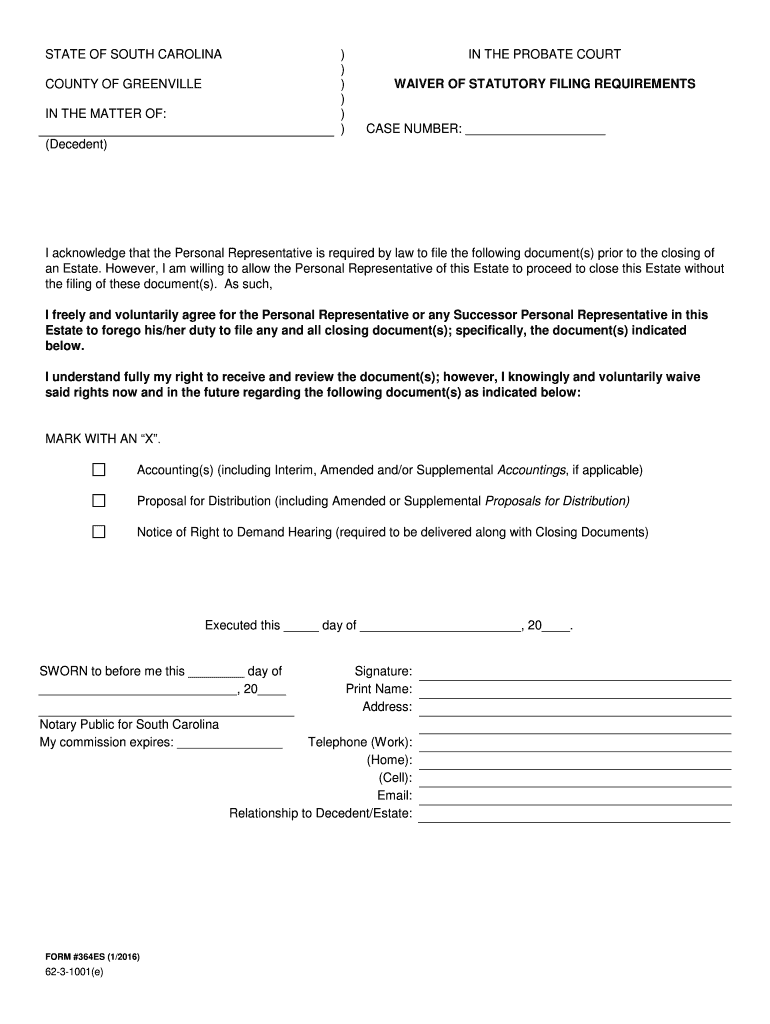
T the Personal Representative is required by law to file the following document(s) prior to the closing of an Estate. However, I am willing to allow the Personal Representative of this Estate to proceed to close this Estate without the filing of these document(s). As such, I freely and voluntarily agree for the Personal Representative or any Successor Personal Representative in this Estate to forego his/her duty to file any and all closing document(s); specifically, the document(s) indicated bel.
Loading

Open form follow the instructions

Easily sign the form with your finger

Send filled & signed form or save
How to fill out the SC 364ES online
Filling out the SC 364ES form online is an essential task for individuals involved in the probate process in South Carolina. This guide provides clear and detailed instructions to assist users in completing the form with ease and accuracy.
Follow the steps to successfully complete the SC 364ES form online.
- Click the ‘Get Form’ button to access and open the SC 364ES form in the online editor.
- Fill in the case number in the appropriate field at the top of the form.
- Indicate the decedent's name in the designated area to identify the estate.
- Review the waiver section carefully, ensuring that you understand your rights regarding the filing of the specified documents.
- Mark an ‘X’ next to each document you are willing to waive the filing requirements for.
- Provide the date on which you are executing the waiver in the indicated space.
- Sign the form in the designated signature section, ensuring to date it correctly.
- Print your name clearly in the area provided.
- Complete your address and contact information in the specified fields.
- Specify your relationship to the decedent or estate in the appropriate section.
- Once all sections are completed, review your entries for accuracy.
- Save your changes, and then you can download, print, or share the completed form as needed.
Begin completing your SC 364ES form online today for a streamlined experience.
Experience a faster way to fill out and sign forms on the web. Access the most extensive library of templates available.
Related content
I acknowledge that Personal Representative(s) are required by law to file the following...
Nov 8, 2024 — Waiver of Filing Requirements - 364ES; Waiver of Statutory Requirements...
Get answers to your most pressing questions about US Legal Forms API.
How to make a list of assets for a will?
To make a comprehensive list of assets for a will, start by gathering documents that outline your properties, accounts, and investments. Ensure you include details like account numbers, and descriptions of real estate. This list will serve as an effective guide for your executor and beneficiaries. Utilizing tools provided by SC 364ES can enhance the clarity and completeness of your asset list.
Which of the following assets do not go through probate?
Assets that typically do not go through probate include life insurance policies, retirement accounts, and properties held in joint ownership. Such assets transfer directly to designated beneficiaries or co-owners outside the probate process. Understanding the implications of SC 364ES can help you identify which of your assets will bypass the probate system, streamlining the estate settlement.
How to fill out a renunciation form?
Filling out a renunciation form involves declaring that you will not accept an inheritance. You must provide your personal information and specify the estate in question. It's essential to follow the guidelines closely to ensure legality. Accessing SC 364ES can offer valuable templates and insights to assist in completing this form accurately.
What is a waiver of statutory filing requirements in SC?
A waiver of statutory filing requirements allows an executor to bypass certain filing obligations in South Carolina, thereby simplifying the probate process. This waiver might be applicable when all heirs agree, mitigating some of the administrative burden. Familiarizing yourself with SC 364ES can clarify when and how this waiver can be utilized to your advantage.
What is included in inventory property?
Inventory property includes all tangible and intangible assets within the estate, such as real estate, bank accounts, stocks, personal belongings, and business interests. Every asset needs to be documented with its fair market value for the probate inventory. Ensuring your inventory is complete and accurate is key, and resources like SC 364ES provide guidance to streamline this process.
Can personal possessions be distributed before probate?
Yes, personal possessions can generally be distributed before probate concludes, as long as they are not part of the estate's primary assets. However, it's crucial to keep in mind that distributing personal items may affect the overall value of the estate. Being aware of how SC 364ES interacts with these distributions can help avoid disputes later on. Always consult a professional for clarity on these matters.
How much does an estate have to be worth to go to probate in SC?
In South Carolina, an estate must typically be valued at more than $25,000 to go through probate. However, certain simplified processes may apply for smaller estates. Understanding the specific thresholds for SC 364ES can help you determine whether the probate process is necessary for your situation. Consulting with legal forms can ensure you manage your estate appropriately.
How to fill out probate inventory?
To fill out the probate inventory, first gather all relevant documents such as asset statements, property deeds, and bank accounts. You should categorize all assets and assign their fair market values. It's important to ensure accuracy, as this document is pivotal in the probate process and can impact the distribution of the estate. Utilizing resources like SC 364ES can help you navigate the forms necessary for this step.
How to file for workers compensation in South Carolina?
To file for workers compensation in South Carolina, report your injury to your employer promptly and seek medical attention. Make sure to fill out the appropriate forms, which SC 364ES helps streamline. The process can be complex, so consider consulting resources like uslegalforms for step-by-step guidance. It is essential to ensure that you receive the benefits you deserve during your recovery.
How long do you have to be separated in SC to file for divorce?
In South Carolina, you must be separated for at least one year before you can file for divorce if you are pursuing a no-fault divorce. This period allows both parties to reflect and settle matters amicably. Utilizing SC 364ES can provide you with the necessary forms and information needed to file appropriately. If you're unsure, consult with legal professionals to assist you.
Use professional pre-built templates to fill in and sign documents online faster. Get access to thousands of forms.
If you believe that this page should be taken down, please follow our DMCA take down process here.