Loading
Form preview
  • US Legal Forms
  • Other Templates
  • Legal Forms
  • Oregon Legal Forms
  • Or 8.080.3 2014

Get Or 8.080.3 2014-2026

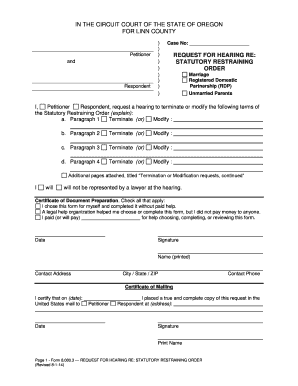
IN THE CIRCUIT COURT OF THE STATE OF OREGON FOR LINN COUNTY Petitioner and Respondent Case No REQUEST FOR HEARING RE STATUTORY RESTRAINING ORDER Marriage Registered Domestic Partnership RDP Unmarried Parents I Respondent request a hearing to terminate or modify the following terms of the Statutory Restraining Order explain a. Paragraph 1 Terminate or Modify b. Paragraph 2 Additional pages attached titled Termination or Modification requests continued will will not be represented by a lawyer at t.

How it works

  1. Open form

    Open form follow the instructions

  2. Easily sign form

    Easily sign the form with your finger

  3. Share form

    Send filled & signed form or save

How to use or fill out the OR 8.080.3 online

Filling out the OR 8.080.3 form, which is a request for a hearing regarding a statutory restraining order, is a crucial step for individuals seeking to modify or terminate existing orders. This comprehensive guide will walk you through the process of completing this form online, ensuring you understand each section and its requirements.

Follow the steps to accurately complete the OR 8.080.3 form online.

  1. To begin, press the ‘Get Form’ button to access the OR 8.080.3 form and open it for editing.
  2. Once the form is open, enter the case number at the top of the document to identify your filing.
  3. In the section labeled 'Request for Hearing Re:', specify whether the matter relates to marriage, registered domestic partnership, or unmarried parents.
  4. In the provided spaces, clearly state your requests regarding the statutory restraining order for each paragraph you wish to modify or terminate. Indicate whether you want to 'Terminate' or 'Modify' the terms as applicable.
  5. If additional requests are necessary, you may attach further pages titled 'Termination or Modification requests, continued,' ensuring clarity in your submissions.
  6. Indicate whether you will be represented by a lawyer at the hearing by checking the appropriate box.
  7. In the 'Certificate of Document Preparation' section, check all applicable statements to confirm your involvement in the completion of the form.
  8. Fill in the date, your signature, printed name, contact address, city/state/ZIP, and contact phone number in the designated fields.
  9. Complete the 'Certificate of Mailing' section by certifying the date and details of the mailing to the respondent, including their address.
  10. Review the entire form for accuracy and completeness, then save your changes, download, print, or share the form as needed.

Take the next step and complete your OR 8.080.3 form online today.

Get form

Experience a faster way to fill out and sign forms on the web. Access the most extensive library of templates available.
Get form

Related content

Petitioner and REQUEST FOR HEARI
... to Petitioner Respondent at (address): Date. Signature. Print Name. Page 1 - Form...
Learn more
NURSING EDUCATION: SEEKING CRITICAL-REFLEXIVE ...
by KL Silva · Cited by 42 — The theories and principles guiding the SUS are addressed...
Learn more

Related links form

Bankruptcy B6H 2007 Bankruptcy B6I 2007 Bankruptcy B6J 2013 Bankruptcy B6J 2007

Questions & Answers

Get answers to your most pressing questions about US Legal Forms API.

Contact support

Several valid reasons exist for dropping a restraining order. You may have resolved conflicts with the other party, or there may no longer be a genuine threat of harm. It's also possible that you want to move forward and rebuild relationships. Consulting with a legal professional or leveraging the resources at US Legal Forms can provide necessary guidance throughout this decision-making process.

Removing a restraining order in Oregon involves filing a request with the court that initially issued it. You will need to demonstrate that the reasons for the order no longer exist and that removing it is in the best interest of all parties involved. The judge will review your evidence and determine whether to grant the removal. For accurate forms and instructions, consider using US Legal Forms to simplify the process.

Yes, you can appeal a restraining order in Oregon. If you believe the court made an error when issuing the order, you have the right to challenge it. The appeal must be filed within a specific timeframe and typically requires a written brief explaining your reasons. Engaging with a legal professional or using resources from US Legal Forms can assist you in navigating the appeal process effectively.

To dismiss a restraining order in Oregon, you typically need to file a motion with the court that issued the order. This motion should explain the reasons for wanting to dismiss the order, and in many cases, both parties may need to agree on the dismissal. The court will then review the motion and make a determination. Using US Legal Forms can help guide you through this process and ensure proper documentation.

In Oregon, the burden of proof for obtaining a restraining order under OR 8.080.3 rests on the petitioner. This means that you must provide sufficient evidence to show that there is a credible threat of harm. Evidence can include documentation, witness statements, or photographic evidence. The court considers these factors carefully before granting a restraining order.

To fill out a third-party authorization form, begin by providing your details, followed by the information of the third party you wish to authorize. Clearly specify the scope of authorization, making sure all fields are accurately filled in according to IRS regulations. This form can be crucial when dealing with tax matters related to OR 8.080.3. Once completed, submit this form with your tax return or to your tax advisor as needed.

Whether it is better to claim 1 or 3 on your W4 depends on your financial circumstances and family situation. Claiming 1 could lead to higher tax withholding while claiming 3 may reduce it, but it also depends on your expected tax liability. It’s important to consider possible credits and deductions articulated in OR 8.080.3. Review your tax obligation every year, as it can change based on your income or filing status.

Claiming 0 on your W4 means that the maximum federal income tax will be withheld from your paycheck. On the other hand, claiming 1 indicates that you have at least one dependent or want to reduce your withholding. The decision on whether to claim 0 or 1 should be guided by your financial goals, and referencing OR 8.080.3 can offer crucial insights. Make sure you assess your situation each year as tax laws may change.

Yes, you can leave step 3 blank on your W4, but be mindful that this might lead to higher tax withholding from your paychecks. It is always advisable to assess your financial situation and determine if you qualify for any dependents according to OR 8.080.3. Filling out step 3 can potentially lower your overall tax burden. Consider consulting a tax professional if you are unsure.

In step 3 of the employee withholding certificate, clearly indicate the number of qualifying dependents you are claiming. This is essential because it decides how much federal income tax will be withheld from your paycheck. Referencing OR 8.080.3 can provide additional insight into tax benefits applicable to your dependents. After filling it out, submit the certificate to your employer promptly.

Get This Form Now!

Use professional pre-built templates to fill in and sign documents online faster. Get access to thousands of forms.
Get form
If you believe that this page should be taken down, please follow our DMCA take down processhere.
Get OR 8.080.3
Get form
  • Adoption
  • Bankruptcy
  • Contractors
  • Divorce
  • Home Sales
  • Employment
  • Identity Theft
  • Incorporation
  • Landlord Tenant
  • Living Trust
  • Name Change
  • Personal Planning
  • Small Business
  • Wills & Estates
  • Packages A-Z
  • Affidavits
  • Bankruptcy
  • Bill of Sale
  • Corporate - LLC
  • Divorce
  • Employment
  • Identity Theft
  • Internet Technology
  • Landlord Tenant
  • Living Wills
  • Name Change
  • Power of Attorney
  • Real Estate
  • Small Estates
  • Wills
  • All Forms
  • Forms A-Z
  • Other Templates
  • Legal Hub
  • About Us
  • Help Portal
  • Legal Resources
  • Blog
  • Affiliates
  • Contact Us
  • Delete My Account
  • Site Map
  • Industries
  • Forms in Spanish
  • Localized Forms
  • State-specific Forms
  • Forms Kit
  • Real Estate Handbook
  • All Guides
  • Notarize
  • Incorporation services
  • For Consumers
  • For Small Business
  • For Attorneys
  • USLegal
  • FormsPass
  • pdfFiller
  • signNow
  • altaFlow
  • DocHub
  • Instapage
Form Packages
  • Adoption
  • Bankruptcy
  • Contractors
  • Divorce
  • Home Sales
  • Employment
  • Identity Theft
  • Incorporation
  • Landlord Tenant
  • Living Trust
  • Name Change
  • Personal Planning
  • Small Business
  • Wills & Estates
  • Packages A-Z
Form Categories
  • Affidavits
  • Bankruptcy
  • Bill of Sale
  • Corporate - LLC
  • Divorce
  • Employment
  • Identity Theft
  • Internet Technology
  • Landlord Tenant
  • Living Wills
  • Name Change
  • Power of Attorney
  • Real Estate
  • Small Estates
  • Wills
  • All Forms
  • Forms A-Z
  • Other Templates
Customer Service
  • Legal Hub
  • About Us
  • Help Portal
  • Legal Resources
  • Blog
  • Affiliates
  • Contact Us
  • Delete My Account
  • Site Map
  • Industries
  • Forms in Spanish
  • Localized Forms
  • State-specific Forms
  • Forms Kit
Legal Guides
  • Real Estate Handbook
  • All Guides
Prepared for you
  • Notarize
  • Incorporation services
Our Customers
  • For Consumers
  • For Small Business
  • For Attorneys
Our Sites
  • USLegal
  • FormsPass
  • pdfFiller
  • signNow
  • altaFlow
  • DocHub
  • Instapage
Social Media
Call us now toll free:
+1 833 426 79 33
As seen in:
© Copyright 1999-2026 airSlate Legal Forms, Inc. 17 Station Street, Ste. 203, Brookline, MA 02445
  • Your Privacy Choices
  • Terms of Service
  • Privacy Notice
  • Content Takedown Policy
  • Bug Bounty Program