Loading
Form preview
  • US Legal Forms
  • Other Templates
  • Legal Forms
  • Multi-State Legal Forms
  • Dss-5242 2006

Get Dss-5242 2006-2026

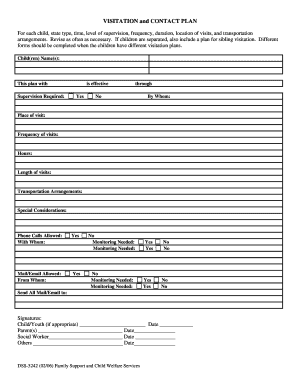
Signatures: Child/Youth (if appropriate) Parent(s) Social Worker Others Date Date Date Date DSS-5242 (02/06) Family Support and Child Welfare Services No No No No.

How it works

  1. Open form

    Open form follow the instructions

  2. Easily sign form

    Easily sign the form with your finger

  3. Share form

    Send filled & signed form or save

How to fill out the DSS-5242 online

The DSS-5242 is a vital document used for creating a visitation and contact plan for children. This guide will provide you with detailed, step-by-step instructions to effectively fill out the form online, ensuring clarity and compliance with requirements.

Follow the steps to complete the DSS-5242 form accurately.

  1. Click ‘Get Form’ button to obtain the form and open it in the editor.
  2. Begin by entering the names of the child or children in the designated 'Child(ren) Name(s):' field.
  3. Indicate the type of supervision required for visitations in the 'Supervision Required:' section.
  4. Select 'Yes' or 'No' to indicate whether the plan is effective and specify the valid period by entering the start and end dates.
  5. Fill in 'By Whom:' to note the individual responsible for overseeing the visitation plan.
  6. Specify the location of visits in the 'Place of visit:' field.
  7. Detail the 'Frequency of visits:' and the 'Hours:' of visitation for clarity on how often and when visits will occur.
  8. Define the 'Length of visits:' to provide a clear time frame for each visitation.
  9. Include any 'Special Considerations:' which may be relevant to the visitations.
  10. Specify if phone calls are allowed and identify with whom by filling out the 'Phone Calls Allowed:' section.
  11. Indicate if mail or email communications are permitted and clarify the source in 'Mail/Email Allowed:' section.
  12. Assess if monitoring of these arrangements is necessary and select the corresponding options.
  13. Gather signatures from the appropriate parties, including the child/youth (if applicable), parent(s), social worker, and others. Ensure all dates are included next to the signatures.
  14. Once all sections are completed, ensure to save changes, and consider downloading, printing, or sharing the filled form as needed.

Start completing your DSS-5242 online today to ensure a smooth visitation process.

Get form

Experience a faster way to fill out and sign forms on the web. Access the most extensive library of templates available.
Get form

Related content

DSS-5242: Family Time and Contact Plan...
2001 Mail Service Center Raleigh, NC 27699-2000 Customer Service Center: 1-800-662-7030...
Learn more
On the Civil SideIt's My Birthday and I'll Cry if...
2, 5, 13-15; DSS Form 5242. This sibling visitation plan could address visitation on the...
Learn more
VSS Sound Reception System
Mar 24, 2006 — SPAREPART-KIT For VSS – system. Part No. VSS111S. Parts No. Qty...
Learn more

Related links form

AK CIV-751 2006 AK CIV-752 2013 AK CIV-760 2014 AK CIV-770 2015

Questions & Answers

Get answers to your most pressing questions about US Legal Forms API.

Contact support

In North Carolina, the DSS is regulated by both state and federal laws, with oversight provided by the North Carolina Department of Health and Human Services (DHHS). The DHHS ensures that DSS complies with relevant standards and regulations. Understanding the regulatory framework can provide clarity on how DSS operates and its responsibilities. For more information or assistance, platforms like uslegalforms can be beneficial.

To lodge a complaint with the NC Social Work Board, you should review their specific complaint procedure on their official website. Gather all relevant details and documentation related to your complaint to provide a comprehensive overview. Filing your complaint in detail improves the likelihood of a thorough investigation. Resources available on uslegalforms can further assist you in preparing a formal complaint.

Filing a complaint against DSS in NC can be done by directly visiting or contacting your local DSS office. Clearly outline your concerns in writing and ensure you follow up for a response. Keeping a record of all communications can help safeguard your case. For added support, you may want to check out uslegalforms to explore templates that simplify the complaint process.

Opening a DSS file typically involves a few straightforward steps. You need to know the specific type of DSS file you are trying to access, as different files may require different software. Generally, you'll need compatible program software installed on your device to view these files. If you require help in navigating these processes, uslegalforms has helpful guides and templates to assist you.

To file a complaint against DSS in North Carolina, you can start by contacting your local DSS office directly. You should document your concerns thoroughly and submit any supporting evidence related to your complaint. It’s important to keep track of your correspondence and responses you receive. Alternatively, you can use platforms like uslegalforms to find resources and templates that help streamline the complaint process.

Yes, you can sue DSS in North Carolina under certain circumstances. If you believe your rights have been violated due to its actions or decisions, you have the option to seek legal advice regarding a lawsuit. Common grounds for litigation include negligence or failure to comply with established protocols. It is advisable to consult with an attorney to explore your options effectively.

In North Carolina, DSS has a statutory timeframe of 45 days to conclude investigations of alleged abuse or neglect. However, this period may be extended if necessary to ensure thorough examinations. Awareness of these timelines can assist those engaging with DSS-5242 to remain focused and informed through the process.

The length of a DSS investigation can depend on several factors, such as the specifics of the case and the amount of information collected. Generally, these inquiries can take weeks or longer to complete. It's helpful to remember that for those involved in DSS-5242, staying informed can alleviate concerns as the investigation unfolds.

In the context of disability, DSS stands for Disability Services Support. This name reflects the department's commitment toward providing assistance and resources for individuals living with disabilities. Knowing how DSS-5242 aligns with disability services can empower users to access essential resources effectively.

During home visits in NC, DSS investigators look for signs of a safe and nurturing environment for the child. They assess living conditions, parental attitudes, and interactions between caregivers and children. DSS-5242 situations often encourage families to prepare their homes and engage positively during these visits to foster a constructive relationship with investigators.

Get This Form Now!

Use professional pre-built templates to fill in and sign documents online faster. Get access to thousands of forms.
Get form
If you believe that this page should be taken down, please follow our DMCA take down processhere.
Get DSS-5242
Get form
  • Adoption
  • Bankruptcy
  • Contractors
  • Divorce
  • Home Sales
  • Employment
  • Identity Theft
  • Incorporation
  • Landlord Tenant
  • Living Trust
  • Name Change
  • Personal Planning
  • Small Business
  • Wills & Estates
  • Packages A-Z
  • Affidavits
  • Bankruptcy
  • Bill of Sale
  • Corporate - LLC
  • Divorce
  • Employment
  • Identity Theft
  • Internet Technology
  • Landlord Tenant
  • Living Wills
  • Name Change
  • Power of Attorney
  • Real Estate
  • Small Estates
  • Wills
  • All Forms
  • Forms A-Z
  • Other Templates
  • Legal Hub
  • About Us
  • Help Portal
  • Legal Resources
  • Blog
  • Affiliates
  • Contact Us
  • Delete My Account
  • Site Map
  • Industries
  • Forms in Spanish
  • Localized Forms
  • State-specific Forms
  • Forms Kit
  • Real Estate Handbook
  • All Guides
  • Notarize
  • Incorporation services
  • For Consumers
  • For Small Business
  • For Attorneys
  • USLegal
  • FormsPass
  • pdfFiller
  • signNow
  • altaFlow
  • DocHub
  • Instapage
Form Packages
  • Adoption
  • Bankruptcy
  • Contractors
  • Divorce
  • Home Sales
  • Employment
  • Identity Theft
  • Incorporation
  • Landlord Tenant
  • Living Trust
  • Name Change
  • Personal Planning
  • Small Business
  • Wills & Estates
  • Packages A-Z
Form Categories
  • Affidavits
  • Bankruptcy
  • Bill of Sale
  • Corporate - LLC
  • Divorce
  • Employment
  • Identity Theft
  • Internet Technology
  • Landlord Tenant
  • Living Wills
  • Name Change
  • Power of Attorney
  • Real Estate
  • Small Estates
  • Wills
  • All Forms
  • Forms A-Z
  • Other Templates
Customer Service
  • Legal Hub
  • About Us
  • Help Portal
  • Legal Resources
  • Blog
  • Affiliates
  • Contact Us
  • Delete My Account
  • Site Map
  • Industries
  • Forms in Spanish
  • Localized Forms
  • State-specific Forms
  • Forms Kit
Legal Guides
  • Real Estate Handbook
  • All Guides
Prepared for you
  • Notarize
  • Incorporation services
Our Customers
  • For Consumers
  • For Small Business
  • For Attorneys
Our Sites
  • USLegal
  • FormsPass
  • pdfFiller
  • signNow
  • altaFlow
  • DocHub
  • Instapage
Social Media
Call us now toll free:
+1 833 426 79 33
As seen in:
© Copyright 1999-2026 airSlate Legal Forms, Inc. 17 Station Street, Ste. 203, Brookline, MA 02445
  • Your Privacy Choices
  • Terms of Service
  • Privacy Notice
  • Content Takedown Policy
  • Bug Bounty Program