Loading
Get Ao 399 2009-2026
How it works
-

Open form follow the instructions
-

Easily sign the form with your finger
-

Send filled & signed form or save
How to fill out the AO 399 online
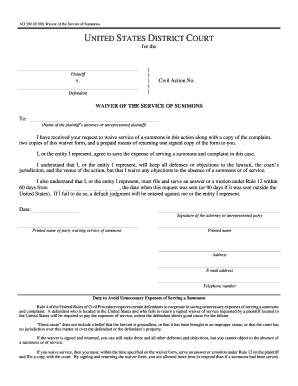
Filling out the AO 399 form, the Waiver of the Service of Summons, online is a straightforward process that saves time and expenses. This guide will walk you through each step to ensure you complete the form accurately and efficiently.
Follow the steps to successfully complete the AO 399 online.
- Click the ‘Get Form’ button to access the AO 399 form and open it in your preferred editor.
- Fill in the name of the district court in the designated space at the top of the form.
- Indicate the names of the plaintiff and defendant in their respective fields.
- Enter the civil action number assigned to this case.
- Address the waiver to the plaintiff's attorney or the unrepresented plaintiff as specified.
- After reviewing the waiver request, confirm your agreement to waive service by checking the relevant box or signing where indicated.
- Date your response in the provided field, ensuring it's completed accurately.
- Sign the form in the designated area, or if you represent an entity, include the printed name of the person waiving service along with their title.
- Provide the printed name of the party waiving service of summons, along with their address, email address, and telephone number.
- Review all entered information for accuracy before proceeding to save changes, download, or print the document.
Complete your AO 399 form online today to streamline your legal processes.
Related links form
Yes, filing an affidavit of service is typically required in federal court after serving the summons. This document confirms that the service was completed according to the rules. If you choose to use the AO 399 waiver, filing an affidavit may not be necessary, depending on the circumstances. Being aware of these requirements will help ensure compliance with court rules.