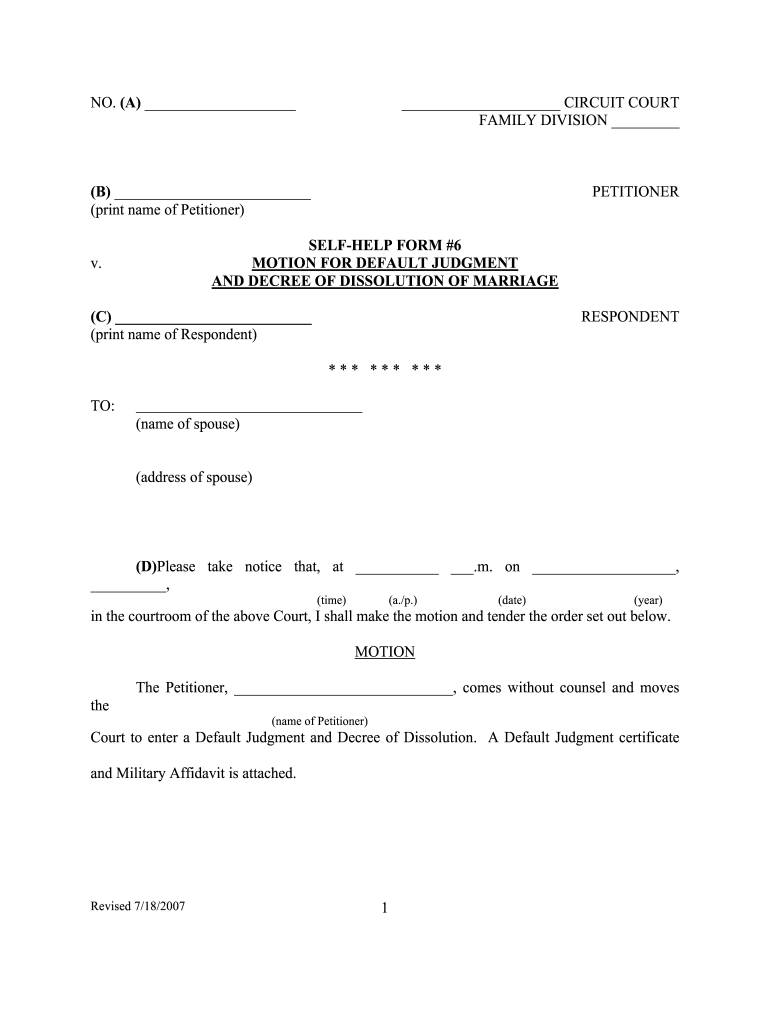
ULT JUDGMENT AND DECREE OF DISSOLUTION OF MARRIAGE v. (C) (print name of Respondent) RESPONDENT *** *** *** TO: (name of spouse) (address of spouse) (D)Please take notice that, at .m. on , , (time) (a./p.) (date) (year) in the courtroom of the above Court, I shall make the motion and tender the order set out below. MOTION The Petitioner, , comes without counsel and moves the (name of Peti.
Loading

Open form follow the instructions

Easily sign the form with your finger

Send filled & signed form or save
How to fill out the KY Self-Help Form 6 online
The KY Self-Help Form 6 is a crucial document for individuals seeking a default judgment and decree of dissolution of marriage in Kentucky. This guide provides clear, step-by-step instructions on how to accurately complete this form online, making the process as straightforward as possible for those unfamiliar with legal documents.
Follow the steps to successfully complete the KY Self-Help Form 6 online
- Press the ‘Get Form’ button to access the KY Self-Help Form 6 and open it in your preferred editor. This will allow you to view and fill out the form online.
- Begin by inputting the necessary information in section (A), where you will indicate the court number and the applicable circuit court and family division.
- In section (B), print the name of the Petitioner—this is the person initiating the motion.
- In section (C), print the name of the Respondent, which refers to the other party involved in the case.
- For section (D), provide the details about the court appearance, including the date and time when the motion will be tendered.
- In section (E), sign the form to certify that you are the person filing the motion. Make sure to also print your name in section (F) below your signature.
- Complete section (G) by entering your address and telephone number for contact information.
- In section (H), you must certify that you have accurately provided the details of the other party involved, including their name, address, and telephone number.
- After ensuring all information is accurate, sign the certification at the bottom of the form.
- Finally, save your changes to the form. You may download, print, or share the completed form as needed to ensure it is filed appropriately.
Complete your forms online with confidence and ensure you follow all necessary procedures.
Experience a faster way to fill out and sign forms on the web. Access the most extensive library of templates available.
Related content
These forms are provided as a convenience to individuals to assist them in their official...
Kentucky Autism Training Center · Home · / Past Events · / files · / 6 Transition...
This compilation includes state, District of Columbia, and territory statutes as of...
Get answers to your most pressing questions about US Legal Forms API.
How to get divorce papers without going to court?
You can obtain divorce papers without going to court by using resources like the KY Self-Help Form 6. This form is designed to help you prepare the required documents independently, which can then be filed directly with the court. Many people find this approach less intimidating and more convenient, as it allows you to manage your divorce on your terms. Make sure to follow the provided instructions thoroughly to avoid delays.
How long do you have to be separated to file for divorce in KY?
In Kentucky, you must be separated for at least 60 days before you can file for divorce. This waiting period is in place to give both parties time to reflect on their decision. By using the KY Self-Help Form 6, you can ensure that your paperwork is prepared correctly and submitted promptly after this period. This form provides a clear pathway to complete the divorce process efficiently.
Can you finalize a divorce without going to court?
Yes, you can finalize a divorce without going to court by using the KY Self-Help Form 6. This form allows you to handle your divorce paperwork independently and submit it to the court for approval. Many individuals successfully complete their divorces this way, saving time and reducing stress. With the right resources, you can navigate the process confidently and ensure everything is completed correctly.
How many years do you have to be separated to be legally divorced in Kentucky?
In Kentucky, you generally need to be separated for at least 12 months before you can file for divorce. This separation period allows both parties to reflect on their situation and reach an agreement on various issues. If you are using the KY Self-Help Form 6, you will find resources that explain how to document your separation effectively, helping you move forward in the process. Remember that proper documentation is crucial for your case.
What is the first step in getting a divorce in Kentucky?
The first step in getting a divorce in Kentucky is to gather the necessary information and documents. You will need to understand your current situation, including property, debts, and any children involved. Utilizing the KY Self-Help Form 6 simplifies the process by providing clear instructions and forms to get you started. It's important to approach this step with care, as it sets the foundation for your divorce proceedings.
How do I file for custody in Kentucky without a lawyer?
Filing for custody in Kentucky without a lawyer is straightforward with the KY Self-Help Form 6. This form simplifies the process and provides a clear pathway to complete your filing. After filling out the form accurately, submit it to the local court. Always double-check your documentation to ensure compliance with court requirements.
How to get a custody agreement without a lawyer?
To achieve a custody agreement without a lawyer, consider drafting it yourself using the KY Self-Help Form 6. This resource provides clear guidance in creating an agreement that meets legal standards. Make sure to include relevant details like visitation rights and responsibilities. Moreover, both parents need to mutually agree to avoid future disputes.
What are the requirements for child custody in Kentucky?
In Kentucky, child custody requirements focus on what is best for the child. Factors considered include the child's age, their relationship with each parent, and the parents' ability to provide a stable environment. Using the KY Self-Help Form 6 can help you understand these requirements better. It's designed to guide you in addressing the key factors to present to the court.
Can you get a divorce online without going to court?
Yes, you can obtain a divorce online without going to court in Kentucky. Utilizing services that provide the KY Self-Help Form 6 simplifies the process. This form allows you to handle most of the paperwork from home. However, certain situations may require a court appearance, so it is wise to consult the specific requirements based on your case.
How to file for custody in KY without a lawyer?
You can file for custody in Kentucky without a lawyer by using the KY Self-Help Form 6. This user-friendly form provides step-by-step instructions for completing the process. After filling out the form, you’ll need to file it with the appropriate court. Additionally, ensure you gather all the necessary documentation for a smoother filing experience.
Use professional pre-built templates to fill in and sign documents online faster. Get access to thousands of forms.
If you believe that this page should be taken down, please follow our DMCA take down process here.