Loading
Get Ks Form 170.2 2016-2026
How it works
-

Open form follow the instructions
-

Easily sign the form with your finger
-

Send filled & signed form or save
How to fill out the KS Form 170.2 online
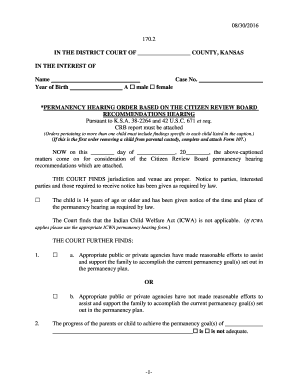
Filling out the KS Form 170.2 online can streamline the process of documenting permanency hearing recommendations. This guide will walk you through each section of the form, ensuring you complete it accurately and efficiently.
Follow the steps to fill out the KS Form 170.2 online effectively.
- Press the ‘Get Form’ button to obtain the form and open it in an accessible online format for editing.
- Begin by entering the county name in the designated space at the top of the form, as well as the case number for reference.
- Fill in the child's name and year of birth, marking the appropriate box for their gender, either 'male' or 'female'.
- Record the date of the court's consideration for the Citizen Review Board permanency hearing recommendations.
- Indicate whether the child is 14 years of age or older and whether they have received notice of the hearing time and place.
- Assess whether the Indian Child Welfare Act applies by checking the appropriate box and, if applicable, use the corresponding ICWA permanency hearing form.
- Provide additional findings regarding the support the family has received and the adequacy of the child's needs being met, checking the correct options as applicable.
- Document whether reintegration is a viable goal or not, indicating the relevant plans for the child’s future which might include adoption or permanent custodianship.
- List any adopted CRB recommendations as outlined in the attached report, ensuring to capture all relevant details.
- Finalize the form by entering the date for the next hearing, indicating whether it will take place before the court or the CRB, and specifying the time.
- Once all fields are complete, you may save changes, download a copy, print the completed form, or share it as needed.
Complete your forms online to ensure a smooth and efficient process.
Related links form
To obtain your tax return forms online, simply visit the Kansas Department of Revenue's official website. You will find a range of forms available, including the crucial KS Form 170.2. The online platform is user-friendly, making it convenient for accessing and submitting your forms.