Loading
Get In Tcm-po-0118 2010-2025
How it works
-

Open form follow the instructions
-

Easily sign the form with your finger
-

Send filled & signed form or save
How to fill out the IN TCM-PO-0118 online
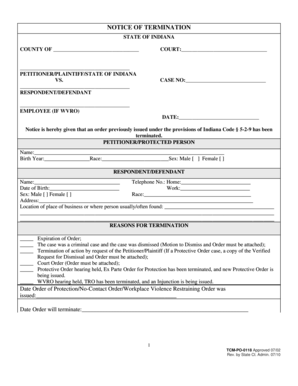
The IN TCM-PO-0118 form is an essential document for notifying relevant parties about the termination of a protective order. This guide will walk you through each section of the form, ensuring that you complete it accurately and efficiently.
Follow the steps to fill out the IN TCM-PO-0118 form online.
- Click ‘Get Form’ button to acquire the form and open it for editing.
- Fill in the county where the court is located in the designated space. This identifies the jurisdiction handling the case.
- Enter the name of the court handling your case in the appropriate field, as this is necessary for processing.
- Provide the names of the parties involved in the case – the petitioner/plaintiff and the respondent/defendant. Ensure correct spelling to avoid any legal issues.
- Input the case number associated with your order. This helps in uniquely identifying your case.
- If applicable, enter the employee's information if the case is related to a Workplace Violence Restraining Order (WVRO), along with the date.
- In the section labeled 'Reasons for Termination', select the relevant options by marking the appropriate checkboxes related to why the order is being terminated. Attach any required documents as specified.
- Document the date the order of protection was issued and when it will terminate. Accurate dates are critical for legal clarity.
- Select the type of action related to the termination from the list provided, marking the relevant option according to your situation.
- Enter the name, address, city, and telephone number for the protected person/plaintiff. It’s important to designate a public mailing address to maintain confidentiality.
- If an attorney is involved, input their attorney number in the designated field.
- Once all fields have been carefully completed, review the document for accuracy. Save your changes and download, print, or share the completed form as needed.
Complete your documents online with confidence and accuracy.
In most cases, the P0128 code indicates an issue with the thermostat rather than a sensor. A faulty thermostat might cause improper coolant flow, leading to incorrect readings from the sensors. To ensure accurate troubleshooting, inspect the thermostat first and then investigate the sensors if the issue persists. US Legal Forms provides comprehensive resources to help you navigate these automotive challenges.
Industry-leading security and compliance
US Legal Forms protects your data by complying with industry-specific security standards.
-
In businnes since 199725+ years providing professional legal documents.
-
Accredited businessGuarantees that a business meets BBB accreditation standards in the US and Canada.
-
Secured by BraintreeValidated Level 1 PCI DSS compliant payment gateway that accepts most major credit and debit card brands from across the globe.