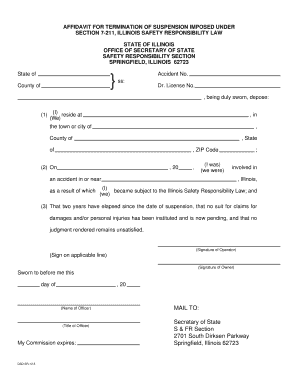
723 Attached is the Affidavit for Termination of Suspension you requested. Please complete the form and submit it to our office at the above address. Please be aware of the following procedural facts in connection to the Affidavit: 1. Please make certain that the Affidavit is not signed or dated prior to two years from the date of your driver s license suspension. An Affidavit signed prior to the eligibility date is not acceptable by law and will be returned to you. 2. Please make certain that.

How it works
  • Open form

    Open form follow the instructions

  • Easily sign form

    Easily sign the form with your finger

  • Share form

    Send filled & signed form or save

How to fill out the IL DSD SR-12.5 online

This guide provides clear and comprehensive instructions on how to fill out the IL DSD SR-12.5, the Affidavit for Termination of Suspension. Follow the steps outlined below to ensure the accurate completion of your form online.

Follow the steps to successfully complete the IL DSD SR-12.5 form.

  1. Click 'Get Form' button to access the Affidavit for Termination of Suspension in your preferred editor.
  2. Begin by filling in the statement of the county and state in which the affidavit is being completed. Provide your full address, including town or city, county, and ZIP code.
  3. Enter the date of the accident and the year that corresponds to the accident details. Make sure to check the accuracy of all information before proceeding.
  4. Confirm your compliance with the requirements by stating that two years have elapsed since the date of suspension and that no legal claims or judgments are outstanding.
  5. Affix your signature in the designated space provided for the operator. If applicable, include the signature of the vehicle owner.
  6. Ensure your affidavit is signed and dated by a notary public to validate the document.
  7. Review the entire form for completeness and accuracy to avoid processing delays. Pay attention to details such as the Driver's License Number and Date of Birth, which are required.
  8. Once all information is confirmed and accurate, save your changes. You can download, print, or share the completed form as needed before submitting it to the Secretary of State's office.

Complete your IL DSD SR-12.5 affidavit online today for a seamless filing experience.

Get form

Experience a faster way to fill out and sign forms on the web. Access the most extensive library of templates available.

Related content

Licensing Procedures for Older Drivers

by FD Thomas · 2013 · Cited by 11 — DSD had an older driver specialist who oversaw...

Learn more
Illinois Rules of the Road 2024 - Rutland Township

May 7, 2025 — Persons are subject to arrest, possible imprisonment of up to five years...

Learn more
DSD-440 Flexible Disk Memory System User's...

The infd~mation contained in this manu.l is subJect to change without notice. Data...

Learn more
Questions & Answers

Get answers to your most pressing questions about US Legal Forms API.

Contact support

How to fill out Schedule 1 line 1?

Filling out Schedule 1 line 1 requires entering specific types of income that are not included in your Form 1040, such as business income or other income sources. Make sure to review the instructions carefully to report your income accurately. Utilizing IL DSD SR-12.5 can help clarify this process and ensure you submit correct information.

To complete a withholding exemption form, specify your taxpayer status and any other relevant information to dictate your withholding preferences. This form helps adjust the tax withholding based on your expected tax liability for the year. Consider using IL DSD SR-12.5 for straightforward instructions and forms tailored to your needs.

Filling out Box 12 involves identifying the specific codes that describe the items being reported, such as retirement contributions or health savings account amounts. These codes should be correctly matched with the income reported to ensure compliance. For clarity and accuracy, tools like IL DSD SR-12.5 can assist you in this process.

Schedule Line 1 relates to additional income that taxpayers must report on their Schedule 1 form. It captures items like rental income or alimony received. Accurate completion of this section is crucial for tax compliance, and resources like IL DSD SR-12.5 can provide helpful support.

Line 1 of the Form 1040 requires you to enter your total wages, salaries, and tips. This figure serves as the starting point for determining your gross income. Ensure you thoroughly check this line, especially if you have multiple income sources, and consider using IL DSD SR-12.5 to simplify calculations.

To fill out a withholding allowance form, you need to provide your personal information, including filing status and the number of allowances you wish to claim. This information helps your employer accurately determine the amount of tax to withhold from your paycheck. For straightforward guidance, consider leveraging resources such as IL DSD SR-12.5.

Line 1 on Schedule 1 is where you report additional income, such as tax-exempt interest or business income. This section helps you clarify various types of income that may not fit into the standard 1040 lines. Utilizing tools like IL DSD SR-12.5 can assist you in ensuring compliance and accuracy in reporting these figures.

Schedule 1 is a supplementary form that allows you to report additional income or adjustments to income that are not listed directly on your Form 1040. A common example includes income such as unemployment compensation and certain business income. Understanding Schedule 1 is essential for accurate tax reporting, particularly when using features like IL DSD SR-12.5 to streamline the process.

To file a non-resident tax return, gather all income documentation from sources related to the state where you earned the income. Use the appropriate forms for non-residents, ensuring you accurately report your earnings. The IL DSD SR-12.5 may apply, depending on your situation. For a more efficient filing experience, consider using UsLegalForms, which offers comprehensive tools to handle your tax filings.

Filing an Illinois non-resident tax return requires you to complete Form IL-1040-NR. This form is designed for individuals who earn income in Illinois but reside elsewhere. Ensure to provide information about your income sources, and if applicable, report any amounts related to the IL DSD SR-12.5. Utilizing platforms like UsLegalForms can simplify this process by providing guided resources.

Get This Form Now!

Use professional pre-built templates to fill in and sign documents online faster. Get access to thousands of forms.

If you believe that this page should be taken down, please follow our DMCA take down process here.

Get IL DSD SR-12.5