Loading
Get Ia Eform 3.20
How it works
-

Open form follow the instructions
-

Easily sign the form with your finger
-

Send filled & signed form or save
How to fill out the IA eForm 3.20 online
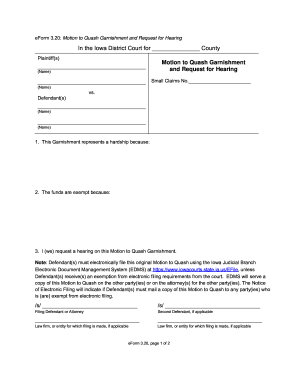
This guide provides clear instructions on how to complete the IA eForm 3.20, which pertains to filing a motion to quash garnishment and request a hearing. We aim to help you navigate each section of the form with ease and confidence.
Follow the steps to successfully complete the IA eForm 3.20
- Click the ‘Get Form’ button to access the IA eForm 3.20. This action will enable you to open the form and begin filling it out.
- In the section for plaintiff(s), enter the name(s) of the individual(s) or entity filing the motion. Ensure that you correctly spell all names as they appear on legal documents.
- In the 'Defendant(s)' section, include the name(s) of the individual(s) or entity against whom the motion is filed. Double-check for accuracy.
- For the 'Motion to Quash Garnishment' part, clearly describe why this garnishment represents a hardship under the first point. Be specific and concise.
- In the second point, explain why the funds in question are exempt from garnishment. Use relevant and factual information to support your claim.
- Tick the box where you request a hearing regarding your Motion to Quash Garnishment, affirming your intent to proceed with this request.
- Complete any required signatures, making sure to sign and print your name as well as the name of any second defendant, if applicable. Include the law firm or entity information if represented.
- Fill in your mailing address, telephone number, and email address in the designated areas. Ensure all contact information is current to facilitate communication.
- Once you have filled out all required fields, review the form to verify that all information is accurate. Make any necessary changes.
- After confirming that the form is complete, save your changes. You can choose to download the form, print it for your records, or share it as needed, following the filing requirements.
Complete your IA eForm 3.20 online today to ensure your motion is filed correctly.
Related links form
In small claims court, each party typically pays for their own lawyer's fees, regardless of who wins the case. However, some courts may award fees to the prevailing party in specific circumstances. The IA eForm 3.20 can help you understand your rights and options when it comes to legal fees in small claims cases.