Loading
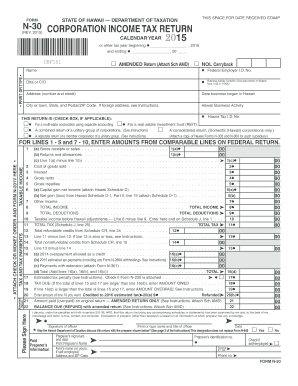
Get Hi Dot N-30 2015
How it works
-

Open form follow the instructions
-

Easily sign the form with your finger
-

Send filled & signed form or save
How to fill out the HI DoT N-30 online
This guide provides clear, step-by-step instructions for completing the HI DoT N-30 Corporation Income Tax Return online. Whether you are familiar with tax forms or not, this comprehensive guide will assist you in accurately filling out the necessary information.
Follow the steps to complete your HI DoT N-30 form online
- Click the ‘Get Form’ button to access the HI DoT N-30 form and open it in the online editor.
- Enter your company name and Federal Employer Identification Number (EIN) at the top of the form. If applicable, also include your Doing Business As (DBA) name or c/o details.
- Fill in the Business Activity Code number. Use the code found on your federal Form 1120 or 1120A to ensure accuracy.
- Provide the physical address of your business, along with the date your business began operations in Hawaii.
- Indicate your Hawaii Tax Identification Number and the type of return you are filing by checking the appropriate boxes. Choices include amended returns, NOL carryback, among others.
- Complete sections 1 to 10 as required. For each line, enter amounts as needed from your comparable federal return.
- Fill out tax-related fields such as total income, deductions, and compute your taxable income in lines 8 through 10, ensuring you make entries corresponding to your federal filings.
- After calculations, determine the total tax owed on line 11. Make sure to consider any refundable or nonrefundable credits.
- Finally, review the entire form for completeness and accuracy. Use the options available to save changes, download, or print the completed form.
Complete your HI DoT N-30 form online today to ensure timely filing!
Get form
Experience a faster way to fill out and sign forms on the web. Access the most extensive library of templates available.
Related links form
Hawaii does not allow for the carryback of net operating losses (NOL) for most taxpayers, which can be confusing for businesses. Instead, NOLs can be carried forward to offset future taxable income. Familiarizing yourself with the HI DoT N-30 form will assist you in maximizing your tax strategy in light of these regulations.
Get This Form Now!
Use professional pre-built templates to fill in and sign documents online faster. Get access to thousands of forms.