Loading
Get Ga Juv-13 2001-2026
How it works
-

Open form follow the instructions
-

Easily sign the form with your finger
-

Send filled & signed form or save
How to fill out the GA JUV-13 online
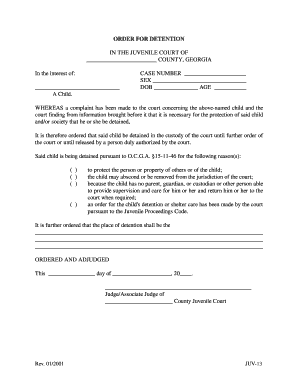
Filling out the GA JUV-13 form online is a vital step in addressing the needs of a child in the juvenile court system. This guide provides clear instructions to help you complete the form accurately and efficiently.
Follow the steps to effectively complete the GA JUV-13 form.
- Click ‘Get Form’ button to access the GA JUV-13 form. Once you have clicked the button, the form will open for you to fill it out.
- Fill in the child's name in the designated space under 'In the interest of:' to specify the individual to whom the order pertains.
- Enter the case number in the corresponding field to help identify the legal case associated with the juvenile.
- Complete the sections labeled ‘SEX,’ ‘DOB,’ and ‘AGE’ to provide critical identifying information about the child.
- Review the reasons for detention section. You need to check all applicable boxes to justify the need for the child's detention as outlined in the form.
- In the space provided, detail the specific place of detention where the child will be held. This information must be accurate and clear.
- Finally, date the form and add the name and signature of the Judge or Associate Judge responsible for the order.
- Once all fields are completed, save the form with your changes. You may also download, print, or share the document as required.
Complete your documents online to ensure prompt and efficient processing.
Court cases generally fall into three categories: civil, criminal, and administrative cases. Civil cases involve disputes between individuals or entities, criminal cases address violations of law, and administrative cases deal with regulatory issues. Understanding these distinctions is important, especially when considering how they impact juvenile cases under GA JUV-13.