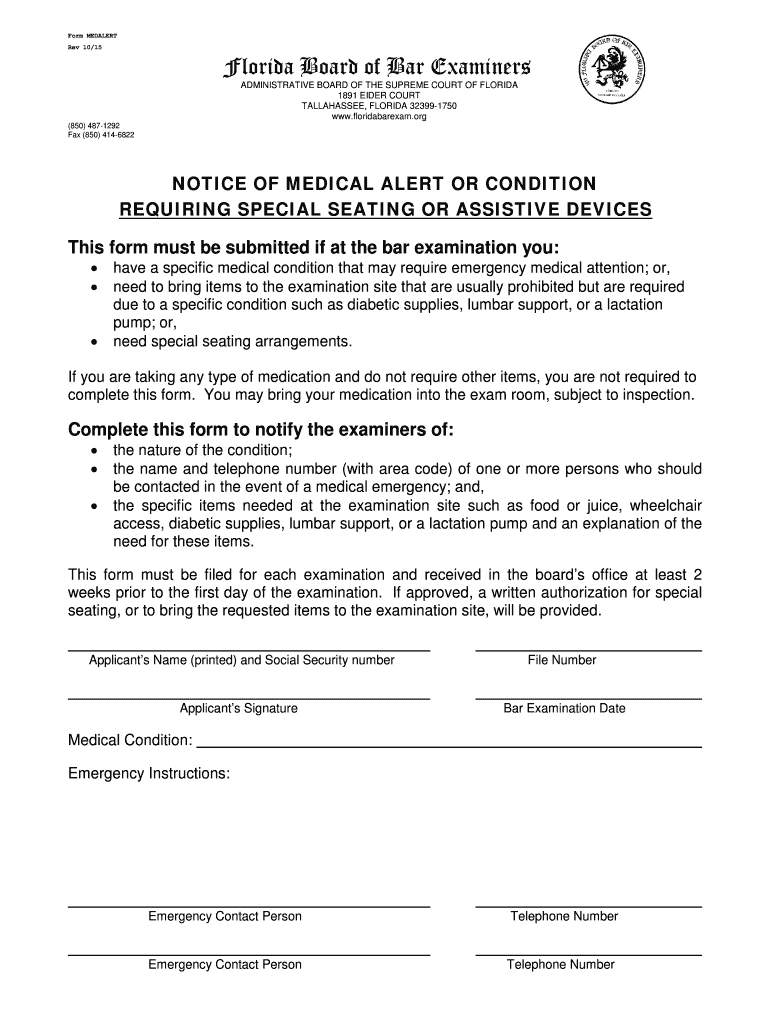
Fax (850) 414-6822 NOTICE OF MEDICAL ALERT OR CONDITION REQUIRING SPECIAL SEATING OR ASSISTIVE DEVICES This form must be submitted if at the bar examination you: have a specific medical condition that may require emergency medical attention; or, need to bring items to the examination site that are usually prohibited but are required due to a specific condition such as diabetic supplies, lumbar support, or a lactation pump; or, need special seating arrangements. If you are taking a.
Loading

Open form follow the instructions

Easily sign the form with your finger

Send filled & signed form or save
How to fill out the FL MEDALERT online
The FL MEDALERT form is essential for individuals attending the bar examination in Florida who have specific medical needs. Completing this form accurately ensures necessary accommodations are made for a comfortable testing environment.
Follow the steps to fill out the FL MEDALERT form online.
- Click ‘Get Form’ button to obtain the form and open it in your preferred document editor.
- Begin filling in your personal information by entering your name and social security number in the designated fields. Ensure this is typed accurately for identification purposes.
- Provide your file number, if applicable, in the specified area to assist with your records.
- Enter the date of your bar examination to ensure the form corresponds with the correct event.
- Describe your medical condition in detail in the ‘Medical Condition’ section. Be specific about your needs to facilitate appropriate accommodations.
- List any emergency instructions that may be relevant in case of a medical situation during the examination.
- Provide the name and telephone number of one or more emergency contact persons. Ensure you include the area code with the telephone number.
- If you have multiple emergency contacts, repeat the previous step for each contact.
- In the section regarding specific items needed, clearly indicate any assistive devices, medical supplies, or special seating arrangements you require during the exam.
- Review the completed form thoroughly to verify that all information is accurate and complete.
- Once you are satisfied with the form, save your changes, and prepare to submit it to the board's office. Remember that the form must be submitted at least two weeks prior to your examination date.
Complete your FL MEDALERT form online today to ensure all necessary accommodations are arranged for your examination.
Experience a faster way to fill out and sign forms on the web. Access the most extensive library of templates available.
Related content
Apr 29, 2022 — People with diabetes, seizure disorders, or heart disease should always...
OHP is here to support you by offering vaccinations, titer checks, screening tests, and...
Test your system for the first time with an ADT agent to ensure your system is working...
Get answers to your most pressing questions about US Legal Forms API.
Do people still wear MedicAlert bracelets?
Many people still choose to wear MedicAlert bracelets, recognizing their importance in health management. With FL MEDALERT, these bracelets offer a simple yet effective way to communicate vital medical information. They remain a valuable tool for individuals with specific health conditions or allergies, ensuring that help arrives promptly and appropriately. Wearing a MedicAlert bracelet shows commitment to your well-being and preparedness.
Does MedicAlert still exist?
Yes, MedicAlert is very much operational today, and it continues to provide essential services like FL MEDALERT. This platform remains committed to helping individuals maintain their safety and health in emergency situations. With modern updates and a focus on user-friendly features, MedicAlert adapts to today’s needs while delivering reliable assistance. You can trust that MedicAlert is still a vital resource.
What is the highest rated medical alert system for seniors?
When it comes to the highest-rated system for seniors, FL MEDALERT stands out among the options. This service offers reliable support, easy-to-use features, and quick access to medical information during emergencies. Customers appreciate its comprehensive coverage and responsive service, making it a top choice for anyone prioritizing safety. Investing in FL MEDALERT means investing in peace of mind.
Can you get a MedicAlert bracelet?
Yes, you can easily get a MedicAlert bracelet through FL MEDALERT. This system offers customizable options to fit your medical needs and personal style. Simply choose the type of bracelet that best suits you and provide your medical information for the engraving. The process is straightforward, ensuring that you are well-prepared for any emergency.
How do I reset my First Alert Professional?
Resetting your First Alert Professional device is straightforward. Locate the reset button on the device which is typically found on the side or bottom. Press and hold it for several seconds until you hear a confirming sound, indicating that it has been reset. This helps in maintaining the reliability of your FL MEDALERT services.
How do I reset my emergency alerts on my iPhone?
If you're using an iPhone and need to reset your emergency alerts, go to the settings app, then select 'Notifications'. Find 'Emergency Alerts' and toggle them off, followed by turning them back on to refresh your alert settings. This process can help integrate better with your FL MEDALERT system for seamless emergency connections.
How to reset a medical pendant?
To reset your FL MEDALERT pendant, start by pressing the reset button, which is generally located near the charging port. Hold the button until you see a light flash or hear a sound, confirming that the reset was successful. This action refreshes the pendant's settings and connects it back to your system, ensuring it functions as intended.
Should you sleep with a medical alert necklace?
Wearing your FL MEDALERT necklace while sleeping is highly recommended. This practice ensures that you have immediate access to emergency assistance at any time, especially if you experience a health scare during the night. Just remember to keep the necklace comfortably adjusted for a peaceful sleep.
How do I turn off the medical alert device?
Turning off your FL MEDALERT device is simple. Locate the power switch usually found on the side or bottom of the device. Slide the switch to the off position, and you should see an indicator light turn off, confirming that the device is powered down.
How do I reset my medical alert?
To reset your FL MEDALERT device, first locate the reset button, typically found on the back or side of the device. Press and hold the reset button until you hear a confirmation beep, indicating the reset was successful. This process helps refresh your device settings and ensures optimal functioning.
Use professional pre-built templates to fill in and sign documents online faster. Get access to thousands of forms.
If you believe that this page should be taken down, please follow our DMCA take down process here.