We use cookies to improve security, personalize the user experience, enhance our marketing activities (including cooperating with our marketing partners) and for other business use.
Click "here" to read our Cookie Policy. By clicking "Accept" you agree to the use of cookies. Read less
Read more
Accept
Loading
Form preview
  • US Legal Forms
  • Form Library
  • Legal Forms
  • Florida Legal Forms
  • Fl Marriage License Pre-application

Get Fl Marriage License Pre-application

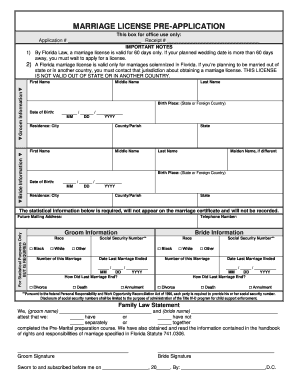
R planned wedding date is more than 60 days away, you must wait to apply for a license. 2) A Florida marriage license is valid only for marriages solemnized in Florida. If you re planning to be married out of state or in another country, you must contact that jurisdiction about obtaining a marriage license. THIS LICENSE IS NOT VALID OUT OF STATE OR IN ANOTHER COUNTRY. Application # Bride Information Groom Information First Name Middle Name Last Name Birth Place: (State or Fo.

How it works

  1. Open form

    Open form follow the instructions

  2. Easily sign form

    Easily sign the form with your finger

  3. Share form

    Send filled & signed form or save

How to fill out the FL Marriage License Pre-Application online

Completing the Florida Marriage License Pre-Application online is a straightforward process that can help you manage your wedding planning efficiently. This guide will walk you through each step to ensure you provide all necessary information accurately.

Follow the steps to complete your pre-application with ease.

  1. Click the ‘Get Form’ button to access the FL Marriage License Pre-Application form and open it for editing.
  2. Begin filling out the bride's information. You will need to provide the first name, middle name, last name, date of birth (in MM/DD/YYYY format), birth place (state or foreign country), and residence details including city and county/parish.
  3. Next, enter the groom's information in a similar manner. This includes their first name, middle name, last name, date of birth, birth place, and residence details.
  4. Complete the statistical information section which is required but will not appear on the marriage certificate. Input the future mailing address and telephone numbers.
  5. Indicate the race for both the bride and groom from the provided options. This is for statistical purposes only.
  6. Provide social security numbers for both parties as mandated by federal law. Ensure that the handling of this information is consistent with privacy and security guidelines.
  7. Complete the section on the end of previous marriages, including the date of how the last marriage ended. Clearly indicate if it ended in divorce, death, or annulment.
  8. Fill out the family law statement, confirming whether you and your partner have completed the Pre-Marital preparation course. Affix signatures where required.
  9. Finally, review your completed application for accuracy. Save changes, and download or print the form as necessary for submission.

Begin the online process now to ensure your marriage license application is completed promptly and correctly.

Get form

Experience a faster way to fill out and sign forms on the web. Access the most extensive library of templates available.
Get form

Related content

Preapplication - Clerk of the Court
Online Marriage License Bureau. Spouse's Info for the Online Pre-Application. Enter...
Learn more
Formal Marriage
Three fourths of states adopt a waiting period: one to ten days with three days commonly...
Learn more
MINOR CONSENT TO MEDICAL TREATMENT LAWS
This compilation includes state, District of Columbia, and territory statutes as of...
Learn more

Related links form

CA CDTFA-106 (formerly BOE-106) 2015 CA CDTFA-146-RES (Formerly BOE-146-RES) 2017 CA CDTFA-146-RES (Formerly BOE-146-RES) 2015 CA CDTFA-230-F 2017

Questions & Answers

Get answers to your most pressing questions about US Legal Forms API.

Contact support

Yes, in Florida, you can get married the same day you obtain your marriage license. After completing your FL Marriage License Pre-Application and securing your license, there is no waiting period before your ceremony. This makes it a convenient option for couples looking to tie the knot quickly.

Yes, applying for a marriage license online in Florida is convenient and can save time. By filling out the FL marriage license pre-application on the designated county clerk's website, you can easily gather the necessary information before your in-person appointment to finalize the license.

When applying for a marriage license in Florida, you must present a valid photo ID, which can be a driver's license or a passport. Additionally, both partners must be present to sign the application. You may also need to provide your Social Security number, so keep that in mind when filling out the FL marriage license pre-application.

To apply for an FL marriage license pre-application, you need specific documents. Typically, you'll need a valid photo ID, such as a driver's license or passport, and proof of residency may be required. It’s beneficial to check with your local clerk's office for additional requirements and ensure that you have everything ready before your application.

To file for marriage in Florida, you need to obtain a marriage license first. After acquiring the license, you can have your ceremony officiated by an authorized person. Utilize the FL Marriage License Pre-Application from US Legal Forms to streamline your application process and ensure that you have all necessary information prepared.

It is advisable to obtain your marriage license at least a week before your wedding. This timing ensures that you have ample time to address any potential issues or questions that may arise during the process. Completing the FL Marriage License Pre-Application in advance can streamline your visit to the clerk's office, making the experience much smoother.

When completing the marriage license application in Florida, you should provide your current last name. If you plan to change your last name after marriage, indicate your desired new last name on the application under the appropriate section. Utilizing the FL Marriage License Pre-Application can help you clarify these details before your appointment.

You may apply for a marriage license in Florida as early as 60 days before your wedding. However, it's advisable to submit the FL Marriage License Pre-Application at least a few weeks in advance to avoid any last-minute issues. This time frame allows you to gather all necessary documentation and ensure a smooth process.

Most counties in Florida allow walk-in applications for marriage licenses, but some may require an appointment. It's best to check with your local clerk's office regarding their specific policies. By using the FL Marriage License Pre-Application, you can save time and ensure that you have all your documents ready before your visit.

Yes, you can apply for a FL marriage license online through platforms like US Legal Forms. The FL Marriage License Pre-Application simplifies the process, allowing you to fill out your details from the comfort of your home. After completing the online application, you will still need to visit the clerk's office in person to finalize the license.

Get This Form Now!

Use professional pre-built templates to fill in and sign documents online faster. Get access to thousands of forms.
Get form
If you believe that this page should be taken down, please follow our DMCA take down processhere.

Industry-leading security and compliance

US Legal Forms protects your data by complying with industry-specific security standards.
  • In businnes since 1997
    25+ years providing professional legal documents.
  • Accredited business
    Guarantees that a business meets BBB accreditation standards in the US and Canada.
  • Secured by Braintree
    Validated Level 1 PCI DSS compliant payment gateway that accepts most major credit and debit card brands from across the globe.
Get FL Marriage License Pre-Application
Get form
Form Packages
Adoption
Bankruptcy
Contractors
Divorce
Home Sales
Employment
Identity Theft
Incorporation
Landlord Tenant
Living Trust
Name Change
Personal Planning
Small Business
Wills & Estates
Packages A-Z
Form Categories
Affidavits
Bankruptcy
Bill of Sale
Corporate - LLC
Divorce
Employment
Identity Theft
Internet Technology
Landlord Tenant
Living Wills
Name Change
Power of Attorney
Real Estate
Small Estates
Wills
All Forms
Forms A-Z
Form Library
Customer Service
Terms of Service
Privacy Notice
Legal Hub
Content Takedown Policy
Bug Bounty Program
About Us
Blog
Affiliates
Contact Us
Delete My Account
Site Map
Industries
Forms in Spanish
Localized Forms
State-specific Forms
Forms Kit
Legal Guides
Real Estate Handbook
All Guides
Prepared for You
Notarize
Incorporation services
Our Customers
For Consumers
For Small Business
For Attorneys
Our Sites
US Legal Forms
USLegal
FormsPass
pdfFiller
signNow
airSlate WorkFlow
DocHub
Instapage
Social Media
Call us now toll free:
+1 833 426 79 33
As seen in:
  • USA Today logo picture
  • CBC News logo picture
  • LA Times logo picture
  • The Washington Post logo picture
  • AP logo picture
  • Forbes logo picture
© Copyright 1997-2025
airSlate Legal Forms, Inc.
3720 Flowood Dr, Flowood, Mississippi 39232
Form Packages
Adoption
Bankruptcy
Contractors
Divorce
Home Sales
Employment
Identity Theft
Incorporation
Landlord Tenant
Living Trust
Name Change
Personal Planning
Small Business
Wills & Estates
Packages A-Z
Form Categories
Affidavits
Bankruptcy
Bill of Sale
Corporate - LLC
Divorce
Employment
Identity Theft
Internet Technology
Landlord Tenant
Living Wills
Name Change
Power of Attorney
Real Estate
Small Estates
Wills
All Forms
Forms A-Z
Form Library
Customer Service
Terms of Service
Privacy Notice
Legal Hub
Content Takedown Policy
Bug Bounty Program
About Us
Blog
Affiliates
Contact Us
Delete My Account
Site Map
Industries
Forms in Spanish
Localized Forms
State-specific Forms
Forms Kit
Legal Guides
Real Estate Handbook
All Guides
Prepared for You
Notarize
Incorporation services
Our Customers
For Consumers
For Small Business
For Attorneys
Our Sites
US Legal Forms
USLegal
FormsPass
pdfFiller
signNow
airSlate WorkFlow
DocHub
Instapage
Social Media
Call us now toll free:
+1 833 426 79 33
As seen in:
  • USA Today logo picture
  • CBC News logo picture
  • LA Times logo picture
  • The Washington Post logo picture
  • AP logo picture
  • Forbes logo picture
© Copyright 1997-2025
airSlate Legal Forms, Inc.
3720 Flowood Dr, Flowood, Mississippi 39232