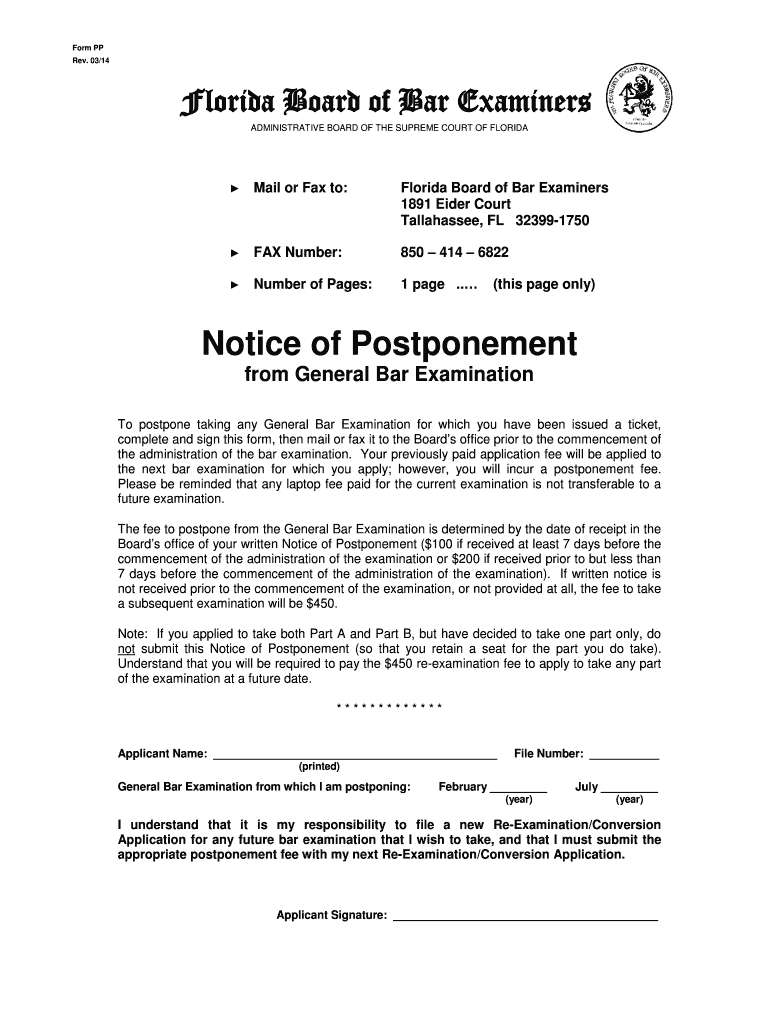
-1750 FAX Number: 850 414 6822 Number of Pages: 1 page .. (this page only) Notice of Postponement from General Bar Examination To postpone taking any General Bar Examination for which you have been issued a ticket, complete and sign this form, then mail or fax it to the Board s office prior to the commencement of the administration of the bar examination. Your previously paid application fee will be applied to the next bar examination for which you apply; however, yo.
Loading

Open form follow the instructions

Easily sign the form with your finger

Send filled & signed form or save
How to fill out the FL Bar Exam Form PP online
Filling out the FL Bar Exam Form PP is an essential step for those who need to postpone their General Bar Examination. This guide provides clear, step-by-step instructions to help you complete the form accurately and efficiently.
Follow the steps to complete the FL Bar Exam Form PP online
- Press the ‘Get Form’ button to obtain the form and open it for editing.
- In the ‘Applicant Name’ section, enter your full name as it appears on official documents.
- Locate the ‘File Number’ field and input your assigned file number accurately.
- Indicate the General Bar Examination you are postponing by checking either ‘February’ or ‘July’ and entering the corresponding year.
- Review the information you have entered for accuracy and completeness to avoid any issues.
- Sign the form in the ‘Applicant Signature’ section to certify your intent to postpone the examination.
- Save your changes, then download the form for your records. You may now print or share the completed form as needed.
Complete the necessary forms online to ensure your postponement is processed timely.
Experience a faster way to fill out and sign forms on the web. Access the most extensive library of templates available.
Related content
Apr 14, 2025 — The Supreme Court of Florida posts the pass/fail results from the most...
Learn about the Bar application process, including character and fitness requirements...
The manual describes the three types of PSIM. Technical specifications, safety information...
Get answers to your most pressing questions about US Legal Forms API.
Do you have to take the MPRE before the bar in Florida?
In Florida, passing the MPRE is required, but you do not have to take it before sitting for the bar exam. You can take the bar exam first and then focus on completing the MPRE. This flexibility allows you to align your study schedules as needed, ensuring you're well-prepped for the FL Bar Exam Form PP and the MPRE.
How many people pass The Florida Bar on the first try?
The pass rate for first-time takers of The Florida Bar exam in Florida typically hovers around 70% to 75%. This statistic highlights that many candidates are well-prepared and succeed on their first attempt. To improve your chances, utilize effective study materials, and the FL Bar Exam Form PP can be instrumental in guiding you through the necessary steps.
Is the MPRE harder than the bar exam?
The difficulty of the MPRE compared to the bar exam varies based on your preparation and background in ethical rules. Generally, many candidates find the MPRE to be more straightforward, as it focuses specifically on professional responsibility rather than a wide range of law topics. Regardless, thorough preparation is key to succeeding in both. Consider reviewing resources for the FL Bar Exam Form PP alongside your MPRE studies.
Do you have to pass MPRE before bar?
You do not need to pass the MPRE before taking the Florida Bar Exam. However, it is essential to successfully complete the MPRE before you can receive your license. This sequential requirement means that while you can take both at different times, completing the MPRE early is advisable for better planning. Properly managing this timeline will aid you in your FL Bar Exam Form PP preparation.
Does Florida bar require MPRE?
Yes, the Florida Bar requires you to pass the Multistate Professional Responsibility Examination (MPRE). This exam tests your knowledge of professional conduct. Passing the MPRE is a crucial step in your journey to becoming a licensed attorney in Florida. Therefore, make sure to prepare adequately for it alongside the FL Bar Exam Form PP.
Can I get a copy of my Florida bar application?
Yes, you can obtain a copy of your Florida bar application. To do this, you should contact the Florida Board of Bar Examiners. They can provide you with details about the process for requesting a copy and any associated fees. Additionally, using the FL Bar Exam Form PP can streamline your application process.
Is the Florida bar exam changing?
Yes, the Florida Bar exam is set to change in future years, with potential new formats and content updates on the horizon. Staying informed about these changes is vital for prospective lawyers. Tools like the FL Bar Exam Form PP can provide the latest insights and resources to help you navigate this evolving examination landscape.
Will Florida get rid of the bar exam?
There have been discussions about alternative paths to legal licensure, but there are currently no official plans to eliminate the Florida Bar exam. The FL Bar Exam Form PP remains a crucial assessment that ensures all practicing lawyers meet specific legal knowledge standards. Staying updated on these discussions can help you prepare for the evolving legal landscape.
Is Florida the hardest bar exam?
Many consider the Florida Bar exam one of the more challenging exams in the United States. The comprehensive nature of the test, combined with a competitive pass rate, can make it daunting. However, utilizing resources like the FL Bar Exam Form PP can provide essential guidance and support during your study process.
What are the changes to the bar exam in 2026?
In 2026, the Florida Bar exam will undergo significant changes, including a possible shift to a new format and updated testing subjects. The FL Bar Exam Form PP may reflect these modifications, providing test-takers with the latest information and structure. It is crucial for aspiring lawyers to stay informed about these changes to ensure they are adequately prepared.
Use professional pre-built templates to fill in and sign documents online faster. Get access to thousands of forms.
If you believe that this page should be taken down, please follow our DMCA take down process here.