Loading
Get Ct Pc-371 2019-2026
How it works
-

Open form follow the instructions
-

Easily sign the form with your finger
-

Send filled & signed form or save
How to fill out the CT PC-371 online
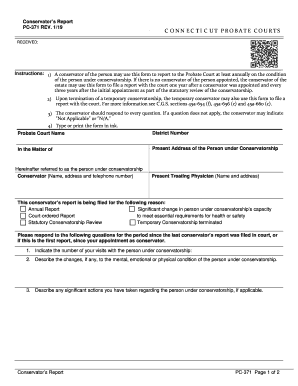
This guide provides a comprehensive overview for users on how to complete the CT PC-371 form online, a conservator’s report required by Connecticut probate courts. It aims to support users, regardless of their experience level, in submitting this important document accurately and efficiently.
Follow the steps to fill out the CT PC-371 form online
- Press the ‘Get Form’ button to access the CT PC-371 form and open it in your preferred online editor.
- Carefully enter the name of the Probate Court and the District Number at the top of the form, ensuring you provide accurate details.
- Fill in 'In the Matter of' section with the complete name of the person under conservatorship, followed by their present address.
- Provide the name, address, and telephone number of the conservator in the designated field.
- Input the name and address of the present treating physician in the appropriate section.
- Select the reason for filing the report by checking the relevant box among options such as 'Annual Report' or 'Statutory Conservatorship Review.'
- Respond to the questions provided in the form. If a question does not apply, write 'Not Applicable' or 'N/A' clearly in the space provided.
- Complete the section requiring details on visits, changes in condition, significant actions taken, and any arising problems.
- Indicate whether the appointment of a conservator remains the least restrictive means of intervention, explaining if necessary.
- Describe any efforts made to encourage the independence of the person under conservatorship.
- If applicable, provide your opinion on whether the conservatorship should be continued, modified, or terminated, along with your reasoning.
- Sign and date the form in the designated areas, ensuring your name is printed legibly.
- Once all fields are completed, save your changes, and choose to download, print, or share the filled-out form as necessary.
Complete your CT PC-371 form online today to ensure timely and accurate reporting.
Closing a deceased estate involves several critical steps, starting with filing for probate with the court. Ensure that you collect all documents, including the will and any debts. Complete necessary forms like CT PC-371 to document the closure and notify all interested parties, including beneficiaries, about the estate's end.