Get Co Pc-901 2017
How it works
-

Open form follow the instructions
-

Easily sign the form with your finger
-

Send filled & signed form or save
How to fill out the CO PC-901 online
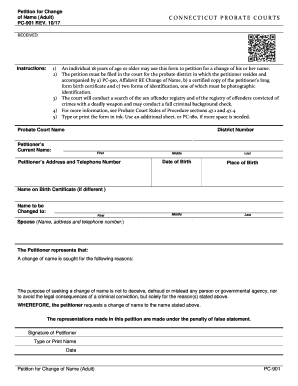
The CO PC-901 form is essential for individuals seeking a legal change of name. This guide provides clear, step-by-step instructions for completing the petition online, ensuring that even those with little legal experience can navigate the process easily.
Follow the steps to successfully complete your name change petition.
- Click ‘Get Form’ button to access the form and open it in the editor.
- Begin by entering the probate court name and district number where you will file your petition.
- Fill in your current name, including first, middle, and last names, along with your address and telephone number.
- Enter your date and place of birth.
- If your name on the birth certificate differs from your current name, please provide that name as well.
- Specify the new name you wish to adopt by filling in your desired first, middle, and last names.
- If applicable, include your spouse’s name, address, and telephone number.
- Clearly state the reasons for your name change, ensuring to mention that the purpose is not to deceive or defraud anyone.
- Read the statement regarding the truth of the representations in the petition and sign where indicated.
- Finally, check your entries for accuracy, save your changes, and choose to download, print, or share the completed form.
Start filling out your CO PC-901 form online today to initiate your name change process.
Get form
Filing probate in Connecticut involves submitting a petition to the probate court in the district where the deceased lived. You will need to provide necessary documentation, such as the will, an inventory of assets, and any relevant identification. This process ensures that the deceased person's wishes are carried out as per their will. For a smoother experience, US Legal Forms offers resources to guide you through the probate filing process.