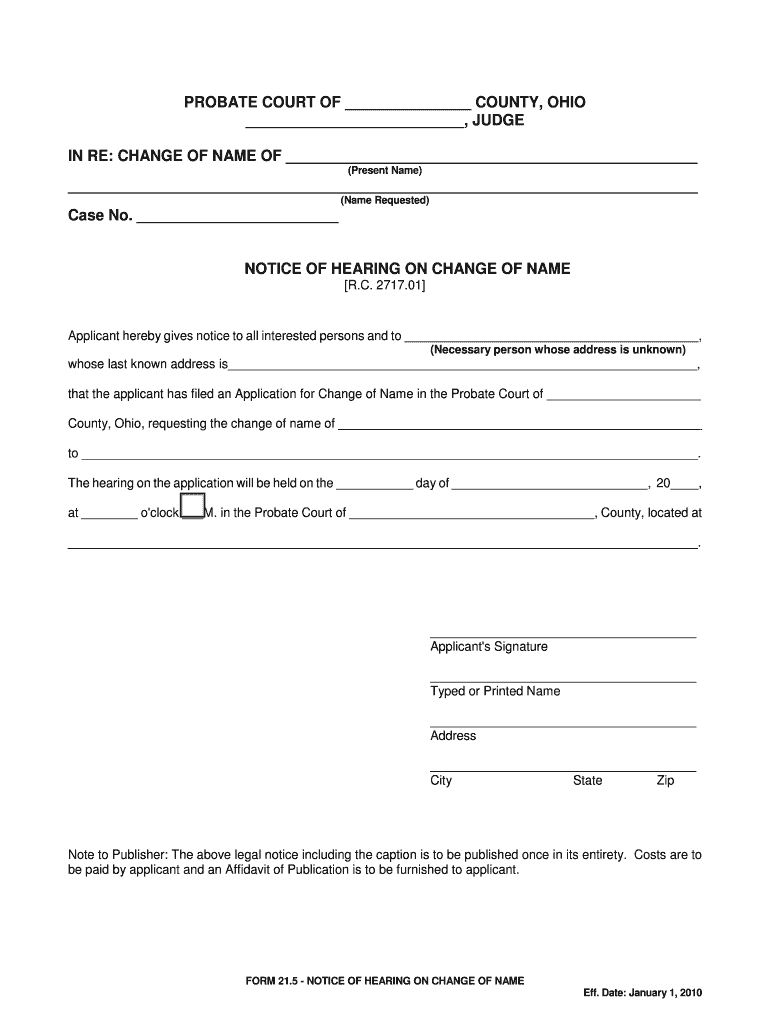
(Name Requested) Case No. NOTICE OF HEARING ON CHANGE OF NAME R.C. 2717.01 Applicant hereby gives notice to all interested persons and to , (Necessary person whose address is unknown) whose last known address is , that the applicant has filed an Application for Change of Name in the Probate Court of.
Loading

Open form follow the instructions

Easily sign the form with your finger

Send filled & signed form or save
How to fill out the OH Form 21.5 online
This guide provides clear instructions for completing the OH Form 21.5 online, which is used for requesting a change of name in the Probate Court of Ohio. By following these steps, users can efficiently fill out the form and ensure they provide all necessary information.
Follow the steps to complete the OH Form 21.5 online
- Press the ‘Get Form’ button to obtain the document and open it in your online editor.
- In the top section of the form, fill in your current name under 'Present Name.' Ensure that this matches your official documents.
- Next, input the name you wish to adopt under 'Name Requested.' This should also be exactly as you intend it to appear legally.
- Complete the 'Case No.' section. If you do not have one, leave this blank until your application is processed.
- In the 'Necessary Person' field, specify anyone whose address is unknown. This should be a person closely related to your name change, ensuring that all interested parties are notified.
- Fill in the last known address for the necessary person. Be as accurate as possible to avoid issues during notification.
- Indicate the date and time of the hearing by specifying the day, month, and year in the 'Hearing Date' section.
- Include the location of the Probate Court in the designated space, ensuring that you provide the full address.
- Finally, sign the form in the designated area with your current signature. Below it, print your name, address, city, state, and zip code.
- After completing the form, save your changes. You may then download, print, or share the completed form as needed.
Start completing your documents online today.
Experience a faster way to fill out and sign forms on the web. Access the most extensive library of templates available.
Related content
Jan 1, 2023 — FORM 21.5 - NOTICE OF HEARING ON CHANGE OF NAME. Amended: January 1, 2023...
by M Gaskill · 2023 — Theorists have engaged in a decades-long debate about form in...
section 21.5. Abiomed recommends that air transport carriers follow the guidance FAA...
Get answers to your most pressing questions about US Legal Forms API.
How long do you have to file probate after death in Ohio?
In Ohio, the timeframe to file probate after death is generally within three months. Delaying beyond this period can complicate the estate settlement process. It is advisable to prepare your paperwork, like the OH Form 21.5, as early as possible to ensure you meet this deadline without unnecessary stress.
What forms do I need to file probate in Ohio?
To file probate in Ohio, you will need a few essential forms. Most importantly, you should have the application for probate, the deceased's will, and any pertinent identification. Depending on your situation, you might also need additional documents like the OH Form 21.5, which details particulars about the estate.
How to file probate in Ohio without a lawyer?
Filing probate in Ohio without a lawyer is achievable, yet it requires careful attention to detail. Begin by obtaining the necessary forms from your local probate court and properly filling them out, including the OH Form 21.5 if applicable. You will need to submit these forms along with any required documents, ensuring that you follow your local court's procedures closely.
Does Ohio have a small estate affidavit?
Yes, Ohio does have a small estate affidavit that simplifies the process of transferring assets after someone passes away. This affidavit can be used when the estate falls below a certain value, allowing heirs to bypass formal probate. Remember, you may need to refer to the OH Form 21.5 to ensure compliance with specific requirements.
What is the simplified probate process in Ohio?
The simplified probate process in Ohio is designed for small estates and generally involves fewer steps than standard probate. It allows for a streamlined approach to settling an estate without extensive court oversight. Using OH Form 21.5 can help clarify your needs during this process, making it easier to navigate what can often feel overwhelming.
What documents does probate court need in Ohio?
In Ohio, probate court typically requires several key documents. You may need to submit the deceased person's will, the application for probate, and any necessary identification. Additionally, if applicable, you might have to provide the OH Form 21.5, which can assist in ensuring a smoother process.
How to start probate process in Ohio?
To start the probate process in Ohio, you must file a petition in the local probate court. You will need to submit the deceased person's will, along with other required documents including the OH Form 21.5 if applicable. The court will then determine whether to admit the will to probate and appoint an executor or administrator. It’s crucial to have all required documents to ensure a smooth process.
Do I need an attorney for probate in Ohio?
In Ohio, hiring an attorney for probate is not mandatory, but it is highly beneficial. An attorney can help navigate the complexities of the probate process, including the preparation of necessary documents such as the OH Form 21.5 if it relates to assets or name changes. If your case is straightforward, you might manage without one, but having legal guidance can simplify your experience.
How long does it take to change your name in Ohio?
The name change process in Ohio can vary but typically takes a few weeks to several months. Once you submit documents like the completed OH Form 21.5, courts generally process name changes relatively quickly. It's crucial to ensure that all your paperwork is filled out correctly to avoid delays. Keep in mind that changes to state-issued IDs may take additional time.
How to legally change your name in Ohio after marriage?
To legally change your name in Ohio after marriage, you need to update your name on your marriage certificate first. After obtaining the updated certificate, you can use it to change your name on other documents, such as your driver's license and Social Security card. Don't forget to complete the OH Form 21.5 for name change documentation. This form provides a streamlined process for updating your name across various legal documents.
Use professional pre-built templates to fill in and sign documents online faster. Get access to thousands of forms.
If you believe that this page should be taken down, please follow our DMCA take down process here.