Ress as required by Code of Civil Procedure section 116.570(a)(3) ( ) This case has not been before this Court previously. (specify name and address): ( This case has been before this Court previously. The short title, docket number and citation are: ( b. ) ) Matters related to this appeal or involving the same issue have been or presently are before this Court. The short titles, docket numbers and citations are: (Optional) In addition to the requirement above, each of the other parties wa.
Loading

Open form follow the instructions

Easily sign the form with your finger

Send filled & signed form or save
How to fill out the CA SC-110 online
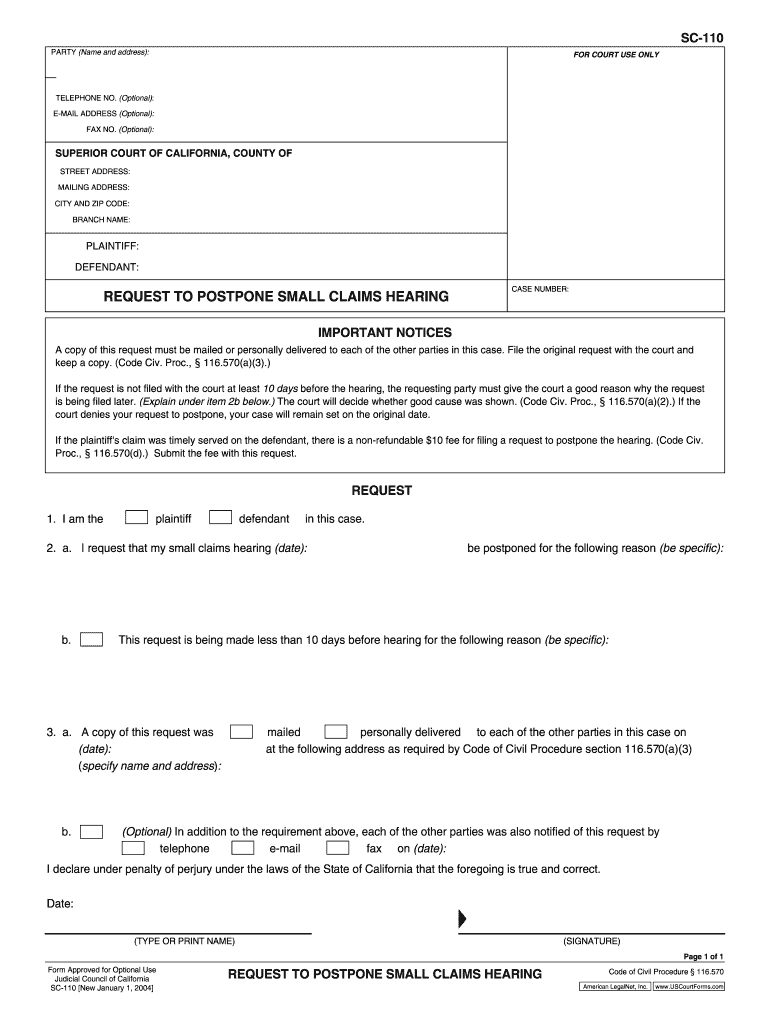
The CA SC-110 form is essential for individuals wishing to request a postponement of a small claims hearing in California. This guide will provide clear, step-by-step instructions tailored to assist users in completing the form online, regardless of their prior legal experience.
Follow the steps to successfully fill out the CA SC-110 form online.
- Click the ‘Get Form’ button to access the CA SC-110 form and open it in the editor.
- Begin by filling in your name and address in the 'Party' section to clearly identify yourself within the document.
- Enter your telephone number, email address, and fax number in the optional fields, if you choose to provide this contact information.
- Specify the 'Superior Court of California, County of' where your case will be heard by entering the appropriate county name, street address, mailing address, city, and zip code.
- Indicate the short title and parties involved, clearly distinguishing between the plaintiff and defendant.
- Fill in the docket number and case number to reference your specific case accurately.
- Indicate your status as a party involved in the case by checking the appropriate box: Cross-Appellee, Appellant, Intervenor, etc.
- If applicable, provide details about your attorney, including their name and bar admissions.
- In the 'Time Request' section, indicate if oral argument is desired, and request the total number of minutes for argument if necessary.
- Provide a specific reason for your request to postpone the hearing in the provided space.
- Confirm and indicate your availability for the argument and any inconvenient dates, ensuring to communicate any changes in availability.
- Sign the form at the designated areas, either through a digital signature option if available or by printing and signing manually.
- Finally, after completing all sections, you can save changes, download, print, or share the completed form as needed.
Complete your CA SC-110 form online today and ensure your small claims hearing is properly scheduled.
Experience a faster way to fill out and sign forms on the web. Access the most extensive library of templates available.
Related content
The course consists of several modules of activity- and experience-based learning...
AVISOS: ○ Esta câmera de vídeo foi projetada para ser utilizada com sinais de...
Get answers to your most pressing questions about US Legal Forms API.
How to file a motion to dismiss in California?
To file a motion to dismiss in California, you should draft the motion clearly and include necessary supporting documents. After preparing your motion, file it with the appropriate court and serve it to all involved parties. Make sure to comply with local rules, particularly utilizing the CA SC-110 form when required. If you need templates or assistance, USLegalForms offers resources to simplify this process.
Can you file a motion to dismiss without filing an answer?
Yes, you can file a motion to dismiss without filing an answer to the complaint. This motion can be submitted at the beginning of the case and a properly completed CA SC-110 form will be vital in this process. Filing early allows you to challenge the legal basis of the complaint before engaging further. For precise instructions, reviewing available resources on platforms like USLegalForms can be beneficial.
What is a SC100 form?
The SC100 form is a legal document used in California to start small claims court cases. It outlines the claim and provides essential details about the parties involved. By utilizing this form, you can facilitate the smooth management of your case. If you need assistance with related documents, the CA SC-110 form can help you close out any cases that may need to be dismissed.
Who files a request for dismissal?
The party who initiated the lawsuit typically files a request for dismissal. This can be the plaintiff who wishes to end the case voluntarily. It is essential to properly fill out the CA SC-110 form when requesting dismissal to ensure your request is processed correctly. If you are uncertain, consider reaching out to legal forms platforms like USLegalForms for guidance.
What are the two dismissal rules in California?
In California, the two main dismissal rules are voluntary dismissal and involuntary dismissal. A voluntary dismissal occurs when the plaintiff chooses to withdraw the case, often using the CA SC-110 form. An involuntary dismissal may happen when the court dismisses a case due to a party’s failure to follow procedural rules. Understanding these rules helps you navigate the legal system effectively.
How do I write a motion for dismissal?
To write a motion for dismissal, you need to start with a header that includes your name and contact information, the court's name, and the case number. Clearly state your request for dismissal and provide the reasons for it. Be sure to reference the applicable laws and regulations, particularly focusing on CA SC-110, if relevant. Conclude with your signature and date to formalize the document.
What are good reasons to drop a restraining order?
Good reasons to drop a restraining order might include changes in the relationship, such as reconciliation or improved communication. If the abuse or threats have ceased and you feel safe, it may also be a valid reason. It is essential to fully assess your situation before proceeding, as your safety should always come first. Consider consulting with legal experts or using platforms like US Legal Forms for advice on navigating this decision.
How to fill out CIV 110?
Filling out the CIV 110 form involves providing detailed information about your domestic violence situation, similar to the CA SC-110. Start with your personal details, then describe the nature of the events that led to your need for a restraining order. Be honest and thorough in your description, as this form is critical in helping you present your case effectively. If you need guidance, resources from US Legal Forms can streamline the process.
What to say at a restraining order hearing?
During a restraining order hearing, it’s crucial to clearly state your reasons for requesting the order. Share any specific incidents of harassment or violence relevant to your case. Stay calm, provide factual details, and present any evidence you've gathered, such as witness statements or photographs. Remember, the focus is on demonstrating why a CA SC-110 is necessary for your safety.
How to fill out DV 110 form?
Filling out the DV 110 form requires carefully outlining the details of your situation. Start by providing personal information about yourself and the person you are seeking a restraining order against. Make sure to include information about any incidents of violence or threats while focusing on clarity. For assistance, consider using resources from platforms like US Legal Forms to guide you through the process.
Use professional pre-built templates to fill in and sign documents online faster. Get access to thousands of forms.
If you believe that this page should be taken down, please follow our DMCA take down process here.