Loading
Get Ma Mvu-33 2011-2026
How it works
-

Open form follow the instructions
-

Easily sign the form with your finger
-

Send filled & signed form or save
How to fill out the MA MVU-33 online
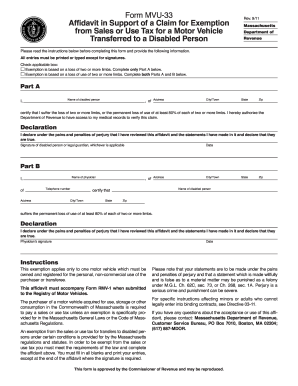
The MA MVU-33 form is an important document used to claim an exemption from sales or use tax for a motor vehicle transferred to a person with a disability. This guide will help you navigate the process of filling out this form online in a clear and user-friendly manner.
Follow the steps to complete the MA MVU-33 form online.
- Click ‘Get Form’ button to obtain the form and open it in the online editor.
- Begin by reading the instructions carefully to ensure you understand the requirements for the exemption. All entries must be printed or typed, except for signatures.
- Check the applicable box to indicate the basis of the exemption: either a loss of two or more limbs or a loss of use of two or more limbs. This will determine which parts of the form you need to complete.
- In Part A, fill in the name, address, city, state, and zip code of the person with a disability. This section only requires completion if the exemption is based on the loss of two or more limbs.
- In the declaration statement in Part A, affirm that the information you provided is true and that you authorize the Department of Revenue to access your medical records for verification.
- Sign and date the form in the designated areas. If applicable, the legal guardian may sign instead.
- If the exemption is based on a loss of use, complete Part B. Provide the name, telephone number, and address of the physician certifying the disability.
- In Part B, the physician must certify the level of disability, filling in the necessary details about the disabled person.
- The physician should also sign and date their portion of the form confirming that the information is accurate.
- Review all entries to ensure accuracy and completeness. Save your changes before proceeding.
- Once the form is complete, you can download, print, or share the affidavit as required. Attach this affidavit to Form RMV-1 when submitting to the Registry of Motor Vehicles.
Ensure your application is properly completed by following these steps for a smooth filing process online.
You should file your MA Form 2 with the local assessors in your city or town. Contact your local tax office for specific submission procedures or deadlines. Using tools like the MA MVU-33 can help ensure your vehicle information is accurate, making the filing of Form 2 easier.