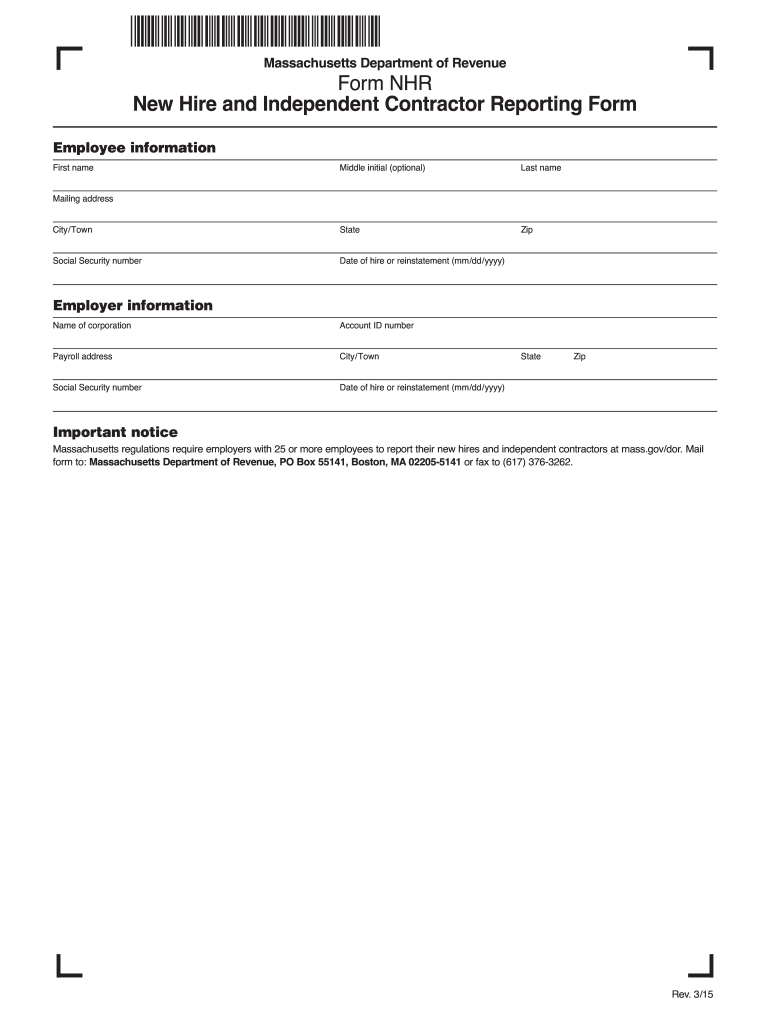
T notice Massachusetts regulations require employers with 25 or more employees to report their new hires and independent contractors at mass.gov/dor. Mail form to: Massachusetts Department of Revenue, PO Box 55141, Boston, MA 02205-5141 or fax to (617) 376-3262. Rev. 3/15.
Loading

Open form follow the instructions

Easily sign the form with your finger

Send filled & signed form or save
How to fill out the MA NHR online
The Massachusetts New Hire and Independent Contractor Reporting Form (MA NHR) is essential for employers to report new hires and independent contractors. This guide provides clear, step-by-step instructions for completing the form online, ensuring compliance with state regulations.
Follow the steps to complete the MA NHR form online.
- Press the ‘Get Form’ button to acquire the MA NHR form and open it in your editing space.
- Provide employee information in the designated fields. Fill in the first name, optional middle initial, and last name of the employee.
- Complete the city or town, state, and zip code where the employee resides.
- Enter the employee's Social Security number for identification purposes.
- Indicate the date of hire or reinstatement using the format mm/dd/yyyy.
- Fill in the mailing address of the employee accurately.
- In the employer information section, enter the name of the corporation as it appears on legal documents.
- Input the employer's account ID number for tracking purposes.
- Provide the payroll address along with the associated city or town, state, and zip code.
- Re-enter the employer's Social Security number if applicable.
- Specify the date of hire or reinstatement for the employer as well, using the mm/dd/yyyy format.
- Review the form for accuracy and completeness before submission.
- After confirming all details are correct, save changes, and choose to download, print, or share the completed form as needed.
Complete the MA NHR form online today to ensure compliance with Massachusetts regulations.
Experience a faster way to fill out and sign forms on the web. Access the most extensive library of templates available.
Related content
Massachusetts regulations require employers with 25 or more employees to report their new...
Jan 13, 2025 — Open PDF file, 44.36 KB, Form NHR: New Hire and Independent Contractor...
The SIND integrator is shipped only after stringent inspection at the factory. Visually...
Get answers to your most pressing questions about US Legal Forms API.
What is NHR paperwork?
NHR paperwork refers to the necessary documentation involved in the New Hire Reporting process. This includes forms that employers must submit to state agencies to report new employees, ensuring compliance with employment laws. In Massachusetts, understanding and completing MA NHR paperwork is essential for both employers and employees, and resources are available on US Legal Forms to assist with these requirements.
What forms do new employees need to fill out in Massachusetts?
In Massachusetts, new employees are required to complete the W-4 for tax purposes and the I-9 to verify their eligibility to work. Additionally, they need to fill out the MA employee tax withholding form, which is part of the MA NHR documentation. Utilizing comprehensive resources like those on the US Legal Forms platform can help streamline this paperwork process.
What paperwork does a new employee need to fill out?
New employees generally need to fill out tax withholding forms like the W-4, employment eligibility verifications such as the I-9, and any state-specific paperwork. For those in Massachusetts, paying attention to the MA NHR documentation is crucial. This ensures that employees meet both federal and state obligations efficiently.
What forms do I need for a new employee in Massachusetts?
In Massachusetts, employers must collect the W-4 and I-9 forms from new employees. Moreover, employers should also provide the MA employee tax withholding form. To make this task easy, you can access various templates and checklists through the US Legal Forms platform, which also offers insights into MA NHR requirements.
What forms must an employee complete when beginning a new job?
When starting a new job, employees typically need to complete a W-4 form for tax withholding, an I-9 form for employment eligibility verification, and any relevant state-specific forms. In Massachusetts, understanding the MA NHR requirements can simplify this process. Completing these forms accurately ensures compliance and facilitates a smooth onboarding experience.
What is the meaning of NHR status?
NHR status indicates that an individual is classified as a Non-Resident for tax purposes in Massachusetts. This classification is vital for determining how income is taxed. Understanding your NHR status can help you avoid unnecessary taxes and ensure compliance with state regulations. Platforms like US Legal Forms can assist with the necessary documentation to clarify and support your NHR classification.
What is MA withholding tax?
MA withholding tax is the amount deducted from an employee's paycheck to cover state income tax in Massachusetts. This tax is based on your earnings and filing status, and it is collected by employers on behalf of the state. Understanding these deductions, especially in relation to your NHR status, is critical for effective financial planning. Tools provided by US Legal Forms can help clarify how withholding tax affects your income.
What is the meaning of NHR?
NHR stands for Non-Resident status in Massachusetts. This classification is important for understanding tax obligations, as non-residents face different tax rules than residents. NHR status can impact the way your income is taxed at both state and federal levels. By learning about NHR status, you can better navigate your tax requirements.
What is the NHR process?
The NHR process involves several steps that a non-resident must follow to ensure proper tax withholding in Massachusetts. First, you need to determine your non-resident status and understand how it affects your earnings. Next, you will complete the NHR paperwork, which may include specific tax forms. US Legal Forms provides resources to guide you through each step of this process, making it more manageable.
What paperwork do you fill out when you get hired?
When hired, you need to complete various forms, including tax forms like the W-4 and the I-9 for identification and authorization to work. Employers may also ask for direct deposit forms and policies specific to benefits. Utilizing the MA NHR platform can help streamline these processes and keep your documents organized.
Use professional pre-built templates to fill in and sign documents online faster. Get access to thousands of forms.
If you believe that this page should be taken down, please follow our DMCA take down process here.
This form is available in several versions. Select the version you need from the drop-down list below.