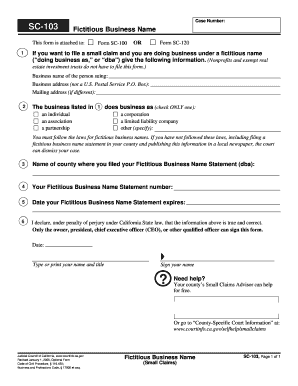
430 Business and Professions Code 17900 et seq. SC-103 Page 1 of 1 For your protection and privacy please press the Clear This Form button after you have printed the form. Small Claims Save This Form Print This Form Clear This Form. To keep other people from seeing what you entered on your form please press the Clear This Form button at the end of the form when finished. SC-103 Case Number Fictitious Business Name This form is attached to Form SC-100 OR If you want to file a small claim and you .
Open form follow the instructions
Easily sign the form with your finger
Send filled & signed form or save
How to fill out the CA SC-103 online
The CA SC-103 form is essential for individuals filing small claims under a fictitious business name in California. This guide provides a comprehensive and user-friendly approach to completing the form online, ensuring that users can navigate the process with ease.
Follow the steps to fill out the form correctly.
- Press the ‘Get Form’ button to obtain the form and open it in your preferred online editor.
- Enter your case number in the designated field. This number is usually provided on the forms related to your small claims case.
- In the section labeled 'Fictitious Business Name,' input the business name under which you are operating. This is your 'doing business as' (dba) name.
- Provide your business address in the required field, ensuring it is a physical address and not a P.O. Box. If your mailing address differs from this, fill in that information in the subsequent field.
- Specify the type of entity doing business as the fictitious name by checking only one option: individual, association, partnership, corporation, limited liability company, or other. Make sure to clearly indicate your choice.
- List the name of the county where your Fictitious Business Name Statement was filed. This is important for legal compliance.
- Fill in your Fictitious Business Name Statement number, which can be found on the statement itself.
- Input the expiration date of your Fictitious Business Name Statement. This helps clarify the validity of your business registration.
- Review the declaration statement carefully. When you are ready, type or print your name and your title. This declaration confirms that the information provided is true and accurate.
- Sign your name in the designated area to complete the form.
- Once you have reviewed the form for accuracy, you may choose to save your changes, print the form, or share it as necessary. Don't forget to press the ‘Clear This Form’ button at the end to protect your privacy.
Complete your document submission online with confidence!
Experience a faster way to fill out and sign forms on the web. Access the most extensive library of templates available.
Related content
If you want to file a small claim and you are doing business under a fictitious name...
1st Floor Science Center Building (SC-103) ; Monday - Thursday, 9:00am - 7:00pm;...
A Philips dedica-se a produzir produtos fiáveis, concebidos a pensar no bem-estar do...
Get answers to your most pressing questions about US Legal Forms API.
How do I defend myself in small claims court?
Defending yourself in small claims court requires understanding the claim against you and preparing your case. Gather relevant documents and evidence, and present your counterarguments clearly using the details from the CA SC-103 form. The US Legal Forms platform can assist in ensuring you have the necessary resources to build a solid defense.
Can you file a motion to dismiss in small claims court in California?
Yes, you can file a motion to dismiss in small claims court in California. When you believe there are valid reasons to terminate the proceedings, using the CA SC-103 form is crucial. It's essential to provide clear justifications for your motion, as this can significantly impact the outcome of your case.
How do I dismiss a Small Claims case in California?
To dismiss a Small Claims case in California, you must file a request or a motion using the appropriate form, which can include the CA SC-103. Make sure to notify the other party and the court about your intention to dismiss the case. Following the correct procedures ensures a smooth dismissal process.
How to fill out a motion to dismiss form?
To fill out a motion to dismiss form, you should clearly state the reasons for your request. This includes citing any legal grounds and providing supporting evidence where applicable. If you use the CA SC-103 form through the US Legal Forms platform, it simplifies this process, allowing you to focus on presenting your case effectively.
What is a SC 103 form?
The SC 103 form, known as the Small Claims Plaintiff's Claim and Order to Go to Small Claims Court, is vital for initiating a Small Claims case in California. It outlines your claim details and requests the court's assistance in resolving your dispute. By correctly filling out the CA SC-103, you set up your case for success in the small claims court.
What forms do I need to file a Small Claims case in California?
To file a Small Claims case in California, you generally need the CA SC-103 form, along with other essential documents like the Small Claims Plaintiff's Claim and Order to Go to Small Claims Court. It's important to complete these forms accurately, as they lay the groundwork for your case. Using the US Legal Forms platform can help streamline this process, ensuring you have the right forms in place.
How do I sue for more than $10,000 in California?
If you need to sue for more than $10,000 in California, you must file your case in civil court instead of Small Claims Court. This allows you to claim larger damages, but it also involves more complex procedures. It's advisable to consider consulting with an attorney for comprehensive legal guidance. The details of your claim will not be addressed through the CA SC-103 form but will require other legal filings.
What is the maximum amount you can sue for in civil court?
In civil court, the amount you can sue for is not capped, unlike in Small Claims Court. This means you can pursue damages that reflect the extent of your losses or legal claims. However, you should prepare thoroughly and possibly seek legal advice to navigate the complexities involved. The CA SC-103 form may not apply here, but understanding your options is essential.
What is the maximum amount you can sue for in civil court in California?
The maximum amount you can sue for in civil court varies, as there is no strict limit like there is in Small Claims Court. Generally, civil court claims can involve significant amounts, exceeding hundreds of thousands or even millions of dollars based on the nature of the case. Given these higher stakes, it's crucial to have proper legal guidance. For specific cases, reviewing the guidelines of the CA SC-103 can provide clarity.
What is the maximum amount you can sue for in California?
In California, the maximum amount you can sue for in Small Claims Court is $10,000 for individual plaintiffs. This limit encourages individuals to resolve disputes quickly and affordably. If your case involves more than $10,000, it may be necessary to consider alternatives such as civil court. Understanding the limits of the CA SC-103 form can help you navigate this process.
Use professional pre-built templates to fill in and sign documents online faster. Get access to thousands of forms.
If you believe that this page should be taken down, please follow our DMCA take down process here.