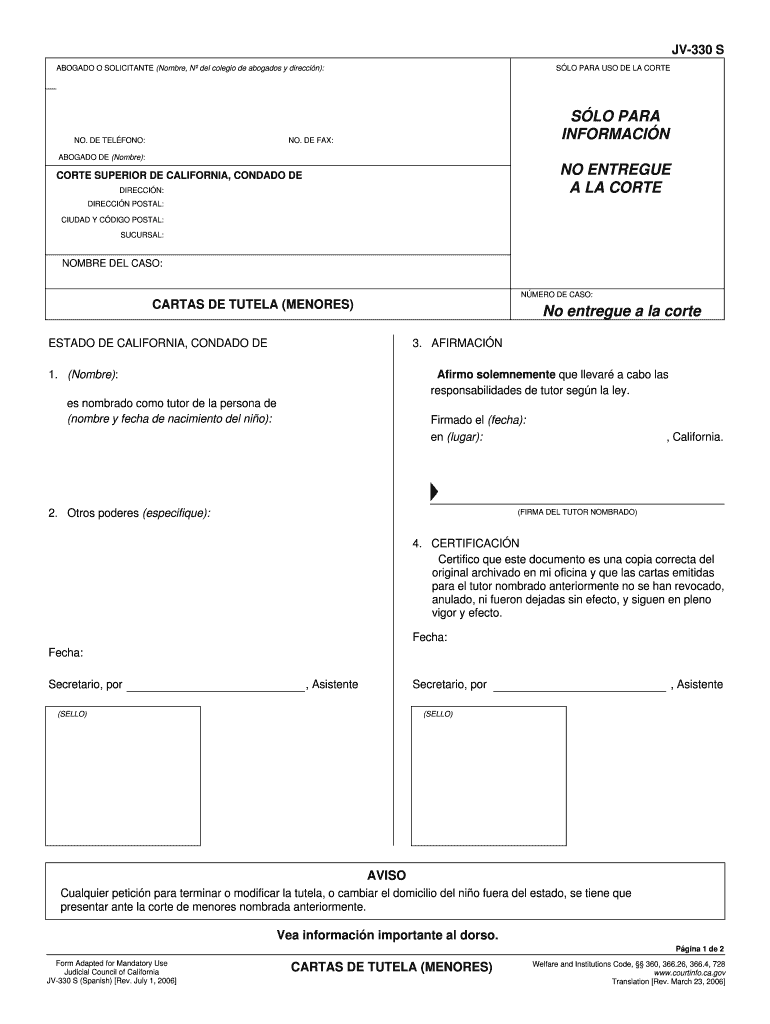
UE A LA CORTE CORTE SUPERIOR DE CALIFORNIA, CONDADO DE DIRECCI N: DIRECCI N POSTAL: CIUDAD Y C DIGO POSTAL: SUCURSAL: NOMBRE DEL CASO: N MERO DE CASO: CARTAS DE TUTELA (MENORES) No entregue a la corte ESTADO DE CALIFORNIA, CONDADO DE 3. AFIRMACI N 1. (Nombre): Afirmo solemnemente que llevar a cabo las responsabilidades de tutor seg n la ley. es nombrado como tutor de la persona de (nombre y fecha de nacimiento del ni o): Firmado el (fecha): en (lugar): 2. Otros poderes (espec.
Loading

Open form follow the instructions

Easily sign the form with your finger

Send filled & signed form or save
How to fill out the CA JV-330 S online
Filling out the CA JV-330 S form online is a crucial step for individuals appointed as guardians of minors. This guide provides clear instructions to assist you with each section of the form.
Follow the steps to complete the CA JV-330 S form effectively.
- Click ‘Get Form’ button to obtain the form and open it in the editor.
- Begin by entering your name, bar number, and address in the designated section for attorney or requester details.
- Provide your phone number and, if applicable, fax number to ensure the court can contact you if needed.
- Next, fill out the section labeled 'Superior Court of California, County of' with the appropriate court information, including address and postal details.
- Enter the case name and case number in the specified fields to connect the form to the correct legal matter.
- In the 'Affirmation' part, declare your role by entering your name and confirming your responsibility as a guardian.
- Indicate the name and date of birth of the minor for whom you are the guardian in the designated section.
- Sign and date the form where indicated, ensuring to include the location of the signing.
- In the certification area, fill in the details confirming that the document is a correct copy and specify any relevant dates.
- Finally, review the completed form for accuracy. You may then choose to save changes, download, print, or share the form as needed.
Complete your CA JV-330 S form online to ensure you have the necessary documentation for your guardianship responsibilities.
Experience a faster way to fill out and sign forms on the web. Access the most extensive library of templates available.
Related content
Sep 1, 2019 — This form, called Letters of Guardianship, is evidence of your appointment...
Os nociceptores mecânicos respondem a pressão intensa enquanto os nociceptores térmicos...
THIS LIMITED WARRANTY OF MIMAKI SHALL BE THE SOLE AND EXCLUSIVE WARRANTY AND IS IN. LIEU...
Get answers to your most pressing questions about US Legal Forms API.
How to file a California corporate disclosure statement online?
Filing a California corporate disclosure statement online requires you to use the state’s designated website. Begin by accessing the appropriate online portal and prepare the CA JV-330 S form if required. Ensure you have all required documentation ready. Platforms like US Legal Forms can provide guided support to help you complete the filing correctly and timely.
What forms do I need for guardianship in California?
When seeking guardianship in California, the key form to submit is the CA JV-330 S. You may also need to include the Petition for Appointment of Guardian and other related documents. It's essential to follow the California court's guidelines for paperwork, as inaccuracies can slow down your application. A platform like US Legal Forms can assist you in gathering and filling out the necessary forms efficiently.
What forms do I need to file for guardianship in California?
To file for guardianship in California, you will primarily need the CA JV-330 S form, alongside other necessary documents such as the Petition for Appointment of Guardian. Additional forms may include the Declaration Under Uniform Child Custody Jurisdiction and Enforcement Act (UCCJEA) and others as needed. It's beneficial to check authorized resources or consult professionals to ensure all required paperwork is complete.
How long does the guardianship process take in California?
The guardianship process in California typically takes several months, depending on the court's schedule and the complexity of your case. After filing the CA JV-330 S form, there may be waiting periods for court hearings. Factors such as contested cases or missing documentation can prolong the process. Being well-prepared can help minimize delays.
How to set up legal guardianship in case of death?
To set up legal guardianship in case of death, you need to file a guardianship petition in your local court. This process involves submitting the CA JV-330 S form, which outlines your intent and details about the child. Additionally, gathering financial documents and other supporting paperwork is crucial. Make sure to consult with a legal expert to streamline the process and ensure compliance with state laws.
How long does it take to get temporary guardianship in California?
The timeline for securing temporary guardianship in California often ranges from a few weeks to a couple of months. This duration depends on how quickly you file the required paperwork, including the CA JV-330 S, and how the court handles your case. Ensuring all forms are correctly filled out can help minimize delays. Utilizing the uslegalforms platform can also streamline your preparation and filing process.
Can I get temporary guardianship without going to court?
In general, obtaining temporary guardianship in California requires a court process, especially when using the CA JV-330 S form. While there may be informal arrangements, they lack legal weight and can lead to complications. If urgent situations arise, formal court procedures are essential to ensure the child's rights and safety are protected. Consulting a legal advisor may clarify your options.
How to get guardianship of a special needs child?
Getting guardianship of a special needs child typically follows the standard court process governed by the CA JV-330 S form. You will need to demonstrate the unique needs of the child and your capacity to meet those needs. It is crucial to have proper documentation, including medical assessments. Partnering with legal professionals can ease the process and provide the support necessary to address all aspects of guardianship.
How long does it take to get guardianship in California?
The duration for obtaining guardianship in California can vary significantly, generally taking between 3 to 6 months. The timeline depends on the complexity of your case and any disputes that arise. When using the CA JV-330 S form, proper completion and timely submission can help avoid delays. Engaging with a legal expert can also help expedite the process.
How to get temporary guardianship of a child in California?
To secure temporary guardianship in California, you must file specific forms, including the CA JV-330 S. This process involves submitting a petition to the court and demonstrating the need for immediate care. It's important to illustrate why the child's welfare is at risk. For assistance, consider using the uslegalforms platform to discover the necessary forms and guidance on this procedure.
Use professional pre-built templates to fill in and sign documents online faster. Get access to thousands of forms.
If you believe that this page should be taken down, please follow our DMCA take down process here.
This form is available in several versions. Select the version you need from the drop-down list below.