Loading
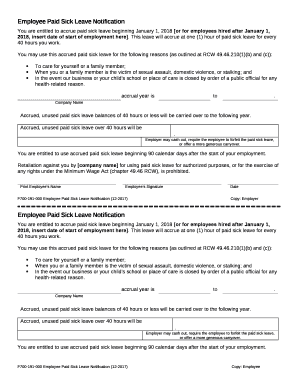
Get Wa F700-191-000 2017
How it works
-

Open form follow the instructions
-

Easily sign the form with your finger
-

Send filled & signed form or save
How to fill out the WA F700-191-000 online
Filling out the WA F700-191-000 form is an important step for employees to understand their rights regarding paid sick leave. This guide will provide you with clear and comprehensive instructions to successfully complete the form online.
Follow the steps to complete the WA F700-191-000 form online.
- Click ‘Get Form’ button to obtain the form and open it in the editor.
- Enter the starting date of employment in the designated area for employees hired after January 1, 2018. This helps establish the accrual timeline for your paid sick leave.
- Specify the accrual year by filling out the start and end dates for your paid sick leave accrual. This information is essential for tracking leave benefits.
- Complete the section that outlines reasons for using the accrued paid sick leave, ensuring to mention care for self or family members, protections against violence, and closures due to health orders.
- Indicate the company name in the designated field to ensure proper identification of your employment.
- Review the section regarding the carryover of accrued, unused paid sick leave. Fill out the policy details based on your employer's terms.
- Sign the form with your name in the designated area to acknowledge your understanding of the rights provided under this notification.
- Include the date of signature to finalize the document.
Complete your documents online to ensure timely and accurate processing of your paid sick leave benefits.
Get form
Experience a faster way to fill out and sign forms on the web. Access the most extensive library of templates available.
Get This Form Now!
Use professional pre-built templates to fill in and sign documents online faster. Get access to thousands of forms.