Get Ca Jv-281 2014-2026
How it works
-

Open form follow the instructions
-

Easily sign the form with your finger
-

Send filled & signed form or save
How to fill out the CA JV-281 online
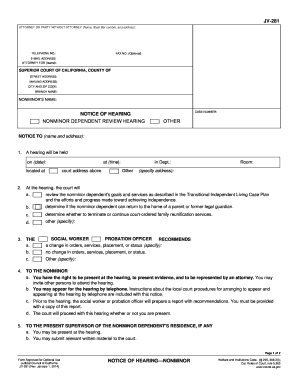
The CA JV-281 form is essential for notifying parties involved in nonminor dependent review hearings. This guide provides step-by-step instructions on how to accurately complete the form online, ensuring that all necessary information is included for your hearing.
Follow the steps to fill out the CA JV-281 form correctly
- Click the ‘Get Form’ button to access the CA JV-281 form. This will open the document for you to begin entering the required information.
- In the first section, provide the name, State Bar number, and address of the attorney or party without attorney. If applicable, include the telephone number, fax number (optional), and email address for further communication.
- Input the nonminor's name and the associated case number in the designated fields. This information is vital for referencing the correct case.
- In the next areas, detail any recommendations from the probation officer or social worker regarding changes in orders, services, or other status. This should be completed based on the specifics surrounding the case.
- At the end of the document, include the date and your signature. If applicable, type or print your name as required.
Complete your documents online today to ensure you are fully prepared for your hearing.
To file a California corporate disclosure statement, you need to complete the correct forms, making sure to include any relevant details about your corporation. Submit your forms to the California Secretary of State along with applicable fees. In some cases, the CA JV-281 form is part of this process, so be sure to check the requirements. Using US Legal Forms can simplify obtaining the necessary paperwork for your filing.