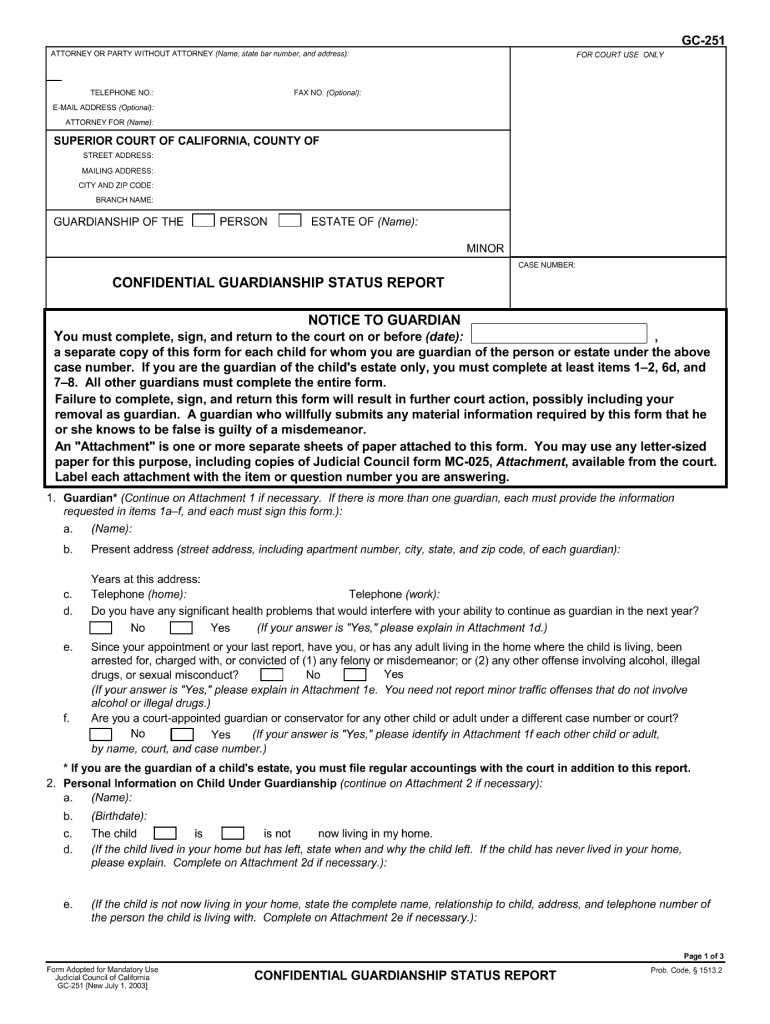
GC-251 ATTORNEY OR PARTY WITHOUT ATTORNEY (Name, state bar number, and address): FOR COURT USE ONLY TELEPHONE NO.: E-MAIL ADDRESS (Optional): ATTORNEY FOR (Name): FAX NO. (Optional): SUPERIOR COURT.
Loading

Open form follow the instructions

Easily sign the form with your finger

Send filled & signed form or save
How to fill out the CA GC-251 online
Filling out the CA GC-251 form online can seem challenging, but with the right guidance, it becomes a straightforward process. This guide provides step-by-step instructions to help users accurately complete the form with confidence.
Follow the steps to successfully complete the CA GC-251 online.
- Click the ‘Get Form’ button to access the CA GC-251 form and open it in your preferred editing tool.
- Begin by entering your full name in the designated field. Ensure that the name provided matches your official documents for consistency.
- Fill in your contact information, including your address, phone number, and email address. This information is essential for follow-up communications.
- Complete the section that asks for specific case details. Provide accurate descriptions or explanations as required, keeping in mind to stay concise and clear.
- Review any additional requirements specified in the form. This may include attaching supplementary documents or providing witness information.
- Once you have filled in all sections, take a moment to review your input for accuracy. Make any necessary edits to ensure clarity.
- After finalizing your entries, choose to save your changes, download the form, print it out, or share it as needed, ensuring that you keep a copy for your records.
Complete your forms online with ease and accuracy today!
Experience a faster way to fill out and sign forms on the web. Access the most extensive library of templates available.
Related content
Give the court specific information about the guardianship. This information is...
Course Outlines ; GC 250 - Print Administration ; GC 251 - Web Design ; GC 252 - Motion...
Jan 15, 2009 — MEMORANDUM FOR DEPUTY ASSISTANT SECRETARY OF THE ARMY. (ENVIRONMENT...
Get answers to your most pressing questions about US Legal Forms API.
What are the two types of guardianship in California?
In California, there are two primary types of guardianship: guardianship of the person and guardianship of the estate. Guardianship of the person focuses on caring for the child's physical and emotional well-being, while guardianship of the estate involves managing the child's financial matters. Understanding these distinctions will help you determine which type suits your situation. US Legal Forms can assist you with the necessary paperwork for either type.
How to fill out form GC 251?
To fill out the GC 251 form, begin by entering your information as the petitioner along with details about the minor. Clearly outline your reasons for requesting guardianship, including any specific needs the child may have. Make sure to follow the guidelines provided for each section to avoid delays in processing your petition. US Legal Forms can provide you with user-friendly templates that make completing this form much easier.
How to fill out GC 210 CA?
Filling out the GC 210 CA form involves providing crucial information about the proposed guardian and the child involved. Start by clearly stating your relationship to the minor and supplying their details accurately. Additionally, include your reasons for seeking guardianship to strengthen your petition. US Legal Forms offers helpful resources and templates to assist you in filling out this important document correctly.
How hard is it to terminate guardianship in California?
Terminating guardianship in California can be a complex process, but it is manageable with the right information. You will need to file a petition using the CA GC-251 form, as well as demonstrate to the court that terminating guardianship is in the best interest of the child or ward. While the process involves legal protocols, having the right guidance can simplify your journey. Consider using resources from US Legal Forms to better navigate this procedure.
What forms do I need for guardianship in California?
To establish guardianship in California, you need several essential forms. Primarily, you will need the CA GC-251 form, which serves as the petition to appoint a guardian. Additionally, other forms such as CA GC-210 and CA GC-255 might be required depending on your specific circumstances. Using US Legal Forms can streamline this process by providing clear instructions and the necessary documents.
How long does it take to get temporary guardianship in California?
The timeframe to acquire temporary guardianship in California can vary but is generally faster than permanent guardianship. After submitting CA GC-251, you can expect a preliminary court hearing within a few weeks. If approved, the temporary guardianship can be established relatively quickly, allowing you to provide immediate care for the child during the necessary time frame.
Can I get temporary guardianship without going to court?
In California, temporary guardianship usually requires court involvement for it to be recognized legally. Although some situations may permit informal guardianship arrangements, filing CA GC-251 is essential for official approval and protection. Without a court order, your authority to act on behalf of the child may be limited and subject to scrutiny.
How fast can you get a guardianship?
Obtaining guardianship in California typically requires careful preparation and patience. While CA GC-251 allows for a quicker temporary guardianship process, finalizing a permanent guardianship may take longer due to court schedules and legal requirements. Seeking legal advice can help expedite the process and ensure that all documents are accurately completed.
How long does the guardianship process take in California?
The guardianship process in California can vary in length, but it generally takes several months to complete. After you file the necessary documents, including CA GC-251, the court schedules a hearing, which can take weeks to months, depending on the court's calendar. By understanding the timeline, you can better prepare and manage expectations throughout the process.
How does temporary guardianship work in California?
In California, temporary guardianship allows a responsible adult to care for a minor for a limited time. The process typically involves filing a form known as CA GC-251 with the court to seek approval. This form outlines your request and the reasons it is necessary. Once the court approves your application, you gain the authority to make decisions for the child during the specified period.
Use professional pre-built templates to fill in and sign documents online faster. Get access to thousands of forms.
If you believe that this page should be taken down, please follow our DMCA take down process here.