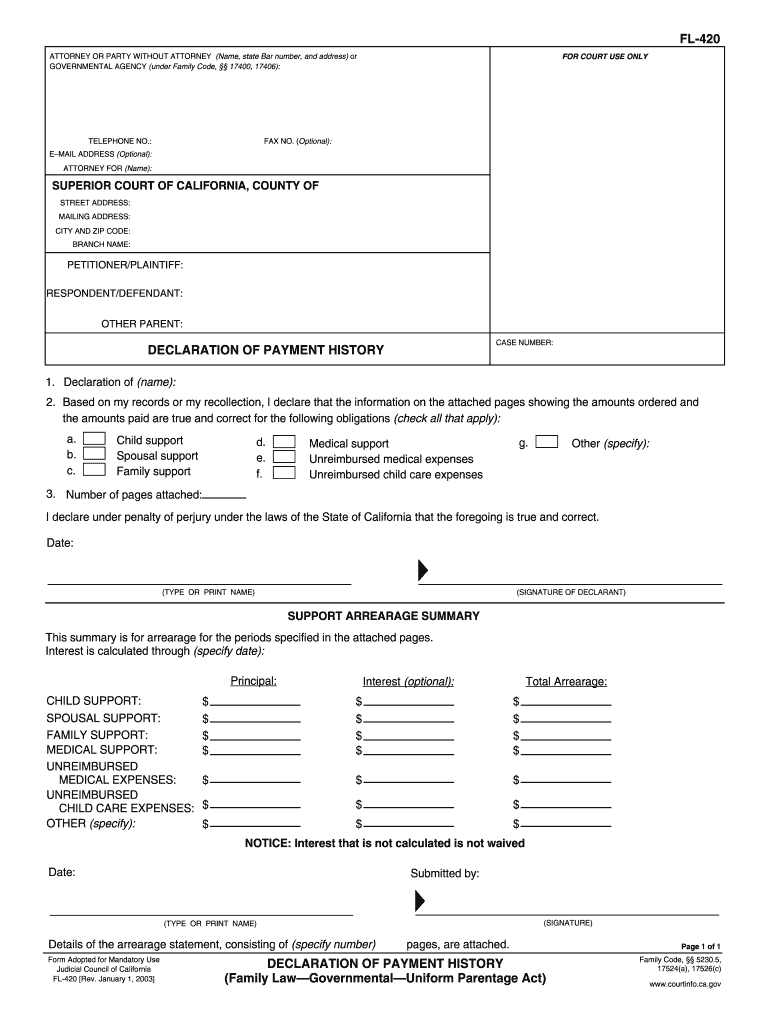
FL-420 ATTORNEY OR PARTY WITHOUT ATTORNEY Name state Bar number and address or GOVERNMENTAL AGENCY under Family Code 17400 17406 TELEPHONE NO. Interest is calculated through specify date Principal CHILD SUPPORT SPOUSAL SUPPORT FAMILY SUPPORT MEDICAL SUPPORT UNREIMBURSED MEDICAL EXPENSES CHILD CARE EXPENSES OTHER specify Interest optional Total Arrearage NOTICE Interest that is not calculated is not waived Submitted by SIGNATURE Details of the arrearage statement consisting of specify number Form.
Loading

Open form follow the instructions

Easily sign the form with your finger

Send filled & signed form or save
How to fill out the CA FL-420 online
The CA FL-420 form is essential for individuals involved in family law cases, specifically regarding the declaration of payment history and support arrearages. This guide will provide you with clear, step-by-step instructions on filling out the form online, ensuring that you understand each component and its significance.
Follow the steps to effectively complete the CA FL-420 form online.
- Use the 'Get Form' button to access the CA FL-420 form and open it in your editing tool.
- Begin by entering the name, state bar number, and address of the attorney or party without attorney. If you represent a governmental agency, include that information as required.
- Fill in the contact details, including telephone number, fax number (optional), and email address (optional). Specify the attorney's name if applicable.
- Indicate the Superior Court of California's details, including the county, street address, mailing address, city, zip code, and the branch name.
- Identify the parties involved by filling in the petitioner/plaintiff, respondent/defendant, and other parent details, along with the case number.
- In the Declaration of Payment History section, state your name as the declarant and ensure the subsequent information regarding payments and obligations is accurately reported.
- Check all applicable obligations related to the payments, including child support, spousal support, medical support, and other relevant categories.
- Include the number of pages attached that provide additional details about the payment history.
- Sign and date the declaration under penalty of perjury, ensuring your printed name accompanies your signature.
- Proceed to the Support Arrearage Summary section, where you summarize any arrearage for specified periods and calculate total amounts, including principal and optional interest.
- Ensure all relevant fields are filled in, and total all amounts, providing a clear final summary of the arrearage.
- Review the completed form for accuracy, then save changes, download, print, or share as needed.
Start filling out your CA FL-420 form online today to ensure your legal documents are complete and accurate.
Experience a faster way to fill out and sign forms on the web. Access the most extensive library of templates available.
Related content
Number of pages attached: CHILD SUPPORT: I declare under penalty of perjury under the laws...
Aug 8, 2024 — Ice Cream Cake by Four20 Pharma, a gamma-irradiated medical cannabis...
Get answers to your most pressing questions about US Legal Forms API.
How do I write a parent declaration?
When writing a parent declaration, focus on relevant aspects of your parenting experience and the welfare of your child. Organize your thoughts clearly, ensuring that each point supports your objectives within the context of CA FL-420. Use straightforward language and stick to factual information that reflects your role as a parent. A well-structured declaration can make a significant impact in family court proceedings.
How to write a declaration in California family law?
To write a declaration in California family law, ensure you gather all relevant facts and details regarding your case. Follow CA FL-420 guidelines for structure and clarity, presenting your information in a logical manner. Be honest and objective in your writing, focusing on how your experiences relate to the legal issues at hand. Always review your declaration for errors before submission.
What is FL 300 form in California?
The FL 300 form in California is used to request orders for various family law issues, such as custody or support modifications. This form plays a critical role in cases where changes to existing court orders are necessary. When paired with the CA FL-420 declaration, it helps present a comprehensive view of the situation to the court. Always ensure you fill out this form accurately to avoid delays.
How do I write a declaration in California family law?
Writing a declaration in California family law involves clearly stating your facts and experiences related to your case. Follow the structure outlined in CA FL-420, ensuring your declaration is concise and focused. Include specific details that support your claims, and look for clarity and authenticity in your language. Lastly, proofread your declaration before submission.
How to file a motion of contempt in California?
To file a motion of contempt in California, begin by preparing the necessary forms, including the CA FL-420 declaration as supporting documentation. Clearly explain how the other party has violated a court order. File these documents with the court and serve them to the other party, adhering to required timelines. It's wise to consult with legal experts for guidance through this process.
How do I write a family declaration letter?
When writing a family declaration letter, begin with an introduction stating your relationship to the case. Clearly outline the facts you want to present, supporting them with relevant information and details. Make sure to format it properly according to the CA FL-420 guidelines. Always end with your signature to authenticate your letter.
What is a supplemental declaration form in family law?
A supplemental declaration form is an additional document that elaborates on information provided in an initial declaration. This can be important for ensuring that the court has all the relevant facts before making a ruling. In the context of CA FL-420, this form can help clarify points or add new developments that may affect the case. It's essential to keep your supplemental declaration organized and truthful.
How to write a good declaration statement?
To write a good declaration statement, start with a clear introduction that states your purpose. Use concise, straightforward language to present your thoughts or experiences. Organize your statements logically, ensuring that they support your position within the context of CA FL-420. Finally, review and edit your declaration for clarity and grammar.
How do I get a copy of a court order in California?
To obtain a copy of a court order in California, you can visit the clerk's office at the courthouse where your case was heard. Alternatively, many courts offer online services where you can request and receive copies of orders, including those related to the CA FL-420. Ensure you have your case number or the details of the order to facilitate the process.
How to serve a request for order in California?
To serve a request for order in California, you must deliver copies of your request and notice of hearing to the other party. You can do this personally or through a process server, depending on the situation. Remember, completing the CA FL-420 properly will ensure that your service meets California law requirements.
Use professional pre-built templates to fill in and sign documents online faster. Get access to thousands of forms.
If you believe that this page should be taken down, please follow our DMCA take down process here.