Loading
Get Ca Arrest Warrant
How it works
-

Open form follow the instructions
-

Easily sign the form with your finger
-

Send filled & signed form or save
How to fill out the CA Arrest Warrant online
Completing a California arrest warrant online can seem daunting, but this guide aims to simplify the process for users of all experience levels. By following the outlined steps, you can efficiently fill out the necessary information for this legal document.
Follow the steps to complete your CA Arrest Warrant online
- Click ‘Get Form’ button to obtain the CA Arrest Warrant and open it for editing.
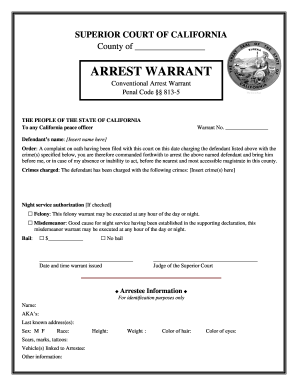
- In the section labeled 'Warrant No.', enter the number assigned to the warrant. If unsure, consult with the relevant court authority for the correct number.
- Insert the defendant’s name in the designated field. Ensure the name is accurate to avoid any legal complications.
- Identify and list the crimes charged against the defendant in the 'Crimes charged' section, ensuring to specify each crime clearly.
- If applicable, indicate night service authorization. Check 'Felony' or 'Misdemeanor' based on the nature of the offense and confirm the justification for night service.
- Specify the bail amount in the given section; select 'No bail' if that applies.
- Fill in the 'Date and time warrant issued' section with the correct information to ensure proper documentation.
- The judge’s signature will need to be included to validate the warrant once all information is completed.
- Complete the 'Arrestee Information' section, providing accurate details for identification purposes, including name, known aliases, last known address, sex, race, physical description, and vehicle information.
- Review all entered information carefully for accuracy before finalizing the document.
- Once satisfied with the completed form, save changes, download, print, or share the form as needed.
Complete and file your CA Arrest Warrant online today for a smooth processing experience.
Yes, you can look up if you have a CA Arrest Warrant in California through the California Department of Justice’s website or local law enforcement agencies. Many counties also provide online databases for public access. Utilizing platforms like USLegalForms can streamline this search and provide additional guidance on handling any warrants you may find.