Get Az Drdc31f 2013
How it works
-

Open form follow the instructions
-

Easily sign the form with your finger
-

Send filled & signed form or save
How to fill out the AZ DRDC31f online
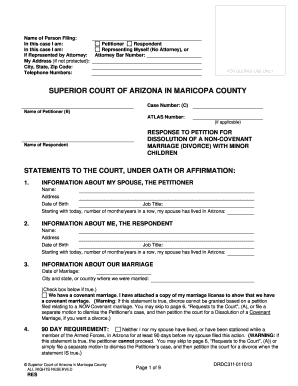
Filling out the AZ DRDC31f form is a crucial step in the process of responding to a petition for dissolution of a non-covenant marriage with minor children in Arizona. This guide provides clear and detailed instructions to help you complete the online form efficiently and accurately.
Follow the steps to successfully complete the AZ DRDC31f online.
- Click ‘Get Form’ button to obtain the form and open it in the editor.
- Complete the 'Information About My Spouse, the Petitioner' section with their name, address, date of birth, and job title.
- Respond to the 90-day residency requirement by selecting the appropriate option regarding residency in Arizona prior to filing.
- Indicate whether your spouse is currently pregnant and fill out the relevant information.
- Request spousal maintenance if applicable, providing reasons if necessary.
- After completing the form, ensure all necessary sections are filled. Save your changes, download, print, or share the completed form as needed.
Complete and file the AZ DRDC31f form online today to proceed with your case.
Get form
Writing a response to a petition involves clearly addressing each point made in the petition. Use clear and straightforward language to express your stance and any counterclaims. Referencing the AZ DRDC31f guidelines while drafting your response is essential to ensure compliance with legal standards. If you need additional help, consider using resources from uslegalforms to aid in drafting a comprehensive response.