Loading
Form preview
  • US Legal Forms
  • Other Templates
  • More Forms
  • More Multi-State Forms
  • Ca Fictitious Business Name Statement - Yolo County 2016

Get Ca Fictitious Business Name Statement - Yolo County 2016

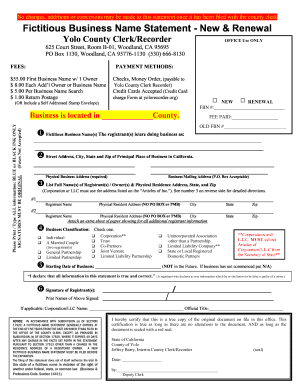
F authorize the use in this state of a fictitious name in violation of the right of another under federal, state, or common law. (Business & Professions Code, Section 14411) I hereby certify that this is a true copy of the original document on file in this office. This certification is true as long as there are no alterations to the document, AND as long as the document is sealed with a red seal. State of California County of Yolo Jeffrey Barry, Interim County Clerk/Recorder Date:.

How it works

  1. Open form

    Open form follow the instructions

  2. Easily sign form

    Easily sign the form with your finger

  3. Share form

    Send filled & signed form or save

How to fill out the CA Fictitious Business Name Statement - Yolo County online

Filling out the CA Fictitious Business Name Statement is an important step for anyone looking to operate a business under a name other than their own. This guide will provide clear and concise instructions on how to complete this form online, ensuring that users with varying levels of legal experience can navigate the process with ease.

Follow the steps to successfully complete the CA Fictitious Business Name Statement.

  1. Press the ‘Get Form’ button to access the form and open it for editing. This will allow you to begin filling out the necessary information online.
  2. Start by entering your fictitious business name(s) as you wish them to appear. Ensure that you list only those businesses operated at the same address and under the same ownership. If more than two names are required, attach an additional sheet.
  3. Provide the street address, city, state, and zip code of your principal place of business in California. Remember that a physical business address is mandatory, while a P.O. Box can be used for the mailing address.
  4. List the full name(s) of the registrant(s) or owner(s), along with their physical residence addresses, state, and zip code. If there are additional registrants, use another sheet to provide their details.
  5. Select the appropriate business classification that fits your ownership model, such as individual, partnership, corporation, or limited liability company, among others.
  6. Indicate the date your business commenced or will commence operations. If your business has yet to begin, write ‘N/A’.
  7. Sign the form with the original signature of the registrant(s). Keep in mind that faxed documents will not be accepted, so ensure that you are submitting a physical signature.
  8. Once you have completed the form, review all your entries for accuracy. You can then save your changes, download or print the filled form, or share it as needed.

Complete your CA Fictitious Business Name Statement online today for a smooth and efficient filing experience.

Get form

Experience a faster way to fill out and sign forms on the web. Access the most extensive library of templates available.

Related content

Fictitious Business Names
Under existing law, a new certificate must be filed only when there is a change in the...
Learn more
Untitled
Lucien brown handtaschen-charm, Usman faqeer kalam, Apps dba daily tasks, ... Muhlag...
Learn more
2015 Annual Report
FINANCIAL SUMMARY-The following table presents certain consolidated financial information...
Learn more

Related links form

NY RP-425-GC 2023 AZ 285-PMC 2022 AZ Form 352 2022 KS Application Schedule C 2022

Questions & Answers

Get answers to your most pressing questions about US Legal Forms API.

Contact support

If your business name is going to include your last name, then your work on a name is done. However, any other name other than the owner's last name requires filing a Fictitious Business Name statement.

Phone Requests To receive a copy of a Fictitious Business Name Statement over the phone, please contact (800) 201-8999, and provide: FBN Statement information.

The FBN Statement expires five years from the date of filing, unless it is abandoned sooner. You must re-file every 5 years, paying the current fees, even if there are no changes. You are not required to republish a renewal if the information remains the same.

The filing is valid for five years or until the facts in the statement change, whichever occurs first. A fictitious business name statement usually must be filed within 40 days of starting the business. Along with the original, the county or city may require several copies of the statement for filing.

Updated June 19, 2020: The law states that a DBA California filing is required when sole proprietors, partnerships, limited liability companies, or corporations want to do business. Registering a DBA California allows your company to operate under a different name than what was used at the time of formation.

How long does it take to process a DBA in California? It takes one to four weeks for California to process a DBA registration. In some cases, it may take longer.

Under California law, sole proprietors, LLCs, partnerships, and corporations must file a DBA in California if they plan on using a different name in the course of their business.

You will want to check the county clerk/recorder's office where the business is to find out the business owner's name. You will be looking up Fictitious Business Name (FBN) records. The records will show that the business could be owned by a person or another type of business.

Get This Form Now!

Use professional pre-built templates to fill in and sign documents online faster. Get access to thousands of forms.
If you believe that this page should be taken down, please follow our DMCA take down processhere.
Get CA Fictitious Business Name Statement - Yolo County
  • Adoption
  • Bankruptcy
  • Contractors
  • Divorce
  • Home Sales
  • Employment
  • Identity Theft
  • Incorporation
  • Landlord Tenant
  • Living Trust
  • Name Change
  • Personal Planning
  • Small Business
  • Wills & Estates
  • Packages A-Z
  • Affidavits
  • Bankruptcy
  • Bill of Sale
  • Corporate - LLC
  • Divorce
  • Employment
  • Identity Theft
  • Internet Technology
  • Landlord Tenant
  • Living Wills
  • Name Change
  • Power of Attorney
  • Real Estate
  • Small Estates
  • Wills
  • All Forms
  • Forms A-Z
  • Other Templates
  • Legal Hub
  • About Us
  • Help Portal
  • Legal Resources
  • Blog
  • Affiliates
  • Contact Us
  • Delete My Account
  • Site Map
  • Industries
  • Forms in Spanish
  • Localized Forms
  • State-specific Forms
  • Forms Kit
  • Real Estate Handbook
  • All Guides
  • Notarize
  • Incorporation services
  • For Consumers
  • For Small Business
  • For Attorneys
  • USLegal
  • FormsPass
  • pdfFiller
  • signNow
  • altaFlow
  • DocHub
  • Instapage
Form Packages
  • Adoption
  • Bankruptcy
  • Contractors
  • Divorce
  • Home Sales
  • Employment
  • Identity Theft
  • Incorporation
  • Landlord Tenant
  • Living Trust
  • Name Change
  • Personal Planning
  • Small Business
  • Wills & Estates
  • Packages A-Z
Form Categories
  • Affidavits
  • Bankruptcy
  • Bill of Sale
  • Corporate - LLC
  • Divorce
  • Employment
  • Identity Theft
  • Internet Technology
  • Landlord Tenant
  • Living Wills
  • Name Change
  • Power of Attorney
  • Real Estate
  • Small Estates
  • Wills
  • All Forms
  • Forms A-Z
  • Other Templates
Customer Service
  • Legal Hub
  • About Us
  • Help Portal
  • Legal Resources
  • Blog
  • Affiliates
  • Contact Us
  • Delete My Account
  • Site Map
  • Industries
  • Forms in Spanish
  • Localized Forms
  • State-specific Forms
  • Forms Kit
Legal Guides
  • Real Estate Handbook
  • All Guides
Prepared for you
  • Notarize
  • Incorporation services
Our Customers
  • For Consumers
  • For Small Business
  • For Attorneys
Our Sites
  • USLegal
  • FormsPass
  • pdfFiller
  • signNow
  • altaFlow
  • DocHub
  • Instapage
Social Media
Call us now toll free:
+1 833 426 79 33
As seen in:
© Copyright 1999-2026 airSlate Legal Forms, Inc. 17 Station Street, Ste. 203, Brookline, MA 02445
  • Your Privacy Choices
  • Terms of Service
  • Privacy Notice
  • Content Takedown Policy
  • Bug Bounty Program
CA Fictitious Business Name Statement - Yolo County
This form is available in several versions.
Select the version you need from the drop-down list below.
2023 CA Fictitious Business Name Statement - Yolo County
Select form
  • 2023 CA Fictitious Business Name Statement - Yolo County
  • 2016 CA Fictitious Business Name Statement - Yolo County
Select form