H Certificate (A.R.S. 36-333.03) Employment Dispute Discrimination* Employment Dispute Other* Verified Rule 45.2 Petition Other (Specify)* OTHER CIVIL CASE TYPES: Eminent Domain/Condemnation* Eviction Actions (Forcible and Special Detainers)* Change of Name Transcript of Judgment Foreign Judgment Quiet Title* Forfeiture* Election Challenge NCC Employer Sanction Action (A.R.S. 23-212) Injunction against Workplace Harassment Injunction against Harassmen.
Loading

Open form follow the instructions

Easily sign the form with your finger

Send filled & signed form or save
How to fill out the AZ CV10f online
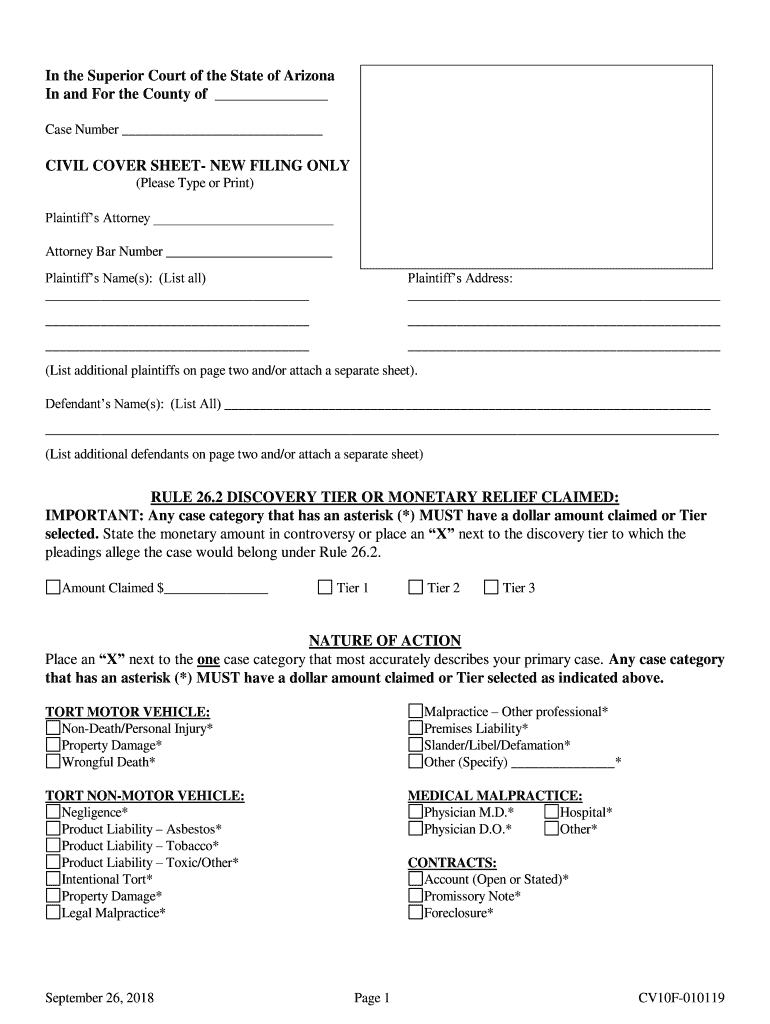
The AZ CV10f form is essential for initiating a civil case in the Superior Court of Arizona. This guide will provide clear and straightforward instructions to help users complete this form accurately and efficiently online.
Follow the steps to fill out the AZ CV10f form correctly.
- Click ‘Get Form’ button to access the AZ CV10f form and open it in your online editor.
- Begin by entering the county name where the case is being filed in the designated space. Be sure to fill in the case number provided by the court if available.
- In the Plaintiff’s Attorney section, type the name of the attorney representing the plaintiff along with their bar number. This information is crucial and must be correct.
- List the names of all plaintiffs in the 'Plaintiff’s Name(s)' section. If there are additional plaintiffs, indicate them on page two or attach a separate sheet.
- Provide the complete address for the plaintiff(s) in the designated address fields. Ensure all information, such as street address, city, state, and zip code, is accurate.
- In the 'Defendant’s Name(s)' section, list all defendants in the same manner as for the plaintiffs. If there are multiple defendants, continue them on page two or attach an additional sheet.
- For the discovery tier or monetary relief claimed, indicate the dollar amount being claimed in the ‘Amount Claimed’ space. Additionally, select the appropriate discovery tier by placing an 'X' next to Tier 1, Tier 2, or Tier 3.
- In the 'Nature of Action' section, place an 'X' next to the category that best describes the case. Note that categories with an asterisk require you to also state the monetary amount claimed or select a discovery tier.
- Review all entries for accuracy. Make any necessary edits to ensure all provided information is correct and complete.
- Once the form is filled out, save your changes. You can download, print, or share the filled AZ CV10f form as needed.
Complete your AZ CV10f form online today to ensure accurate and timely submission.
Experience a faster way to fill out and sign forms on the web. Access the most extensive library of templates available.
Related content
CV10F. Civil Complaint, CVC10F. Summons, CV11F. Certificate of Compulsory Arbitration...
Get answers to your most pressing questions about US Legal Forms API.
How to start a civil lawsuit in Arizona?
To start a civil lawsuit in Arizona, you must first determine the proper court where your case will be filed. Complete the AZ CV10f form, ensuring all information is accurate and detailed. Using guides from US Legal Forms can help you confidently navigate the initial steps and ensure a smooth filing process.
How to file a civil rights lawsuit in Arizona?
Filing a civil rights lawsuit in Arizona involves several critical steps, starting with collecting evidence of your claim. You will need to complete the necessary forms, including the AZ CV10f. Utilizing resources from US Legal Forms can simplify the process, ensuring you don’t miss essential requirements.
How long do I have to file a civil suit in AZ?
The period to file a civil suit in Arizona depends on the nature of your case. For most civil suits, you have one to three years from the date of the incident to file. Understanding these timelines is crucial, and platforms such as US Legal Forms can help you keep track of your filing deadlines.
How long do you have to file a lawsuit in Arizona?
In Arizona, the timeframe to file a lawsuit generally varies based on the type of claim you have. Typically, you may have one to three years to file, depending on whether it's a personal injury or contract dispute. To ensure you stay within these limits, it's wise to consult resources like US Legal Forms that clarify these deadlines.
How do I file a civil lawsuit without a lawyer in Arizona?
In Arizona, you can file a civil lawsuit without a lawyer by first acquiring the AZ CV10f form from your local court or online. Once you've completed the form, submit it to the court along with any required fees. US Legal Forms offers a user-friendly platform that provides detailed instructions to help you navigate the process.
How to file a civil lawsuit on your own?
To file a civil lawsuit on your own, start by gathering all relevant documentation related to your case. Make sure to fill out the AZ CV10f form correctly, as this is crucial for your claim. Consider using resources available on US Legal Forms to ensure you meet all legal requirements and understand the processes involved.
How to file a civil lawsuit without a lawyer?
Filing a civil lawsuit without a lawyer is possible by following a few straightforward steps. You can begin by researching the specifics of your case, including necessary forms and procedures at your local courthouse. The AZ CV10f form is often required, and you can find guides on platforms like US Legal Forms that simplify the filing process.
How do you write a response to a petition?
Writing a response to a petition involves careful reading of the petition and addressing each point clearly and concisely. You should format your response following the guidelines provided for forms such as the AZ CV10f. It's also vital to include your perspective and any objections. For assistance, check out uslegalforms, which offers templates and instructions for drafting your response effectively.
What happens if one party doesn't want a divorce?
If one party doesn’t want a divorce, the other party can still proceed with the divorce process. The court will not force one spouse to stay married, but they will inform both parties about their rights and options. It’s beneficial to consult with an expert or utilize resources like uslegalforms for clarity on the process and how to properly complete required forms like the AZ CV10f.
What to do if your spouse ignores the divorce petition?
If your spouse ignores the divorce petition, you can move forward by requesting a default judgment in court. Make sure to follow proper procedures, including documenting your attempts to notify your spouse. It’s essential to stay informed about your legal rights, and platforms like uslegalforms can provide the helpful tools and forms you need to navigate this process effectively.
Use professional pre-built templates to fill in and sign documents online faster. Get access to thousands of forms.
If you believe that this page should be taken down, please follow our DMCA take down process here.