Loading
Get Fl Iatse Local 835 Eac Email Labor Request 2023-2026
How it works
-

Open form follow the instructions
-

Easily sign the form with your finger
-

Send filled & signed form or save
How to fill out the FL IATSE Local 835 EAC Email Labor Request online
Filling out the FL IATSE Local 835 EAC Email Labor Request form online is essential for ensuring that your labor needs are met efficiently. This guide offers clear, step-by-step instructions to help you complete the form accurately and promptly.
Follow the steps to successfully complete your labor request.
- Click ‘Get Form’ button to access the labor request form and open it in an editable environment.
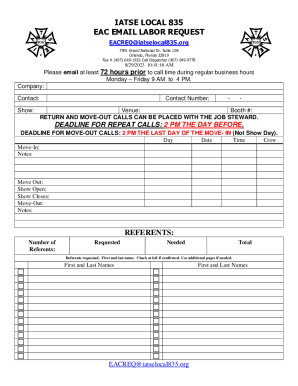
- In the 'Company' field, enter the name of your organization responsible for the labor request. This helps the EAC identify your application.
- Fill in the 'Contact' information with the primary person's name who will be coordinating this request. This ensures clear communication.
- Provide the 'Contact Number' for the individual identified above. This number should be accessible during regular business hours.
- Indicate the 'Venue' where the labor is needed. Accurate venue details facilitate efficient planning and resource allocation.
- Specify the 'Booth #' if applicable, as this may be necessary for certain events or locations.
- Log the 'Day', 'Date', and 'Time' of the labor request under the corresponding sections. Make sure to fill in all details related to Move-In, Show Open, Show Closes, and Move-Out.
- In the 'Referents' section, indicate the number of referents required and provide their first and last names. Check the confirmation box if they are confirmed and include additional pages as needed.
- Once all fields are complete, review the form for accuracy. Ensure every section is filled out logically and correctly to avoid delays.
- After verification, proceed to save your changes. You may also download, print, or share the completed form as needed.
Complete your documents online efficiently and meet your labor needs effortlessly.