Loading
Get Ak Tr-565 2014-2026
How it works
-

Open form follow the instructions
-

Easily sign the form with your finger
-

Send filled & signed form or save
How to fill out the AK TR-565 online
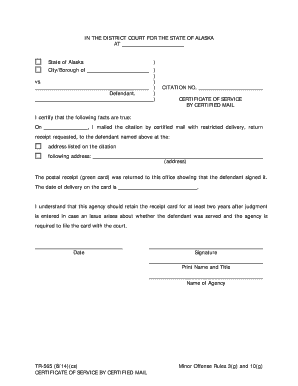
The AK TR-565 form is essential for certifying the service of a citation by certified mail. This guide provides clear, user-friendly instructions to help individuals fill out the form accurately and efficiently online.
Follow the steps to complete the AK TR-565 form online.
- Click the ‘Get Form’ button to access the form and open it in the editing interface.
- Begin by entering the citation number at the top of the form where indicated. Ensure that this number matches the citation you are servicing.
- In the section labeled ‘I certify that the following facts are true,’ fill in the date you mailed the citation. This date is critical for record-keeping purposes.
- Provide the address where the citation was mailed. Enter this information in the designated address field, ensuring accuracy to confirm proper service.
- Document the date of delivery as indicated on the return receipt (green card) once it arrives. This date serves as proof of service.
- Finally, sign and print your name and title at the bottom of the form. Include the name of the agency you represent as this adds legitimacy to the certification.
- Review all entered information for accuracy. Once verified, save your changes, download the form, or print it for submission as required.
Complete your documents online today for a seamless experience.