Loading
Form preview
  • US Legal Forms
  • Other Templates
  • Legal Forms
  • Alaska Legal Forms
  • Ak P-201 1982

Get Ak P-201 1982-2026

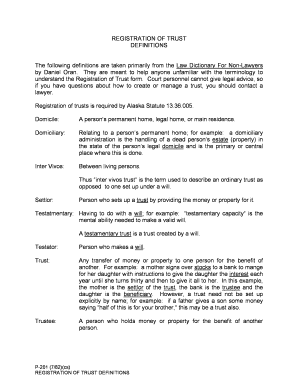
To understand the Registration of Trust form. Court personnel cannot give legal advice, so if you have questions about how to create or manage a trust, you should contact a lawyer. Registration of trusts is required by Alaska Statute 13.36.005. Domicile: A person s permanent home, legal home, or main residence. Domiciliary: Relating to a person s permanent home; for example: a domiciliary administration is the handling of a dead person s estate (property) in the state of the person s.

How it works

  1. Open form

    Open form follow the instructions

  2. Easily sign form

    Easily sign the form with your finger

  3. Share form

    Send filled & signed form or save

How to fill out the AK P-201 online

Filling out the AK P-201 form for the registration of a trust may seem complicated, but this guide will walk you through each section and field. Whether you are familiar with legal documents or new to the process, you will find clear instructions to assist you in completing the form online.

Follow the steps to successfully complete the registration of your trust.

  1. Click the ‘Get Form’ button to access the form and open it in your preferred online editor.
  2. Begin with the trust identification section. Enter the full name of the trust, ensuring it matches the documentation you have prepared. This is crucial for clarity and legal accuracy.
  3. Provide the date on which the trust was established. This date is essential for any legal references related to the trust.
  4. Next, include the details of the settlor. The settlor is the person who has provided the assets for the trust. Fill in their full name and contact information.
  5. Input the trustee's information. The trustee is responsible for managing the trust according to its terms. List their full name and address.
  6. Fill out the beneficiary section by entering the names and details of individuals or entities who will benefit from the trust. Every beneficiary must be clearly identified.
  7. Review the terms of the trust, if applicable, and summarize them in the designated area on the form. This should include any specific instructions or stipulations regarding the trust's assets.
  8. Once all fields are completed, be sure to review your information for accuracy. This step is vital to ensure the legality of the registration.
  9. Finally, you can save your changes, download a copy of the form, print it, or share it as needed.

Complete your trust registration online today and ensure your assets are managed according to your wishes.

Get form

Experience a faster way to fill out and sign forms on the web. Access the most extensive library of templates available.
Get form

Related content

Billing Code 4810-AK-P DEPARTMENT OF THE ...
This document has been submitted to the Office of the Federal Register (OFR) for...
Learn more
Flow-chart-a-k.-2022.pdf
Feb 17, 2022 — MECHANICAL ENGINEERING CURRICULUM (Option A: last Name begins with A-K)...
Learn more
Export type AK series - NamuWiki
Jul 24, 2025 — AK series guns have already been released widely in the second and third...
Learn more

Related links form

NZ Westpac JN15467 2016 UK ACRO Police Certificate Application Form 2023 UK National Urology ST3 Recruitment Audit/Quality Improvement Project Supervisor Form 2017 NY HRA Home TBRA Recertification Package 2017

Questions & Answers

Get answers to your most pressing questions about US Legal Forms API.

Contact support

The AK-203 and AK-204 differ mainly in their design specifications and intended use. The AK-204 features upgrades that target specific military requirements for firepower and precision. Meanwhile, the AK P-201 remains a versatile choice, appealing to a broad range of users seeking reliability in high-pressure scenarios.

The primary difference between the AK-203 and AK-103 lies in their features and modern enhancements. The AK-203 integrates upgrades that improve accuracy, ergonomics, and user comfort. In contrast, the AK P-201 showcases further refinements, catering specifically to current demands in military engagements, ensuring it remains relevant and effective.

The AK-101 uses 5.56x45mm NATO ammunition, which provides versatility and compatibility with NATO forces. This ammunition choice enhances its adaptability in different combat settings. On the other hand, if you're looking into the AK P-201, you'll find it employs different rounds that suit its design for enhanced performance and reliability.

The fastest firing AK model is typically the AK-74, known for its rapid rate of fire. It incorporates technological advancements that allow for quick successive shots. While the AK P-201 may not be the fastest, it offers a balanced rate of fire with accuracy, ensuring it remains effective in various combat scenarios.

The AK-203 has been undergoing extensive testing and evaluation, ensuring it meets both performance and durability standards. Production has ramped up, with expectations for the rifle to be adopted by several military forces. This evolution within the AK series highlights the significance of the AK P-201 as a cutting-edge option for modern warfare.

The AK-203 is set to replace older models of the AK series in various military applications. Specifically, it aims to modernize forces and enhance their capabilities on the battlefield. By introducing the AK P-201, military organizations can leverage improvements in technology and design, thereby boosting their operational effectiveness.

The effective range of the AK-203 rifle is approximately 400 meters, making it suitable for a variety of combat situations. Its design allows for effective targeting at this range, providing rifle users with confidence during operations. Compared to older models, the AK P-201 offers better accuracy and performance over distance, making it a strong contender in modern warfare.

The AK-203 offers several advancements over the AK-47. While both rifles have proven reliability, the AK-203 features modern materials and design improvements, enhancing performance and accuracy. Many users appreciate the ergonomic updates that make handling easier during extended use. Therefore, when comparing the two, many consider the AK P-201 a more capable choice.

Filing in forma pauperis involves several straightforward steps. Begin by gathering your financial information and completing the appropriate forms, such as the AK P-201. Once your forms are filled out, submit them to the court where your case is pending. If you need assistance, US Legal Forms offers comprehensive templates and resources to streamline your filing process.

To file in forma pauperis, begin by completing the necessary forms, which are available online, including the AK P-201. After filling out the forms, submit them to the court along with any required documentation of your financial status. The court will review your petition and inform you if your request is approved. US Legal Forms can help simplify this process by providing the necessary templates and guidance.

Get This Form Now!

Use professional pre-built templates to fill in and sign documents online faster. Get access to thousands of forms.
Get form
If you believe that this page should be taken down, please follow our DMCA take down processhere.
Get AK P-201
Get form
  • Adoption
  • Bankruptcy
  • Contractors
  • Divorce
  • Home Sales
  • Employment
  • Identity Theft
  • Incorporation
  • Landlord Tenant
  • Living Trust
  • Name Change
  • Personal Planning
  • Small Business
  • Wills & Estates
  • Packages A-Z
  • Affidavits
  • Bankruptcy
  • Bill of Sale
  • Corporate - LLC
  • Divorce
  • Employment
  • Identity Theft
  • Internet Technology
  • Landlord Tenant
  • Living Wills
  • Name Change
  • Power of Attorney
  • Real Estate
  • Small Estates
  • Wills
  • All Forms
  • Forms A-Z
  • Other Templates
  • Legal Hub
  • About Us
  • Help Portal
  • Legal Resources
  • Blog
  • Affiliates
  • Contact Us
  • Delete My Account
  • Site Map
  • Industries
  • Forms in Spanish
  • Localized Forms
  • State-specific Forms
  • Forms Kit
  • Real Estate Handbook
  • All Guides
  • Notarize
  • Incorporation services
  • For Consumers
  • For Small Business
  • For Attorneys
  • USLegal
  • FormsPass
  • pdfFiller
  • signNow
  • altaFlow
  • DocHub
  • Instapage
Form Packages
  • Adoption
  • Bankruptcy
  • Contractors
  • Divorce
  • Home Sales
  • Employment
  • Identity Theft
  • Incorporation
  • Landlord Tenant
  • Living Trust
  • Name Change
  • Personal Planning
  • Small Business
  • Wills & Estates
  • Packages A-Z
Form Categories
  • Affidavits
  • Bankruptcy
  • Bill of Sale
  • Corporate - LLC
  • Divorce
  • Employment
  • Identity Theft
  • Internet Technology
  • Landlord Tenant
  • Living Wills
  • Name Change
  • Power of Attorney
  • Real Estate
  • Small Estates
  • Wills
  • All Forms
  • Forms A-Z
  • Other Templates
Customer Service
  • Legal Hub
  • About Us
  • Help Portal
  • Legal Resources
  • Blog
  • Affiliates
  • Contact Us
  • Delete My Account
  • Site Map
  • Industries
  • Forms in Spanish
  • Localized Forms
  • State-specific Forms
  • Forms Kit
Legal Guides
  • Real Estate Handbook
  • All Guides
Prepared for you
  • Notarize
  • Incorporation services
Our Customers
  • For Consumers
  • For Small Business
  • For Attorneys
Our Sites
  • USLegal
  • FormsPass
  • pdfFiller
  • signNow
  • altaFlow
  • DocHub
  • Instapage
Social Media
Call us now toll free:
+1 833 426 79 33
As seen in:
© Copyright 1999-2026 airSlate Legal Forms, Inc. 17 Station Street, Ste. 203, Brookline, MA 02445
  • Your Privacy Choices
  • Terms of Service
  • Privacy Notice
  • Content Takedown Policy
  • Bug Bounty Program