Loading
Get Ak Mc-510 1987-2026
How it works
-

Open form follow the instructions
-

Easily sign the form with your finger
-

Send filled & signed form or save
How to fill out the AK MC-510 online
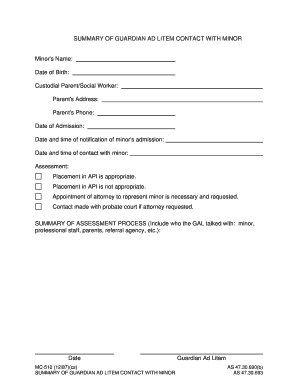
The AK MC-510 form is an essential document used for summarizing contact between a guardian ad litem and a minor. This guide provides clear, step-by-step instructions for users to fill out this form effectively and efficiently online.
Follow the steps to successfully complete the AK MC-510 form:
- Click ‘Get Form’ button to obtain the form and open it in the editor.
- Begin by entering the minor's name and date of birth in the appropriate fields. Ensure that all spelling is correct and relevant information is accurate.
- Fill in the details of the custodial parent or social worker, including their name, address, and phone number. Double-check for accuracy to ensure proper communication.
- Document the date of admission and the date and time of notification regarding the minor's admission. This information is crucial for accurate record-keeping.
- Indicate the date and time of contact made with the minor. This section validates the engagement process and should be filled with precision.
- Complete the assessment section by selecting one of the options regarding placement appropriateness. Be sure to accurately reflect the situation concerning the minor’s placement.
- If necessary, indicate whether an appointment of an attorney to represent the minor is necessary and if so, ensure that contact with the probate court is documented.
- In the summary of the assessment process, detail who the guardian ad litem spoke with during their evaluation, including minors, professional staff, parents, or referral agencies. Use the date format as specified.
- Once all fields are completed, review the form for any errors or omissions. Ensure all necessary information is included and accurate.
- Save your changes, and you may choose to download, print, or share the form as necessary for your records.
Complete your AK MC-510 form online today to ensure timely and accurate submission.
Filling out MC 031 starts with accessing the form through your jurisdiction's court website. Supply your personal information and the relevant case details in the specified sections, being mindful to check for accuracy. Once you've completed all fields, ensure you sign the form before submission to validate your request and comply with court regulations.