Loading
Get Ak Mc-410 2016-2026
How it works
-

Open form follow the instructions
-

Easily sign the form with your finger
-

Send filled & signed form or save
How to fill out the AK MC-410 online
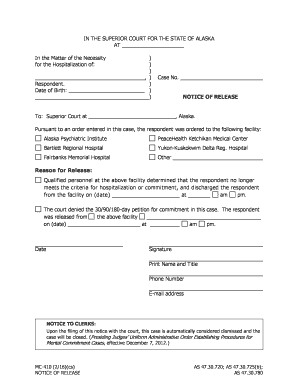
The AK MC-410 is a crucial form for documenting the release of a respondent from a hospital. Ensuring that this form is filled out correctly is essential for both legal and healthcare documentation purposes.
Follow the steps to accurately complete the online AK MC-410 form.
- Click 'Get Form' button to obtain the form and open it in the editor.
- Enter the respondent's name and date of birth in the designated fields. Ensure that all names are spelled correctly to avoid any legal issues.
- Input the case number in the appropriate section. This number is critical for court records and will help in referencing the case during any further legal processes.
- Select the facility from which the respondent is being released. Options include Alaska Psychiatric Institute, PeaceHealth Ketchikan Medical Center, and others. If 'Other' is selected, specify the facility's name.
- Clearly state the reason for the release in the provided space. This should reflect the assessment made by qualified personnel.
- Indicate the date and time of discharge from the facility. Double-check for accuracy as this information is vital for the court records.
- Provide your signature, name, title, phone number, and email address in the designated fields at the end of the form.
- After completing all sections, review the form for any errors. Once confirmed, save changes, and options to download, print, or share the document will be available.
Complete your documents online today for an efficient process.
To fill out the MC-040 form, start by entering your personal information and clearly stating the purpose of the request. It is essential to provide concise details about your conditions and the types of accommodations sought. Make sure to cross-reference with information in the AK MC-410 to ensure alignment with requirements and improve your submission.