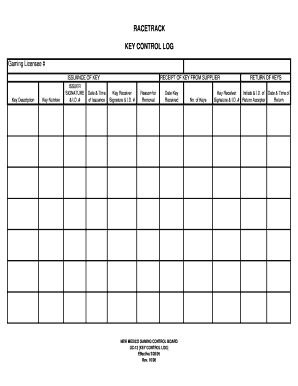
I.D. # Reason for Removal Date Key Received NEW MEXICO GAMING CONTROL BOARD GC-13 KEY CONTROL LOG Effective 2/28/05 Rev. 10/08 No. of Keys RETURN OF KEYS Key Receiver Initials & I.D. of Date & Time of Signature & I.D. # Return Acceptor Return.

How it works
  • Open form

    Open form follow the instructions

  • Easily sign form

    Easily sign the form with your finger

  • Share form

    Send filled & signed form or save

How to fill out the Key Log Template online

Filling out the Key Log Template online can streamline the process of recording key issuance and returns. This guide will walk you through each component of the template to ensure accuracy and compliance with the necessary protocols.

Follow the steps to efficiently complete the Key Log Template.

  1. Click 'Get Form' button to access the Key Log Template and open it in the online editor.
  2. Enter the gaming licensee number in the specified field. This identifies the gaming establishment responsible for the keys listed in the log.
  3. Fill in the key description. Be specific about the key type or function to ensure clear identification.
  4. Input the key number in the corresponding field. This unique identifier helps track each key’s status.
  5. In the 'Issuer' section, record the name and ID number of the person issuing the key. Their signature is also required to validate the issuance.
  6. Document the date and time of issuance in the provided fields to maintain an accurate record.
  7. For receiving keys from a supplier, enter the name of the key receiver and their signature along with their ID number.
  8. Include the reason for removal in the space provided. This is important for tracking purposes.
  9. Input the date when the key was received from the supplier.
  10. In the return section, have the key receiver initial along with their ID number, and document the date and time of return acceptance.
  11. Finally, review all entered information for accuracy before saving your changes. You can then download, print, or share the completed form as required.

Complete your documents online easily and efficiently!

Get form

Experience a faster way to fill out and sign forms on the web. Access the most extensive library of templates available.

Related content

Motor Vehicle Key Sign-Out Log

Apr 10, 2017 — MOTOR VEHICLE KEY SIGN-OUT LOG. VEHICLE NUMBER: OFFICE ROUTING SYMBOL:...

Learn more
key-tracking-form.pdf

Dec 22, 2012 — WSSU's key tracking log tracks issuances, returns, custody transfers, and...

Learn more
Template:Key top

This template renders a key top as found on typewriters and computer keyboards including a...

Learn more
Questions & Answers

Get answers to your most pressing questions about US Legal Forms API.

Contact support

What should be included in a log sheet?

Daily Log Sheets The most common use for a log sheet is for tracking daily tasks and events. In this case, the log sheets will often be in a checklist form. They can range from noting workplace attendance, temperature maintenance, site inspection results, the work to be done for the day, to the food consumed or wasted.

How to Make a Key Log Create a table and divide it into several columns and rows. ... Write a title in your document. In the table that you have created, write the information or data such as the key serial number, location of the lock, the date and time the key was issued, the name of the individual and his/her signature.

48 Templates. A log sheet is an official record of specific activities or events, used to track patterns or operations. Whether you need to monitor expenses, hours worked, visitors, or food intake, our free log sheet templates will help you keep better track of your information.

A log is a computer-generated file that captures activity within the operating system or software applications. The log file automatically documents any information designed by the system administrators, including: messages, error reports, file requests and file transfers.

Creating a Log/Log Chart Select the chart area (the actual chart or the spreadsheet area you want to chart). Click the Chart Wizard button on the toolbar. (See Figure 1.) Select the XY (scatter) type of chart. Select the sub-chart type you want to use. Click on the Finish button.

Creating a Log/Log Chart Select the chart area (the actual chart or the spreadsheet area you want to chart). Click the Chart Wizard button on the toolbar. (See Figure 1.) Select the XY (scatter) type of chart. Select the sub-chart type you want to use. Click on the Finish button.

A log, in a computing context, is the automatically produced and time-stamped documentation of events relevant to a particular system. Virtually all software applications and systems produce log files.

If you're creating a new registry value, right-click or tap-and-hold on the key it should exist within and choose New, followed by the type of value you want to create. Name the value, press Enter to confirm, and then open the newly created value and set the Value data it should have.

Get This Form Now!

Use professional pre-built templates to fill in and sign documents online faster. Get access to thousands of forms.

If you believe that this page should be taken down, please follow our DMCA take down process here.

Get Key Log Template