Loading
Form preview
  • US Legal Forms
  • Other Templates
  • More Forms
  • More Uncategorized Forms
  • Delta Dental Enrollment Change Form 3400 Ca

Get Delta Dental Enrollment Change Form 3400 Ca

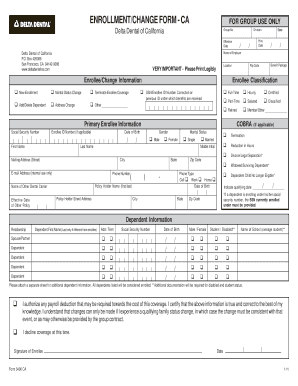
ENROLLMENT/CHANGE FORM - CA Delta Dental of California Delta Dental of California P.O. Box 429086 San Francisco, CA 94142-9086 www.deltadentalins.com FOR GROUP USE ONLY Group No. Effective Date Division.

How it works

  1. Open form

    Open form follow the instructions

  2. Easily sign form

    Easily sign the form with your finger

  3. Share form

    Send filled & signed form or save

How to fill out the Delta Dental Enrollment Change Form 3400 Ca online

Filling out the Delta Dental Enrollment Change Form 3400 Ca online is an important step for users looking to modify their dental coverage. This guide provides clear instructions on how to navigate each section of the form effectively.

Follow the steps to complete your enrollment change form online.

  1. Press the ‘Get Form’ button to access the Delta Dental Enrollment Change Form 3400 Ca and open it in your editor.
  2. Begin by entering the group number and effective date in the specified fields at the top of the form.
  3. Indicate whether you are adding or deleting a dependent by selecting the appropriate option. You may also need to specify if this change is due to marital status, address changes, or other reasons.
  4. Fill in your personal details, including your last name, email address, phone number, and state. Make sure to select the phone type from options such as cell, work, or home.
  5. Provide your birth date, as well as the policy holder's name and address. Ensure that the information is printed legibly.
  6. Complete the enrollment type by selecting whether it’s a new enrollment or a change. Include any relevant dates, such as the hire date and effective date of your other policy.
  7. In the dependent information section, list all dependents being added or removed. Include their names, relationships, social security numbers, birth dates, and specify if they are a student or disabled where applicable.
  8. Review the declaration that certifies the accuracy of the information provided. Acknowledge any payroll deductions necessary for coverage.
  9. Sign and date the form at the bottom. Ensure that all required fields are completed before submitting.
  10. After you have filled out the form, you can save changes, download it, print it, or share it as needed.

Start filling out your Delta Dental Enrollment Change Form 3400 Ca online today for seamless coverage adjustments.

Get form

Experience a faster way to fill out and sign forms on the web. Access the most extensive library of templates available.
Get form

Related content

1403 - Dental - Human Resources Manual - CalHR...
Open enrollment for dental benefits is held each fall and allows eligible employees to:...
Learn more
Delta Dental of California
ENROLLMENT/CHANGE FORM - CA. Delta Dental of California. Primary Enrollee Information...
Learn more
DEC Regulations 18 AAC 75, Oil and Other Hazardous...
by M Dunleavy — Proof of insurance may be provided by a binder, by a certificate of...
Learn more

Related links form

New Zealand As A Safe Adventure Destination Is It A Reality? Purvi ... - Aut Researchgateway Ac HOSTED VOIP ORDER FORM - Adept Telecom Shoulder Evaluation Form Student Personal Report Form - RenWeb

Questions & Answers

Get answers to your most pressing questions about US Legal Forms API.

Contact support

To change your dentist on Delta Dental USA, log into your account and navigate to the 'Dentist Selection' section. Here, you can search for available dentists in your area and select a new one. If you have questions about the process or need assistance, you can always refer to the Delta Dental Enrollment Change Form 3400 Ca for guidance and support.

Delta USA and Delta Dental are related, but they serve different purposes. Delta USA primarily focuses on providing health-related services, while Delta Dental specializes in dental coverage. If you are looking for information or need a Delta Dental Enrollment Change Form 3400 Ca, it's essential to ensure you are referring to the correct entity.

To change your Delta Dental password, visit the Delta Dental login page and select the 'Forgot Password' option. You will receive instructions via email on how to reset your password securely. This process ensures your account's safety while also allowing you to manage your Delta Dental Enrollment Change Form 3400 Ca easily.

You can contact DeltaCare USA by visiting their official website where you will find a dedicated contact section with phone numbers and email addresses. If you prefer, you can also reach out via their customer service hotline for immediate assistance. For any specific inquiries regarding the Delta Dental Enrollment Change Form 3400 Ca, make sure to ask for the enrollment department when you call.

Delta Dental in California is regulated by the California Department of Insurance, which oversees health insurance practices and ensures compliance with state laws. This regulatory body helps maintain standards and protects consumer rights. By understanding these regulations, members can feel more secure in their dental coverage. If changes are necessary, the Delta Dental Enrollment Change Form 3400 Ca can guide you through the process.

Delta Dental has a presence across the United States, though its plans and networks may differ from state to state. While they may not operate directly under the same name in all locations, many states have Delta Dental member companies. This extensive network ensures that dental services are accessible to many members nationwide. Knowing how to navigate your specific Delta Dental Enrollment Change Form 3400 Ca can help you make informed decisions.

Delta Dental of California does provide coverage for out-of-state services, although this may vary based on your specific plan. It's essential to review your benefits to understand the coverage levels. Additionally, members are encouraged to verify in-network dentists if they are seeking care outside California. For any changes regarding your coverage, the Delta Dental Enrollment Change Form 3400 Ca is an important tool.

Yes, Delta Dental of California offers coverage that can extend beyond state lines. However, the extent of benefits may vary based on your specific plan and the network of dentists in other states. It's always a good idea to check with Delta Dental directly or consult your plan documents. For any adjustments, you may need the Delta Dental Enrollment Change Form 3400 Ca.

Delta Dental of California primarily operates as a PPO, providing a flexible network of dentists. Members can choose any dentist, but benefits typically increase when using in-network providers. This flexibility allows you to make the best choices for your dental care. If you are considering or need to submit a Delta Dental Enrollment Change Form 3400 Ca, exploring your options is key.

Delta Dental in California continuously works to enhance the services it provides to its members. This includes updates on coverage options, as well as efforts to improve customer service. For the latest details, members can consult their website or their personal accounts to stay informed about any changes.

Get This Form Now!

Use professional pre-built templates to fill in and sign documents online faster. Get access to thousands of forms.
Get form
If you believe that this page should be taken down, please follow our DMCA take down processhere.
Get Delta Dental Enrollment Change Form 3400 Ca
Get form
  • Adoption
  • Bankruptcy
  • Contractors
  • Divorce
  • Home Sales
  • Employment
  • Identity Theft
  • Incorporation
  • Landlord Tenant
  • Living Trust
  • Name Change
  • Personal Planning
  • Small Business
  • Wills & Estates
  • Packages A-Z
  • Affidavits
  • Bankruptcy
  • Bill of Sale
  • Corporate - LLC
  • Divorce
  • Employment
  • Identity Theft
  • Internet Technology
  • Landlord Tenant
  • Living Wills
  • Name Change
  • Power of Attorney
  • Real Estate
  • Small Estates
  • Wills
  • All Forms
  • Forms A-Z
  • Other Templates
  • Legal Hub
  • About Us
  • Help Portal
  • Legal Resources
  • Blog
  • Affiliates
  • Contact Us
  • Delete My Account
  • Site Map
  • Industries
  • Forms in Spanish
  • Localized Forms
  • State-specific Forms
  • Forms Kit
  • Real Estate Handbook
  • All Guides
  • Notarize
  • Incorporation services
  • For Consumers
  • For Small Business
  • For Attorneys
  • USLegal
  • FormsPass
  • pdfFiller
  • signNow
  • altaFlow
  • DocHub
  • Instapage
Form Packages
  • Adoption
  • Bankruptcy
  • Contractors
  • Divorce
  • Home Sales
  • Employment
  • Identity Theft
  • Incorporation
  • Landlord Tenant
  • Living Trust
  • Name Change
  • Personal Planning
  • Small Business
  • Wills & Estates
  • Packages A-Z
Form Categories
  • Affidavits
  • Bankruptcy
  • Bill of Sale
  • Corporate - LLC
  • Divorce
  • Employment
  • Identity Theft
  • Internet Technology
  • Landlord Tenant
  • Living Wills
  • Name Change
  • Power of Attorney
  • Real Estate
  • Small Estates
  • Wills
  • All Forms
  • Forms A-Z
  • Other Templates
Customer Service
  • Legal Hub
  • About Us
  • Help Portal
  • Legal Resources
  • Blog
  • Affiliates
  • Contact Us
  • Delete My Account
  • Site Map
  • Industries
  • Forms in Spanish
  • Localized Forms
  • State-specific Forms
  • Forms Kit
Legal Guides
  • Real Estate Handbook
  • All Guides
Prepared for you
  • Notarize
  • Incorporation services
Our Customers
  • For Consumers
  • For Small Business
  • For Attorneys
Our Sites
  • USLegal
  • FormsPass
  • pdfFiller
  • signNow
  • altaFlow
  • DocHub
  • Instapage
Social Media
Call us now toll free:
+1 833 426 79 33
As seen in:
© Copyright 1999-2026 airSlate Legal Forms, Inc. 17 Station Street, Ste. 203, Brookline, MA 02445
  • Your Privacy Choices
  • Terms of Service
  • Privacy Notice
  • Content Takedown Policy
  • Bug Bounty Program