Loading
Get Pregnancy Patient History Form - Osteocare 2020-2026
How it works
-

Open form follow the instructions
-

Easily sign the form with your finger
-

Send filled & signed form or save
How to fill out the Pregnancy Patient History Form - Osteocare online
Completing the Pregnancy Patient History Form - Osteocare online is essential for providing your healthcare team with necessary information regarding your pregnancy and medical history. This guide offers step-by-step instructions to ensure you fill out the form accurately and efficiently.
Follow the steps to fill out your Pregnancy Patient History Form online.
- Click 'Get Form' button to obtain the form and open it in the online editor.
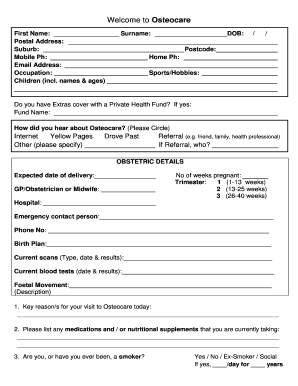
- Begin by entering your first name and surname in the designated fields.
- Fill in your date of birth, postal address, suburb, and postcode.
- Provide your mobile and home phone numbers, along with your email address.
- Indicate your occupation and list any sports or hobbies.
- Include details about your children, including their names and ages.
- Specify whether you have Extras cover with a Private Health Fund and, if applicable, provide the fund name.
- Indicate how you heard about Osteocare by circling the appropriate option.
- In the obstetric details section, enter your expected date of delivery and the name of your GP, obstetrician, or midwife.
- Indicate the number of weeks pregnant you are and select your trimester.
- Provide the name of the hospital you plan to deliver at.
- List an emergency contact person along with their phone number.
- Outline your birth plan in the text box provided.
- Document current scans, including type, date, and results.
- List any current blood tests with their date and results.
- Describe any foetal movement in the appropriate section.
- Identify key reasons for your visit to Osteocare today.
- Provide information about any medications or nutritional supplements you are currently taking.
- Answer the smoking history questions, specifying if you are a current, previous, or social smoker.
- Document any past hospitalizations, surgeries, or major accidents with relevant details.
- Answer the health questions regarding cardiovascular, breathing, digestive, urinary, vision, hearing problems, major dentistry, stress or depression, orthotics, and any additional health concerns.
- Fill out the family medical history section.
- Respond to the pregnancy questions regarding any experiences of symptoms or past pregnancy experiences.
- Read and sign the privacy policy, followed by the cancellation and no-show policy.
- Once you have completed the form, you can save changes, download, print, or share the completed form.
Start filling out the Pregnancy Patient History Form - Osteocare online today to ensure a comprehensive healthcare experience.