Loading
Get Rpt Realty 2020-2026
How it works
-

Open form follow the instructions
-

Easily sign the form with your finger
-

Send filled & signed form or save
How to fill out the Rpt Realty online
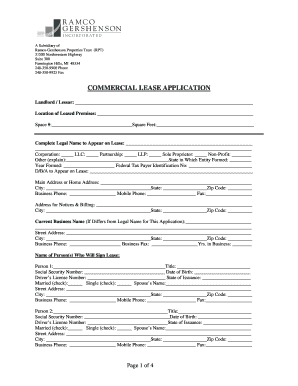
Completing the Rpt Realty commercial lease application online can streamline the process of securing a lease for your desired property. This guide provides a clear, step-by-step approach to filling out each section of the form effectively.
Follow the steps to fill out the Rpt Realty application online.
- Press the ‘Get Form’ button to access the application form. Ensure that you have a stable internet connection to open it properly in your browser.
- Begin filling out the landlord/lessor information section. Provide the name and address of the landlord as requested, ensuring that all details are accurate.
- In the location of the leased premises section, specify the exact location, along with the space number and the number of square feet you are applying for.
- Complete the legal name section with the full legal name of your business entity. Indicate the type of entity, such as corporation, LLC, or sole proprietor, and provide the state and year formed.
- Fill out the DBA (doing business as) name to appear on the lease if different from the legal name. Provide the main business address, including city, state, and zip code.
- Enter your business phone, mobile phone, and fax numbers in the respective fields. If your address for notices and billing differs, fill out that information as well.
- If your current business name differs from the legal name, list it and provide the corresponding street address and contact information.
- List the names of the person or persons who will sign the lease. Include their titles, social security numbers, and driver’s license information.
- Detail any other business locations by filling out the requested information for each location.
- Identify the persons who will guarantee the lease by providing their full information as previously outlined in the application.
- Provide credit references, ensuring that you complete the section for each reference, indicating whether it's business or personal.
- Fill in the bank references, listing each account type and corresponding details, including account numbers.
- Complete the credit card information section by including issuers, card numbers, and approximate balances.
- List any additional creditors not captured in previous sections, detailing their information fully.
- In the additional comments section, provide any extra information that you think may help your application.
- Attach all required documentation listed in the application, checking the appropriate boxes for items provided.
- Review your entire application for accuracy and completeness. Once satisfied, save your changes, download, print, or share the completed form as needed.
Start completing your Rpt Realty application online today for a seamless leasing experience.
Realtors usually use specialized software and tools to file taxes efficiently. Platforms such as Rpt Realty provide valuable resources and integrations specifically designed for real estate professionals. They simplify the filing process and help ensure accurate reporting of all income and expenses. It's important to keep meticulous records for a smooth tax experience.