Get Vadets 2020-2026
How it works
-

Open form follow the instructions
-

Easily sign the form with your finger
-

Send filled & signed form or save
How to fill out the Vadets online driver education course permission form
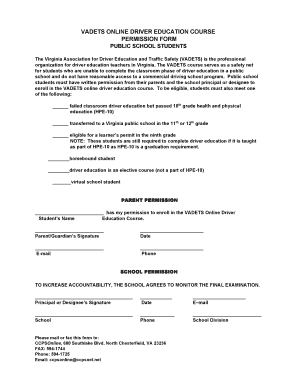
Filling out the Vadets online driver education course permission form is a crucial step for public school students seeking to enroll in this important program. This guide will walk you through the process, ensuring all necessary steps are clearly outlined so that you can complete the form with confidence.
Follow the steps to successfully complete the Vadets form
- Click ‘Get Form’ button to access the Vadets online driver education course permission form. This will open the document in your preferred editor.
- Begin by filling out the student's name in the designated section labeled 'Student’s Name'. Make sure to write the full name clearly.
- Next, you will provide parental permission. The parent or guardian must sign in the area marked with 'Parent/Guardian’s Signature.' This confirms their consent for the student to enroll.
- Indicate the current date next to the signature line to validate the form.
- Provide the parent or guardian's email address and phone number in the appropriate fields. This information is essential for communication.
- Moving on to school permission, the principal or designated representative must sign in the section labeled 'Principal or Designee’s Signature.' This signature shows that the school supports the student’s enrollment in the course.
- Record the date next to the principal's signature to timestamp the agreement.
- Include the principal's email, name of the school, and their phone number in the specified fields to ensure proper identification.
- Finally, list the school division in the provided area. This information is necessary for school records.
- Once all sections are completed, review the form for accuracy. You can then proceed to save changes, download, print, or share the filled-out form as required.
Complete your Vadets permission form online today to ensure your eligibility!
Yes, Virginia has introduced a digital driver's license option, which allows users to display a digital version of their license on their mobile devices. This feature enhances convenience and security while traveling. For more details on obtaining a digital license, consider visiting the Department of Motor Vehicles or using informative platforms like Vadets to learn more.