Open form follow the instructions
Easily sign the form with your finger
Send filled & signed form or save
How to fill out the Hdmf Website online
Filling out the Hdmf Website form is an essential step for those looking to apply for a housing loan as a co-borrower. This guide provides clear instructions to help you navigate the online form efficiently and accurately.
Follow the steps to complete your housing loan application online.
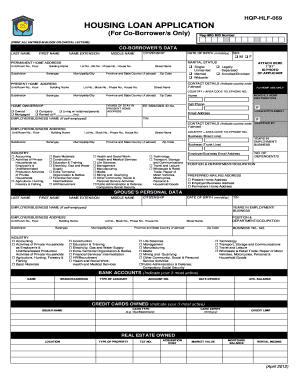
- Press the ‘Get Form’ button to access the housing loan application form and have it open for you.
- Begin by entering your Pag-IBIG MID number at the top of the form. Ensure that you use block or capital letters for clarity.
- Indicate your marital status, providing your permanent home address, including all relevant details such as unit or room number, building name, street name, and zip code. Select ownership status of your residence.
- If applicable, attach a 1” x 1” ID photo of yourself to the form as directed.
- List your active bank accounts and credit cards by providing the required details for each, such as account numbers, average balances, and credit limits.
- Finally, review all the information entered for accuracy, ensure all required fields are completed, and sign the form where indicated. You may then save changes, download, print, or share the completed form.
Begin your application process by completing your housing loan documentation online.
Experience a faster way to fill out and sign forms on the web. Access the most extensive library of templates available.
Related content
by AJ Tritt · 2020 · Cited by 7 — All sources and documentation for HDMF are available...
The document provides an overview of the Home Development Mutual Fund (HDMF), also known...
In research, HDMF is often used in smell tests to study the sense of smell. Its strong yet...
Get answers to your most pressing questions about US Legal Forms API.
How can I file my Pag-IBIG contribution online?
Filing your Pag-IBIG contribution online is quick and efficient. Simply log into your account on the HDMF website and locate the contributions section. From there, follow the prompts to file your contributions and ensure that you remain compliant.
How can I view my Pag-IBIG MDF file online?
To view your Pag-IBIG MDF file online, go to the HDMF website and log into your account. After logging in, navigate to the MDF section where you can easily access and review your information. This process keeps you updated on your membership details.
How do I access my Pag-IBIG account online?
Accessing your Pag-IBIG account online is convenient through the HDMF website. Simply log in using your registered credentials. Once logged in, you can view your contributions, personal information, and other important details.
How to update MDF Pag-IBIG online?
To update your MDF Pag-IBIG online, access your account through the HDMF website. Locate the MDF section, and select the option to update your information. Follow the instructions to make your updates, ensuring your data remains current.
How do I create an HDMF?
Creating an HDMF account is an easy process. Visit the HDMF website and find the registration section. Complete the required fields, provide the necessary information, and you will have your own account to manage your Pag-IBIG services.
How to fill up a MDF form online?
Filling up your Member's Data Form (MDF) online is simple on the HDMF website. First, log into your account, then select the option for the MDF form. Follow the instructions to fill in the necessary details, ensuring accuracy as you complete the form.
How can I check my personal information in Pag-IBIG online?
You can check your personal information on the HDMF website by logging into your Pag-IBIG account. After logging in, navigate to your profile dashboard. This section provides easy access to all your personal data stored in the Pag-IBIG system.
How can I update my Pag-IBIG MDF form online?
To update your Pag-IBIG Member's Data Form (MDF) online, access the HDMF website and log into your account. Once logged in, look for the option to edit your MDF. Follow the prompts to complete your updates quickly and efficiently.
How to update Pag-IBIG contribution online?
You can update your Pag-IBIG contributions online by logging into your account on the HDMF website. Navigate to the contributions section, where you can adjust your payment details. This process is straightforward and allows you to maintain accurate contributions seamlessly.
How much is the Pag-IBIG contribution for OFW?
The Pag-IBIG contribution for Overseas Filipino Workers (OFWs) is generally set at 2% of their monthly income, with a minimum contribution amount. You can find these specifics detailed on the HDMF website. It's important to stay informed to ensure compliance with your contributions.
Use professional pre-built templates to fill in and sign documents online faster. Get access to thousands of forms.
If you believe that this page should be taken down, please follow our DMCA take down process here.