Loading
Get Fl Hsmv 83363 2021-2026
How it works
-

Open form follow the instructions
-

Easily sign the form with your finger
-

Send filled & signed form or save
How to fill out the FL HSMV 83363 online
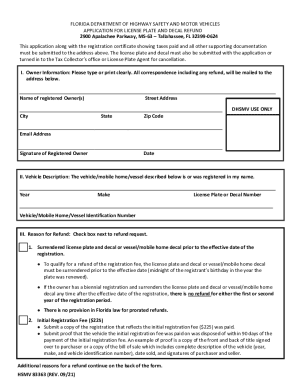
Filling out the FL HSMV 83363 form online can streamline the process of applying for a license plate and decal refund. This guide will provide clear instructions to ensure you complete the form accurately and efficiently.
Follow the steps to successfully complete the FL HSMV 83363 online.
- Click ‘Get Form’ button to access the FL HSMV 83363 form and open it in the editor.
- Begin by entering the owner information. Provide the name of the registered owner and ensure to fill in the street address, city, state, and zip code clearly. Include your email address for any correspondence and sign where indicated.
- In the vehicle description section, fill out the year, make, and license plate or decal number. Also, provide the vehicle, mobile home, or vessel identification number as applicable.
- Move to the reason for refund section. Select the appropriate checkbox next to your reason for requesting a refund, ensuring you meet the specific requirements outlined for each option.
- For each selected refund reason, if required, attach any necessary supporting documentation. This might include copies of registrations, proof of sale, or a declaration of mobile home as real property.
- Once all fields are filled out and documents are attached, review your entries for accuracy. Make any necessary corrections.
- Finally, save your changes, download a copy for your records, and print the form if needed. You can then submit the completed form and all attachments to the appropriate address.
Complete your FL HSMV 83363 form online today to expedite your refund request!