Get F625 109 000 2020-2026
How it works
-

Open form follow the instructions
-

Easily sign the form with your finger
-

Send filled & signed form or save
How to fill out the F625 109 000 online
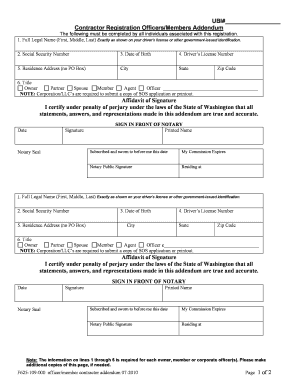
Completing the F625 109 000 form online is an essential step for individuals associated with contractor registration in Washington. This guide will provide you with clear and detailed instructions to ensure that you can accurately fill out the form and submit it successfully.
Follow the steps to fill out the F625 109 000 form correctly
- Click the ‘Get Form’ button to obtain the form and open it in your editor.
- Enter your full legal name in the first field, ensuring it matches exactly with your driver’s license or other government-issued identification.
- Provide your Social Security Number in the designated field, as it is required by federal law.
- Fill in your date of birth, ensuring that it reflects your official documentation.
- Input your driver’s license number or the ID number from any government-issued photo identification, if applicable.
- Complete the residence address by entering your physical location, ensuring that a P.O. Box is not included.
- Select your title from the provided options, which include owner, partner, spouse, member, agent, or officer.
- Sign the affidavit of signature, certifying that all provided information is true and accurate under penalty of perjury.
- Have your signature notarized by a notary public and ensure that all individuals associated with the registration have their signatures individually notarized as required.
- Review all entered information for accuracy and completeness, then choose to save changes, download, print, or share the form as needed.
Get started with your contractor registration by completing the F625 109 000 form online today.
In Washington, whether a handyman needs a contractor's license depends on the nature of the work performed. If the handyman's tasks involve projects exceeding a certain monetary threshold, then a contractor's license is required. You can always verify the specifics on the Washington State Department of Labor and Industries site. If you’re unsure, resources available on the US Legal Forms platform can clarify your F625 109 000 requirements.