Loading

Open form follow the instructions

Easily sign the form with your finger

Send filled & signed form or save
How to fill out the Fedex Proforma Invoice online
Filling out a Fedex Proforma Invoice is a crucial step in ensuring the smooth shipment of goods internationally. This guide provides clear, step-by-step instructions for users of all experience levels to complete the form accurately and efficiently.
Follow the steps to fill out the Fedex Proforma Invoice successfully
- Press the ‘Get Form’ button to access the Fedex Proforma Invoice. This action allows you to open the form in an editable format.
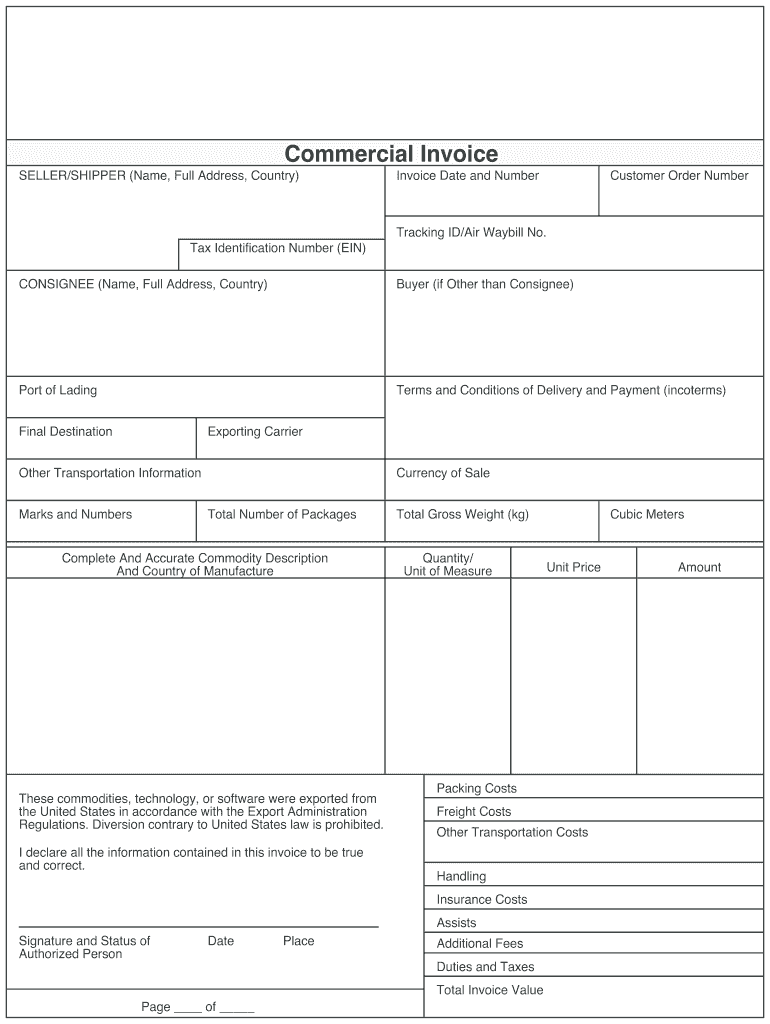
- Begin by entering the seller or shipper's information, including their name, full address, and country. Make sure to include the tax identification number (EIN) as well.
- Fill in the invoice date and invoice number to establish the timeline of the transaction clearly.
- Input the tracking ID or air waybill number to allow for easy tracking of the shipment.
- Complete the consignee section by entering the name, full address, and country of the recipient.
- If the buyer is different from the consignee, provide the buyer's information in the designated area.
- Specify the port of lading to identify where the goods will be loaded for export.
- Outline the terms and conditions of delivery and payment, commonly referred to as INCOTERMS.
- Indicate the final destination of the shipment.
- Record the exporting carrier's details and any additional transportation information necessary.
- List the marks and numbers used for identification of the packages.
- Choose the currency of sale relevant to the transaction.
- Specify the total number of packages being shipped.
- Provide a complete and accurate commodity description along with the country of manufacture.
- Affirm that the commodities, technology, or software comply with US export regulations and declare that all information is true and correct.
- Fill in the total gross weight of the shipment in kilograms.
- Indicate the quantity and unit of measure for the commodities listed.
- Enter the date and the place where the invoice is completed.
- Provide the unit price, packing costs, freight costs, and any other transportation costs or handling fees.
- Include any insurance costs and additional fees, duties, and taxes related to the shipment.
- Calculate the total invoice value and write the amount clearly.
- Add the signature and status of the authorized person responsible for the invoice.
- Finally, review all entries for accuracy and consistency, then save changes, download, print, or share the completed Fedex Proforma Invoice as needed.
Complete your Fedex Proforma Invoice online today to streamline your shipping process.
Experience a faster way to fill out and sign forms on the web. Access the most extensive library of templates available.
Related content
A pro forma invoice is a quote in an invoice format that may be required by the buyer to...
Aug 14, 2017 — Our invoice tends to be more detailed than the Fed Ex-generated one. Log...
Before we start out-of-warranty repairs, we will send you a pro forma invoice (P/I) with...
Get answers to your most pressing questions about US Legal Forms API.
Can you ship with a proforma invoice?
Yes, you can ship with a FedEx proforma invoice. It acts as a customs document that provides item details without requiring payment. However, ensure that the proforma invoice is accurate and comprehensive to avoid delays in customs clearance, allowing your shipment to reach its destination smoothly.
How to fill in a commercial invoice with FedEx?
Filling in a FedEx commercial invoice requires you to enter complete seller and buyer details, a clear description of the goods, and their corresponding values. You should also indicate the country of origin for each item. This invoice is significant for customs processing and must be filled out with careful attention to detail.
How to fill out proforma invoice FedEx?
To fill out a FedEx proforma invoice, start by entering your contact details at the top of the form. Next, add the recipient's information and provide a description of the items being shipped, along with their value. Be sure to double-check all information for accuracy, as this invoice plays a crucial role in customs processing.
What is the difference between invoice and proforma invoice?
A FedEx proforma invoice serves as a preliminary document that outlines the expected costs of goods or services before the sale is finalized. In contrast, an invoice is a formal request for payment after the goods or services have been delivered. The proforma invoice is not a demand for payment, while the invoice is an official transaction record.
How do I convert a proforma invoice to an invoice?
Converting a FedEx proforma invoice to a final invoice involves updating any necessary details. Replace the proforma invoice label with a final invoice label and adjust the amounts as needed. Make sure to retain any relevant details from the proforma document to maintain continuity.
How do I attach a proforma invoice to a package?
To attach a FedEx proforma invoice to your package, print the invoice and place it in a plastic pouch. Securely affix the pouch to the outside of your package. Ensure the proforma invoice is clearly visible, as customs officials may need to review it during transport.
How do I add a customs invoice to a package?
Adding a customs invoice to your package is essential for international shipping. Complete the customs invoice form, including relevant details about the items. Print and place it in a plastic pouch on the package with your FedEx proforma invoice. This combined approach provides transparency for customs operations.
How to attach custom forms to a package?
To attach custom forms to a package, prepare the required forms, such as a FedEx proforma invoice. Place these forms in a clear plastic envelope and securely attach it to the package. This will provide customs officials with necessary information for smooth customs clearance.
How do I submit a commercial invoice to FedEx?
To submit a commercial invoice through FedEx, complete the invoice form thoroughly, including details about the sender, recipient, and item descriptions. Then, print it out and attach it to your shipment along with your FedEx proforma invoice. This ensures that all customs requirements are met before your package is shipped.
How to attach proforma invoice to package?
To attach a FedEx proforma invoice to your package, first print the invoice. Ensure you place it in a clear plastic pouch. Then, securely attach the pouch to the outside of your package. This makes it easy for customs to review your paperwork.
Use professional pre-built templates to fill in and sign documents online faster. Get access to thousands of forms.
If you believe that this page should be taken down, please follow our DMCA take down process here.