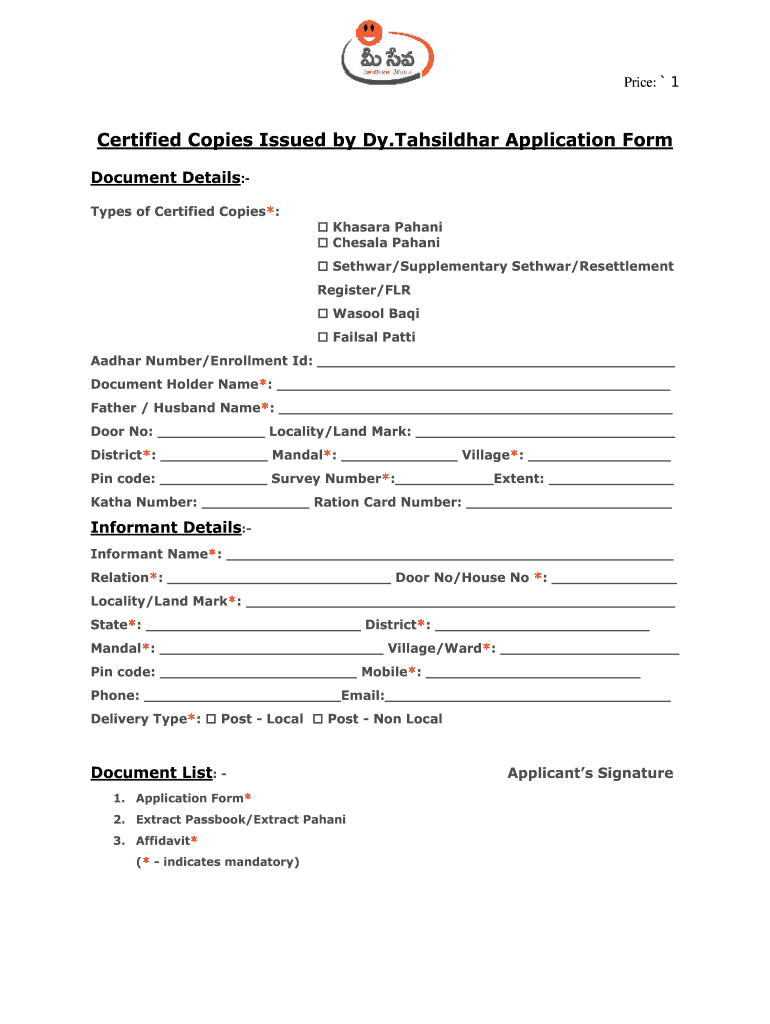

Open form follow the instructions

Easily sign the form with your finger

Send filled & signed form or save
How to fill out the Sethwar Telangana Online form
This guide provides a clear, step-by-step approach to filling out the Sethwar Telangana Online form. Whether you are a first-time user or have some experience, this guide will help you navigate the process with confidence.
Follow the steps to successfully complete the form online.
- Press the ‘Get Form’ button to access the document and open it for editing.
- Begin by entering your Aadhar number or enrollment ID in the designated field.
- Fill in the document holder's name in the appropriate area, ensuring clarity and accuracy.
- Provide your father or partner's name in the specified section.
- Complete the address fields including the door number, locality, and landmark.
- Select the district and mandal from the dropdown menus.
- Indicate your village and pin code in the respective fields.
- Enter the survey number and extent of land as required.
- Fill in the Katha number and ration card number as requested.
- In the informant details section, input the informant's name and relationship to the document holder.
- Complete the informant's address details including door number, locality, state, district, mandal, and village/ward.
- Provide the mobile and phone numbers along with an email address in the indicated fields.
- Choose the preferred delivery type: Post - Local or Post - Non Local.
- Ensure to include all required documents, including the application form and extract passbook, and any mandatory affidavits.
- After reviewing all entered information for accuracy, save your changes, and you may download, print, or share the form as needed.
Complete your Sethwar Telangana Online form today and ensure your documentation is submitted correctly.
Experience a faster way to fill out and sign forms on the web. Access the most extensive library of templates available.
Related content
Sethwar/ Supplementary Sethwar/ Resettlement registrar/FLR:...
May 17, 2018 · If you are not successful in online process, you can file RTI Application...
Get answers to your most pressing questions about US Legal Forms API.
How to get tippon in Telangana online?
To obtain a tippon in Telangana online, visit the official land records portal of the state. Follow the provided procedures to request your tippon document, ensuring you have the necessary details at hand. Sethwar Telangana Online assists in navigating this process smoothly, reducing potential confusion.
How to check property details with Aadhaar number in Telangana?
You can check property details linked to your Aadhaar number through the Telangana government’s online services. Enter your Aadhaar number to retrieve specific property records associated with it. Utilizing Sethwar Telangana Online can simplify this process, making it easier for you to manage your property holdings.
Who will issue the pattadar passbook in Telangana?
The pattadar passbook in Telangana is issued by the local revenue authority, which verifies ownership and relevant land details. Once your application is processed and approved, the office will grant you the passbook. Using Sethwar Telangana Online keeps you informed throughout this process, ensuring you stay updated on any requirements.
How to get pattadar passbook in Telangana?
To obtain a pattadar passbook in Telangana, you need to visit the relevant local revenue office or apply online through the official government portal. Ensure you have all documents ready, including land particulars. Accessing assistance via Sethwar Telangana Online can help guide you in gathering the required papers for a successful application.
How to apply for pattadar passbook online in Telangana?
To apply for a pattadar passbook online, visit the Telangana government's land records portal and follow the application instructions. You will need to provide necessary documents and details about your land. Engaging with Sethwar Telangana Online can streamline your application process, ensuring all steps are followed correctly.
How can I check my property details online in Telangana?
You can check your property details online through the Telangana government’s official portal. By entering relevant information such as your district, Mandal, and survey number, you can access property records conveniently. Utilizing Sethwar Telangana Online makes this lookup process straightforward and user-friendly.
How many days to get pattadar passbook in Telangana?
Typically, it takes about 30 days to receive the pattadar passbook in Telangana once you submit your application. Processing times may vary depending on local offices and demand. Using the Sethwar Telangana Online platform can help track your application status efficiently.
What is Sethwar in Telangana?
Sethwar refers to the record of land ownership in Telangana. It is a crucial document that indicates the rightful ownership and specifics of agricultural land. Understanding Sethwar Telangana Online can help landowners manage their property rights effectively.
How can I know my land value in Telangana?
To determine your land value in Telangana, you can visit the official government websites that provide property valuation services. Tools available online help you assess land prices based on location and additional factors. Accessing Sethwar Telangana Online can simplify this process and provide precise information quickly.
Who will issue Pattadar passbook in Telangana?
The Pattadar passbook in Telangana is typically issued by the Revenue Department. Through the Sethwar Telangana Online platform, this issuance process becomes more accessible and streamlined. You can expect timely updates regarding your application's status.
Use professional pre-built templates to fill in and sign documents online faster. Get access to thousands of forms.
If you believe that this page should be taken down, please follow our DMCA take down process here.