
Open form follow the instructions

Easily sign the form with your finger

Send filled & signed form or save
How to fill out the Doctors Excuse online
Filling out a Doctors Excuse is an essential step for students needing to verify their medical appointments. This guide offers clear, step-by-step instructions to help you complete this document easily and accurately.
Follow the steps to fill out the Doctors Excuse online.
- Click ‘Get Form’ button to access the Doctors Excuse and open it in your preferred editor.
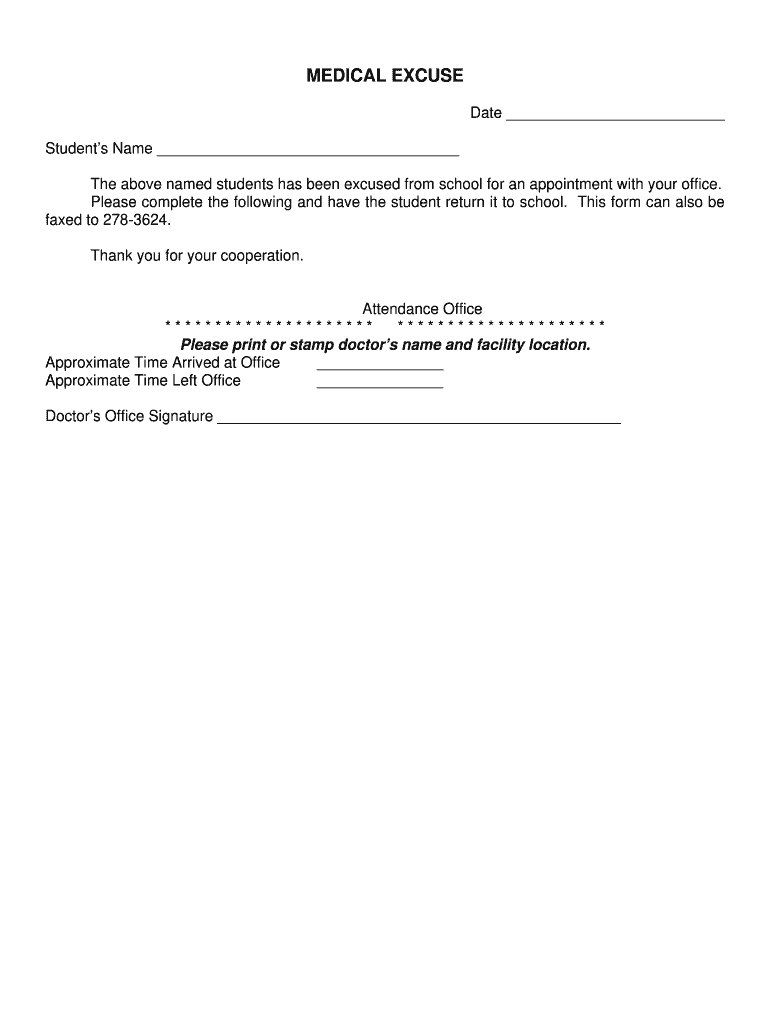
- Begin by filling in the date at the top of the form to indicate when the appointment occurred.
- In the section labeled 'Student’s Name,' enter the full name of the student who is being excused from school.
- After completing the student’s name, the form requires the healthcare provider to fill in their details. This includes their name and facility location, which can be printed or stamped in the designated area.
- Next, indicate the approximate time the student arrived at the doctor’s office by filling in the corresponding field.
- Similarly, specify the approximate time the student left the doctor’s office.
- Lastly, the healthcare provider must sign the form in the provided signature section to validate the excuse.
- Once all fields are completed, you can save the changes, download the completed form, print it, or share it according to your needs.
Complete your Doctors Excuse online today for a smooth verification process.
Experience a faster way to fill out and sign forms on the web. Access the most extensive library of templates available.
Related content
Please excuse the above named patient from federal jury duty due to: It is medically...
doctors excuse template is invaluable. It bridges the gap between health and professional...
It was even used by the Eleventh Doctor as an excuse to Winston Churchill for his tardy...
Get answers to your most pressing questions about US Legal Forms API.
What excuse can I use to get a doctor's note?
Common excuses for requesting a doctor's note include illness, injury, or medical appointments. Minor health issues like flu, migraines, or back pain often qualify for a doctor's excuse. It is important to provide honest information regarding your health condition. For those needing a legitimate excuse, platforms like US Legal Forms can help you find templates and guidance for obtaining a proper doctor's note.
What is a doctor's note for an excuse?
A doctor's note for an excuse is a formal document provided by a licensed medical professional. This document typically outlines your medical condition and certifies that an absence from work or school is necessary. Employers often require this documentation to validate sick leave or other time off. Having a genuine doctor's excuse can make the process smoother and protect your employment status.
Can I get a doctor's note without seeing the doctor?
In some cases, it is possible to obtain a doctor's note without an in-person visit, especially through telemedicine services. These services allow you to consult a licensed physician remotely, who can then provide a valid doctor's excuse based on your symptoms and health history. If you're unable to visit a doctor due to circumstances, consider using telehealth as a valuable option. Remember, transparency with your employer is key.
Do employers actually verify doctor's notes?
Yes, many employers do verify doctor's notes as part of their policy to maintain workplace integrity. They may contact the doctor's office to confirm the authenticity of the doctor's excuse. This practice ensures that employees are using legitimate documentation for their absences. Always be honest in your requests for a doctor's excuse to avoid any potential complications.
What is the easiest way to get a sick note?
Obtaining a Doctors Excuse easily can involve visiting your doctor or using an online form service like USLegalForms. Online platforms might streamline obtaining a sick note tailored to your needs. Ensure any format you choose is recognized by your workplace to prevent issues.
What's the best excuse to miss work?
The best excuse to miss work is rooted in honesty about your health. Conditions that prevent you from performing your duties — such as high fever, contagious illness, or significant stress — warrant a Doctors Excuse. Always prioritize your health and communicate openly with your employer.
What is the best excuse to get a doctor's note?
The best excuse hinges on genuine health concerns. Conditions like severe headaches, flu symptoms, or fatigue are commonly recognized. Your health professional should issue a Doctors Excuse that accurately reflects your situation for your employer.
What can I say to get a doctor's note?
When requesting a Doctors Excuse, explain your symptoms honestly. Describe how your condition affects your ability to perform at work or school. Be upfront about the need for time off; clear communication helps your doctor understand your situation and serves your best interests.
What is a valid reason for a doctor's note?
Valid reasons for requesting a Doctors Excuse can include illness, injury, or mental health issues. Common situations involve needing time off for recovery from surgery or serious flu. Always make sure your reason is legitimate to maintain trust with your employer.
What is the easiest way to get a doctor's note?
The easiest way to obtain a Doctors Excuse is by scheduling an appointment with your healthcare provider. During your visit, communicate your symptoms clearly. Alternatively, consider online services that can provide templates for a Doctors Excuse, ensuring they comply with your destination’s regulations.
Use professional pre-built templates to fill in and sign documents online faster. Get access to thousands of forms.
If you believe that this page should be taken down, please follow our DMCA take down process here.