Loading
Form preview
  • US Legal Forms
  • Form Library
  • More Forms
  • More Uncategorized Forms
  • Sbi Withdrawal Form

Get Sbi Withdrawal Form

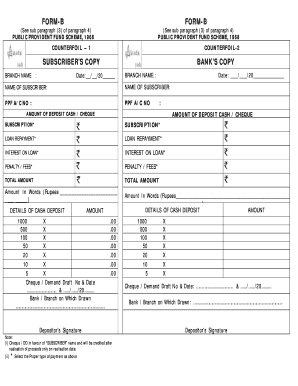
CRIBER S COPY BRANCH NAME : Date: / BANK S COPY BRANCH NAME : /20 Date: NAME OF SUBSCRIBER: PPF A/C NO /20 NAME OF SUBSCRIBER: PPF A/C NO : / : AMOUNT OF DEPOSIT CASH / CHEQUE AMOUNT OF DEPOSIT CASH / CHEQUE SUBSCRIPTION* SUBSCRIPTION* LOAN REPAYMENT* LOAN REPAYMENT* INTEREST ON LOAN* INTEREST ON LOAN* PENALTY / FEES* PENALTY / FEES* TOTAL AMOUNT TOTAL AMOUNT Amount In Words (Rupees ) DETAILS OF CASH DEPOSIT AMOUNT 1000 X 500 X 100 X 5.

How it works

  1. Open form

    Open form follow the instructions

  2. Easily sign form

    Easily sign the form with your finger

  3. Share form

    Send filled & signed form or save

How to fill out the Sbi Withdrawal Form online

Filling out the Sbi Withdrawal Form online can be a straightforward process. This guide provides step-by-step instructions to ensure users complete the form accurately and efficiently.

Follow the steps to successfully complete the Sbi Withdrawal Form online.

  1. Click 'Get Form' button to obtain the form and access it for editing.
  2. Enter the branch name in the designated field for both the subscriber and bank copies. This ensures the form is connected to the correct banking branch.
  3. Fill in the date of the transaction by selecting or typing the date in the appropriate format.
  4. Provide the name of the subscriber in the name field. This is required to identify the person making the withdrawal.
  5. Enter the PPF account number in the specified section to link the withdrawal to the proper account.
  6. Indicate the amount of deposit by selecting the type of payment, whether cash or cheque, and fill in the respective fields for subscriptions, loan repayments, interest on loan, and any penalties or fees.
  7. Calculate the total amount and enter it in the total amount field. Additionally, write the amount in words in the designated area.
  8. Detail the cash deposit amounts in the specified breakdown fields, indicating the quantity for each denomination.
  9. If applicable, enter the cheque or demand draft number along with the date, and specify the bank or branch on which it is drawn.
  10. Complete the process by ensuring the depositor’s signature is provided at the end of the form.
  11. Once all details are filled accurately, save the changes, download the form, print it, or share it as needed.

Complete your Sbi Withdrawal Form online today for a hassle-free experience.

Get form

Experience a faster way to fill out and sign forms on the web. Access the most extensive library of templates available.
Get form

Related content

School Board - Department of Elections - State of...
School Elections. Filing for a School Board Election. General Information. The filing...
Learn more
FAMU SBI
Student Forms. SBI Change of Major Request Form · SBI Permission Code Request Form · SBI...
Learn more
SBI Shinsei Bank
Aug 17, 2025 — There is no separate ATM withdrawal fee, so it is advantageous for small...
Learn more

Related links form

Sample 1040ez 2014 Newark Payroll Tax Statement - 3rd Quarter - The City Of ... - Ci Newark Nj Form 941 Employers Quarterly Federal Tax Return - Clover Zoning Application - The Town Of Stettin - Townofstettin

Questions & Answers

Get answers to your most pressing questions about US Legal Forms API.

Contact support

Yes, SBI has introduced modifications to its ATM transaction rules for 2025 to align with modern banking practices. These changes focus on increased transaction limits and enhanced security measures for users. By familiarizing yourself with these updates, you can effectively utilize the Sbi Withdrawal Form to ensure smooth transactions in the upcoming year.

Recently, SBI has updated its withdrawal rules to enhance customer convenience and security. These changes include adjustments to daily withdrawal limits and improved identification requirements. Keeping abreast of these new rules ensures that you understand how to effectively use the Sbi Withdrawal Form for your transactions.

Filling out a withdrawal form is straightforward. Begin by entering your account number, the amount you wish to withdraw, and your signature for verification. Be sure to use the correct Sbi Withdrawal Form available at your local SBI branch or on their website, as submitting an incomplete form may delay your transaction.

Withdrawing $20,000 from an ATM in a single transaction is generally not permitted due to limits set by most banks, including SBI. Typically, daily withdrawal limits apply, which vary based on your account type and bank policy. To access larger amounts, consider visiting an SBI branch directly or using the Sbi Withdrawal Form to process your request efficiently.

The main difference between NEFT (National Electronic Funds Transfer) and RTGS is in the settlement timing and transaction size. RTGS provides real-time settlement for large transactions, while NEFT processes transactions in batches throughout the day. If you are looking to make a high-value transfer quickly, using the RTGS feature and filling out the Sbi Withdrawal Form may be the best option for you. Understanding these differences helps you choose the right payment method for your needs.

To download the SBI RTGS form PDF in English, visit the official SBI website or their banking portal. Look for the 'Forms' section, where you can find various banking forms including the RTGS form. If you need the Sbi Withdrawal Form, it can typically be found alongside the RTGS form for your convenience. This allows you to have all necessary documentation in one place for smooth transactions.

You can complete an RTGS transfer from SBI without a cheque by utilizing the online banking service. Simply log into your SBI account, select the RTGS option, and fill in the details of the transaction. In this case, it is essential to have the Sbi Withdrawal Form ready if you are withdrawing funds from your account electronically. This streamlines the entire process for quick and easy banking.

RTGS stands for Real-Time Gross Settlement. This is a payment system that allows for the immediate transfer of funds between banks in the United States. A key feature of RTGS is that transactions are settled in real time, making it a preferred method for high-value transfers. To process any RTGS transactions, you may need to fill out an Sbi Withdrawal Form if you are withdrawing funds from your SBI account.

You can easily obtain the 15G form from SBI's online banking platform. After logging in, navigate to the 'Forms' section, where you can find the Sbi Withdrawal Form. Download the form directly from that section, fill it out, and you're all set to submit it.

The last day to submit Form 15G typically aligns with the conclusion of the financial year, which is March 31st each year. It is crucial to ensure that your Sbi Withdrawal Form is submitted by this deadline to avoid higher tax deductions on your interest earnings. Plan ahead and submit your forms earlier to prevent any last-minute issues.

Get This Form Now!

Use professional pre-built templates to fill in and sign documents online faster. Get access to thousands of forms.
Get form
If you believe that this page should be taken down, please follow our DMCA take down processhere.

Industry-leading security and compliance

US Legal Forms protects your data by complying with industry-specific security standards.
  • In businnes since 1997
    25+ years providing professional legal documents.
  • Accredited business
    Guarantees that a business meets BBB accreditation standards in the US and Canada.
  • Secured by Braintree
    Validated Level 1 PCI DSS compliant payment gateway that accepts most major credit and debit card brands from across the globe.
Get Sbi Withdrawal Form
Get form
  • Adoption
  • Bankruptcy
  • Contractors
  • Divorce
  • Home Sales
  • Employment
  • Identity Theft
  • Incorporation
  • Landlord Tenant
  • Living Trust
  • Name Change
  • Personal Planning
  • Small Business
  • Wills & Estates
  • Packages A-Z
  • Affidavits
  • Bankruptcy
  • Bill of Sale
  • Corporate - LLC
  • Divorce
  • Employment
  • Identity Theft
  • Internet Technology
  • Landlord Tenant
  • Living Wills
  • Name Change
  • Power of Attorney
  • Real Estate
  • Small Estates
  • Wills
  • All Forms
  • Forms A-Z
  • Form Library
  • Legal Hub
  • About Us
  • Help Portal
  • Legal Resources
  • Blog
  • Affiliates
  • Contact Us
  • Delete My Account
  • Site Map
  • Industries
  • Forms in Spanish
  • Localized Forms
  • State-specific Forms
  • Forms Kit
  • Real Estate Handbook
  • All Guides
  • Notarize
  • Incorporation services
  • For Consumers
  • For Small Business
  • For Attorneys
  • USLegal
  • FormsPass
  • pdfFiller
  • signNow
  • altaFlow
  • DocHub
  • Instapage
Form Packages
  • Adoption
  • Bankruptcy
  • Contractors
  • Divorce
  • Home Sales
  • Employment
  • Identity Theft
  • Incorporation
  • Landlord Tenant
  • Living Trust
  • Name Change
  • Personal Planning
  • Small Business
  • Wills & Estates
  • Packages A-Z
Form Categories
  • Affidavits
  • Bankruptcy
  • Bill of Sale
  • Corporate - LLC
  • Divorce
  • Employment
  • Identity Theft
  • Internet Technology
  • Landlord Tenant
  • Living Wills
  • Name Change
  • Power of Attorney
  • Real Estate
  • Small Estates
  • Wills
  • All Forms
  • Forms A-Z
  • Form Library
Customer Service
  • Legal Hub
  • About Us
  • Help Portal
  • Legal Resources
  • Blog
  • Affiliates
  • Contact Us
  • Delete My Account
  • Site Map
  • Industries
  • Forms in Spanish
  • Localized Forms
  • State-specific Forms
  • Forms Kit
Legal Guides
  • Real Estate Handbook
  • All Guides
Prepared for you
  • Notarize
  • Incorporation services
Our Customers
  • For Consumers
  • For Small Business
  • For Attorneys
Our Sites
  • USLegal
  • FormsPass
  • pdfFiller
  • signNow
  • altaFlow
  • DocHub
  • Instapage
Social Media
Call us now toll free:
+1 833 426 79 33
As seen in:
© Copyright 1999-2026 airSlate Legal Forms, Inc. 3720 Flowood Dr, Flowood, Mississippi 39232
  • Your Privacy Choices
  • Terms of Service
  • Privacy Notice
  • Content Takedown Policy
  • Bug Bounty Program