Loading
Form preview
  • US Legal Forms
  • Other Templates
  • More Forms
  • More Uncategorized Forms
  • Sf 127

Get Sf 127

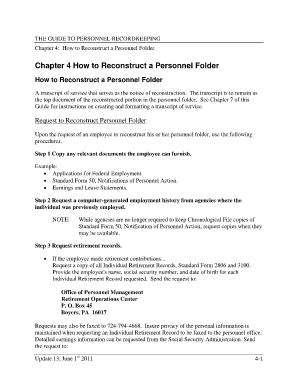
Older A transcript of service that serves as the notice of reconstruction. The transcript is to remain as the top document of the reconstructed portion in the personnel folder. See Chapter 7 of this Guide for instructions on creating and formatting a transcript of service. Request to Reconstruct Personnel Folder Upon the request of an employee to reconstruct his or her personnel folder, use the following procedures. Step 1 Copy any relevant documents the employee can furnish. Example: Appli.

How it works

  1. Open form

    Open form follow the instructions

  2. Easily sign form

    Easily sign the form with your finger

  3. Share form

    Send filled & signed form or save

How to fill out the Sf 127 online

The Standard Form 127 (SF 127), Request for Official Personnel Folder, is essential for individuals seeking to reconstruct their personnel files. This guide will provide you with clear and supportive instructions on how to complete the SF 127 online effectively.

Follow the steps to fill out the SF 127 with ease.

  1. Press the ‘Get Form’ button to access the SF 127 and open it in the editor.
  2. In the 'Employee Information' section, enter the employee's full name, Social Security number, and date of birth accurately.
  3. Check the 'Request Type' options. Indicate whether the request is for an Official Personnel Folder or related documents.
  4. In the 'Remarks' section, clearly state: 'The OPF for this employee is lost or destroyed. This is to request a search be made by NPRC for the OPF of the named employee.'
  5. Provide the employee's previous agency and employment details, including the agency name and the positions held, as necessary.
  6. Review the information entered for accuracy. Ensure all required fields are filled out completely.
  7. After completing the form, you can choose to save changes, download a copy, print it out, or share it as needed.

Take action now and complete the SF 127 online to ensure accurate reconstruction of your personnel folder.

Get form

Experience a faster way to fill out and sign forms on the web. Access the most extensive library of templates available.
Get form

Related content

REQUEST FOR OFFICIAL PERSONNEL FOLDER
Enter complete address to which folder or reply is to be mailed. Include ZIP Code...
Learn more
36 CFR § 1233.18 - What reference procedures are...
(1) Standard Form 127, Request for Official Personnel Folder (Separated Employee), to...
Learn more
DoD-2023-OS-0063] RIN 0790-AL
Dec 22, 2023 — document, and periodically update system security plans that describe...
Learn more

Related links form

TX TDLR COS011 2021 Community.adobe.comt5acrobat-readerThe Document You Are Trying To Load Requires Adobe Reader 8 ... GEORGIA STATE BOARD OF COSMETOLOGY AND BARBERS APPRENTICE APPLICATION Revenue.delaware.govbusiness-tax-formsBusiness Tax Forms 2021-2022 - Division Of Revenue - Delaware

Questions & Answers

Get answers to your most pressing questions about US Legal Forms API.

Contact support

The SF 144 is a form used for documenting an individual’s qualifications for federal positions. It captures educational and professional experience, making it essential for job applications. If you are applying for a new federal position, completing the SF 144 accurately can enhance your application. USLegalForms provides guides and templates that can assist you in filling out the SF 144 effectively.

The SF 127 serves as a formal request to obtain an individual's personnel folder from federal employment. It is designed to help employees access relevant information regarding their employment history. Understanding the significance of the SF 127 is crucial when pursuing your benefits or verifying prior employment. Using USLegalForms can lead you through the completion and submission of this important document.

The SF 127 form is utilized for requesting a copy of a federal employee's official personnel folder. This document contains vital employment information and is essential for those seeking to verify their service records. If you need access to specific employment details or past records, completing the SF 127 is a crucial step. With the support of USLegalForms, you can smoothly navigate the form-filling process.

The SF 75 form is primarily used for initiating a request to outline an employee’s overall service and performance records. This form is important for federal employees as it documents information necessary for benefits or retirement purposes. If you're looking for your service history, the SF 75 can be a critical component. Consider using USLegalForms to ensure you complete this correctly and efficiently.

Requesting federal employee records involves determining the right agency that holds your records. You typically need to complete a form, possibly the SF 127, to facilitate your request. Each agency may have specific procedures, so check their website for detailed instructions. Utilizing USLegalForms can simplify this process, providing you with the necessary documents to make your request.

To access your federal employment records, you can submit a request through the appropriate agency. You need to provide information such as your full name, Social Security number, and the dates of your employment. Additionally, you might find the SF 127 form useful, as it helps streamline the process of obtaining these records. By using USLegalForms, you can easily fill out the form and submit your request with confidence.

You can definitely access your eOPF from home. As long as you have your credentials and a stable internet connection, all your documents, including the SF 127, are just a few clicks away. This remote access feature makes managing your personnel information easy and convenient.

EOPF hosts various important documents, including your SF 127, performance evaluations, and other personnel records. Maintaining these documents in one platform simplifies the management of your employment history. Using US Legal Forms can help you organize and access these important records efficiently.

Yes, you can access your SF 50 from home through the eOPF platform. This form documents important employment information and is essential for various administrative processes. Make sure to log in securely and navigate to the relevant section to retrieve your SF 50.

SF 127 serves as a request for reinstatement of an employee’s leave to return to duty. This form is crucial for processing your leave request and ensuring your effective return to work. Always ensure your SF 127 is complete and filed correctly to avoid delays.

Get This Form Now!

Use professional pre-built templates to fill in and sign documents online faster. Get access to thousands of forms.
Get form
If you believe that this page should be taken down, please follow our DMCA take down processhere.
Get Sf 127
Get form
  • Adoption
  • Bankruptcy
  • Contractors
  • Divorce
  • Home Sales
  • Employment
  • Identity Theft
  • Incorporation
  • Landlord Tenant
  • Living Trust
  • Name Change
  • Personal Planning
  • Small Business
  • Wills & Estates
  • Packages A-Z
  • Affidavits
  • Bankruptcy
  • Bill of Sale
  • Corporate - LLC
  • Divorce
  • Employment
  • Identity Theft
  • Internet Technology
  • Landlord Tenant
  • Living Wills
  • Name Change
  • Power of Attorney
  • Real Estate
  • Small Estates
  • Wills
  • All Forms
  • Forms A-Z
  • Other Templates
  • Legal Hub
  • About Us
  • Help Portal
  • Legal Resources
  • Blog
  • Affiliates
  • Contact Us
  • Delete My Account
  • Site Map
  • Industries
  • Forms in Spanish
  • Localized Forms
  • State-specific Forms
  • Forms Kit
  • Real Estate Handbook
  • All Guides
  • Notarize
  • Incorporation services
  • For Consumers
  • For Small Business
  • For Attorneys
  • USLegal
  • FormsPass
  • pdfFiller
  • signNow
  • altaFlow
  • DocHub
  • Instapage
Form Packages
  • Adoption
  • Bankruptcy
  • Contractors
  • Divorce
  • Home Sales
  • Employment
  • Identity Theft
  • Incorporation
  • Landlord Tenant
  • Living Trust
  • Name Change
  • Personal Planning
  • Small Business
  • Wills & Estates
  • Packages A-Z
Form Categories
  • Affidavits
  • Bankruptcy
  • Bill of Sale
  • Corporate - LLC
  • Divorce
  • Employment
  • Identity Theft
  • Internet Technology
  • Landlord Tenant
  • Living Wills
  • Name Change
  • Power of Attorney
  • Real Estate
  • Small Estates
  • Wills
  • All Forms
  • Forms A-Z
  • Other Templates
Customer Service
  • Legal Hub
  • About Us
  • Help Portal
  • Legal Resources
  • Blog
  • Affiliates
  • Contact Us
  • Delete My Account
  • Site Map
  • Industries
  • Forms in Spanish
  • Localized Forms
  • State-specific Forms
  • Forms Kit
Legal Guides
  • Real Estate Handbook
  • All Guides
Prepared for you
  • Notarize
  • Incorporation services
Our Customers
  • For Consumers
  • For Small Business
  • For Attorneys
Our Sites
  • USLegal
  • FormsPass
  • pdfFiller
  • signNow
  • altaFlow
  • DocHub
  • Instapage
Social Media
Call us now toll free:
+1 833 426 79 33
As seen in:
© Copyright 1999-2026 airSlate Legal Forms, Inc. 17 Station Street, Suite 303, Brookline, MA 02445
  • Your Privacy Choices
  • Terms of Service
  • Privacy Notice
  • Content Takedown Policy
  • Bug Bounty Program