
Open form follow the instructions

Easily sign the form with your finger

Send filled & signed form or save
How to fill out the Ambetter Prior Auth Form online
Filling out the Ambetter Prior Auth Form online can be a straightforward process when guided step by step. This user-friendly guide will help you navigate each section of the form to ensure that all necessary information is accurately provided.
Follow the steps to fill out the Ambetter Prior Auth Form online
- Press the ‘Get Form’ button to access the Ambetter Prior Auth Form and open it in the editor.
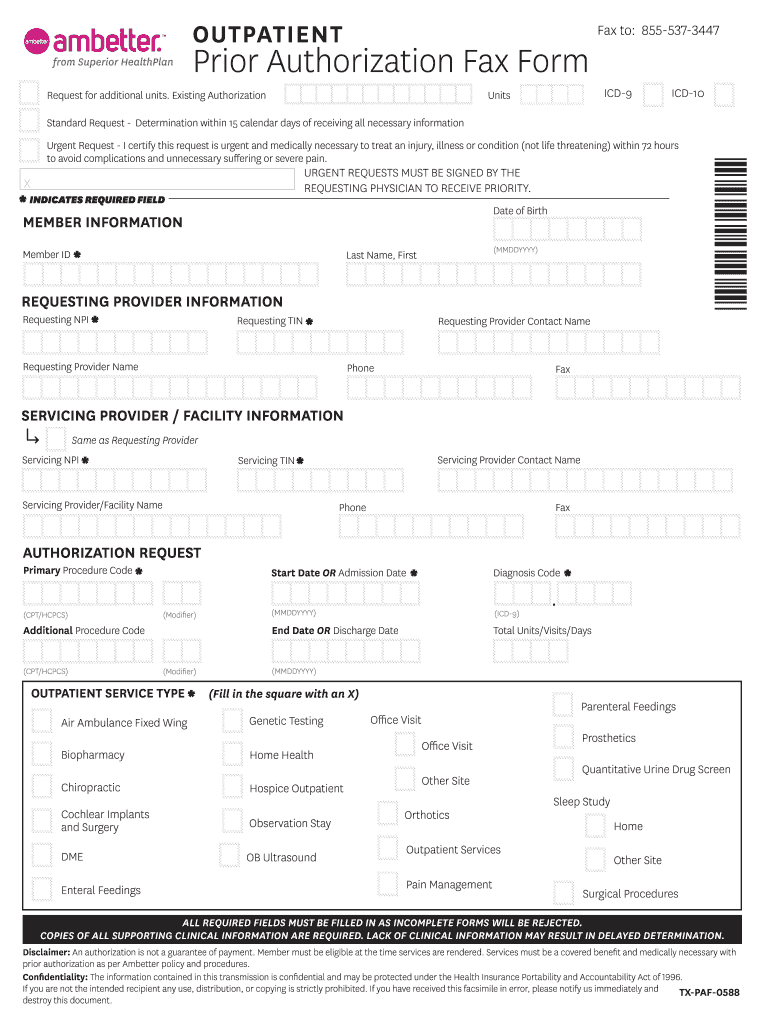
- Complete the member information section. Enter the member ID, date of birth (in MMDDYYYY format), and verify that all marked fields are filled correctly.
- In the requesting provider information section, enter the requesting NPI, last name and first name of the requesting provider, requesting TIN, provider contact name, phone number, and fax number.
- If the servicing provider is the same as the requesting provider, check the applicable box. If not, provide the servicing NPI, servicing TIN, servicing provider/facility name, servicing provider contact name, phone, and fax.
- For the authorization request, fill in the primary procedure code (CPT/HCPCS) and the diagnosis code (ICD-9). Specify the total units, visits, or days required.
- Select the outpatient service type by filling in the square with an X according to the specific service needed.
- Complete the start date or admission date along with the end date or discharge date (both in MMDDYYYY format). If any additional procedure codes are applicable, include those as well.
- Before submitting, double-check that all required fields marked with an asterisk are completed, and ensure that copies of all supporting clinical information are prepared for submission.
- Once all information has been filled in, you can save changes, download, print, or share the completed form.
Complete your Ambetter Prior Auth Form online today to ensure timely processing.
Experience a faster way to fill out and sign forms on the web. Access the most extensive library of templates available.
Related content
Intended Use: When an issuer requires prior authorization of a health care service, use...
Required for consideration of approval. Services must be a covered benefit and medically...
This form is required at time of prior authorization request and is not required at time...
Get answers to your most pressing questions about US Legal Forms API.
How do I know if a prior authorization is approved?
You will typically receive a notification when your prior authorization, such as the Ambetter Prior Auth Form, is approved or denied. This communication may come via mail or through your online Ambetter account. If you haven’t heard back after a reasonable period, don’t hesitate to contact Ambetter customer service for an update. Having clarity on your authorization status is essential for planning your care.
What is a prior authorization form for insurance?
A prior authorization form, like the Ambetter Prior Auth Form, is a document that healthcare providers submit to get approval for specific treatments or medications. This form helps insurance companies evaluate the necessity of the requested service before it is provided. Understanding its purpose can help you navigate your healthcare options more effectively. Always fill out this form completely to avoid delays in processing.
How do I check the status of my Ambetter prior authorization?
You can check the status of your Ambetter prior authorization easily. Simply log in to your Ambetter account on their website or mobile app, where you will find an option to view pending authorizations. Alternatively, you can call their customer service for assistance. Knowing the status of your Ambetter Prior Auth Form gives you peace of mind while awaiting necessary approvals.
What is the fax number for Ambetter prior authorization?
To send your Ambetter Prior Auth Form, you will need to use the correct fax number for prior authorizations. This number varies by state and plan, so it’s important to check your specific Ambetter documentation or provider portal. Using the right fax number ensures your authorization request is received promptly and handled without delay. Always double-check the number before sending to avoid complications.
How do I file a claim with Ambetter?
Filing a claim with Ambetter involves a simple process. First, gather all necessary information, including the Ambetter Prior Auth Form if required for your claim. You can then submit your claim online through their portal or by mailing it to the provided address. Keeping thorough documentation will ensure a smoother experience when filing your claim.
Can I call my insurance about a prior authorization?
Yes, you can definitely call your insurance provider to discuss a prior authorization. Speaking directly to a representative can clarify the requirements and steps involved. They can also provide you with valuable insights concerning the Ambetter Prior Auth Form you may need to submit. Additionally, asking questions during the call may help you feel more informed and confident about your situation.
How do I get a prior authorization from insurance?
To obtain a prior authorization from your insurance, you need to fill out the required Ambetter Prior Auth Form and submit it to your provider. Your healthcare provider typically handles this process on your behalf. However, knowing how to complete the form correctly ensures your request is processed swiftly and efficiently.
What are prior authorization forms?
Prior authorization forms are documents that healthcare providers submit to insurance companies before a patient receives certain services. These forms, like the Ambetter Prior Auth Form, help verify that the procedure is medically necessary. Completing this step ensures that you maximize your insurance benefits and avoid potential claim denials.
What happens if you don't get prior authorization?
If you don't obtain prior authorization, your insurance may deny coverage for the requested service or treatment. This lack of approval can lead to unexpected out-of-pocket costs. It's essential to fill out the Ambetter Prior Auth Form correctly to ensure your requested service is authorized and covered.
What are the most common ways that prior authorization can be performed?
Prior authorization can be performed through electronic submission, faxing the Ambetter Prior Auth Form, or even submitting it by mail, depending on your insurance provider's preferences. Utilizing an online platform, such as uslegalforms, can streamline the process, making it easier to complete and submit the form effectively.
Use professional pre-built templates to fill in and sign documents online faster. Get access to thousands of forms.
If you believe that this page should be taken down, please follow our DMCA take down process here.