Loading
Get Opg 100 Online 2020-2026
How it works
-

Open form follow the instructions
-

Easily sign the form with your finger
-

Send filled & signed form or save
How to fill out the Opg 100 Online online
The Opg 100 Online form is essential for requesting a search of the Public Guardian registers. This comprehensive guide will walk you through the process of completing this form online, ensuring that you know exactly what information to provide and how to navigate each section.
Follow the steps to complete the Opg 100 Online form successfully.
- Click the ‘Get Form’ button to initiate the process and open the form in your preferred editor.
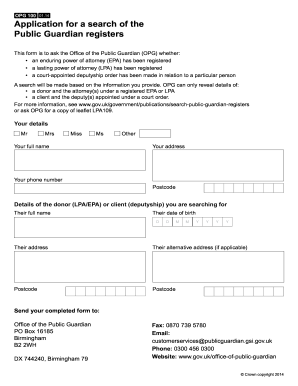
- Begin by entering your personal details in the 'Your details' section. Provide your full name and select a title from Mr, Mrs, Miss, Ms, or Other. Then, complete your address, including your postcode and phone number.
- Proceed to the section for the 'Details of the donor (LPA/EPA) or client (deputyship) you are searching for'. Enter their full name and their date of birth in the specified format (DD/MM/YYYY).
- Fill in the address of the person you are searching for, as well as any alternative address if applicable. Make sure to include the postcodes for both addresses.
- Once all sections are completed and reviewed, you can save the changes to the form. You may then choose to download, print, or share the form as needed.
Start completing your Opg 100 Online form now to ensure your request is processed smoothly.
To prove you have Power of Attorney in the UK online, you can provide the registered document that shows your authority. This may include accessing a digital version through the Office of the Public Guardian's website. Services like Opg 100 Online can help you manage and present your documents effectively.